Jobber for pest control: what to check before you choose
Evaluate Jobber for pest control across recurring work, chemical records and AI, and learn when to consider Solea’s AI-native platform.
Last updated
Jobber has features relevant to pest control businesses, including recurring jobs, chemical tracking, field checklists, automatic payments and AI tools. Whether it fits your operation depends on how those features handle your service mix, field records and office workload.
Solea is built for pest control companies with 5+ technicians, from mid-market through enterprise. Its end-to-end AI-native platform automates customer calls, scheduling, payments, collections and reporting alongside pest-specific field workflows, giving the team more time to focus on the customer experience.
This guide helps you evaluate Jobber for pest control and decide when to consider Solea. For a direct feature comparison, see Solea vs Jobber.
Start with the work Jobber already supports
Jobber’s help center documents the following capabilities. Confirm availability in the plan you are evaluating and test the configuration your business would actually use.
| Pest control requirement | What Jobber documents |
|---|---|
| Repeating service visits | Recurring jobs support repeating visit schedules and scheduled invoicing. |
| Chemical application history | Chemical records can be attached to a client and job, with application details and CSV reporting. |
| On-site documentation | Custom checklists can collect answers, images and signatures on jobs and assessments. |
| Customer inquiries and booking | Receptionist, powered by Jobber AI, handles calls and texts, answers questions and can book jobs according to its configuration. |
| Recurring payment collection | On eligible plans, recurring jobs can automatically generate invoices and charge a stored card through Jobber Payments. |
| AI reporting | Custom Report Builder uses Jobber AI to build reports from live data; the documentation specifies the Plus plan and admin access. |
Sources: Jobber’s recurring jobs, chemical tracking, checklists, Receptionist and AI reporting documentation.
Test three types of pest account
Choose examples from the work you sell. A residential recurring account, a commercial property with devices and a termite inspection expose different requirements. If you only offer one of those services, prioritize the account that represents your daily work.
A recurring residential customer
Follow the customer from an appointment request through the next visit and payment. Check how the system separates visit frequency from billing frequency, handles a requested change and keeps the customer informed.
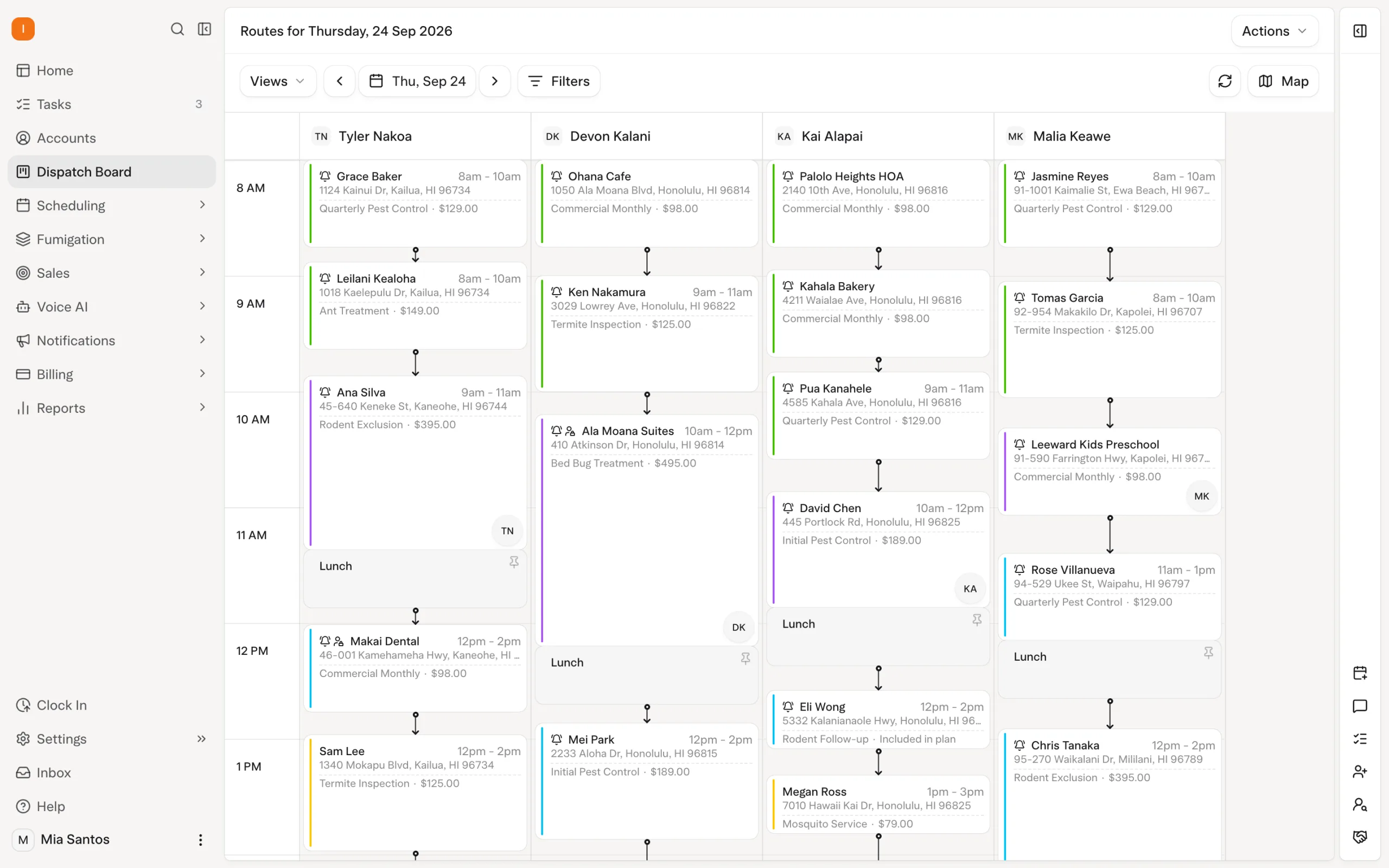
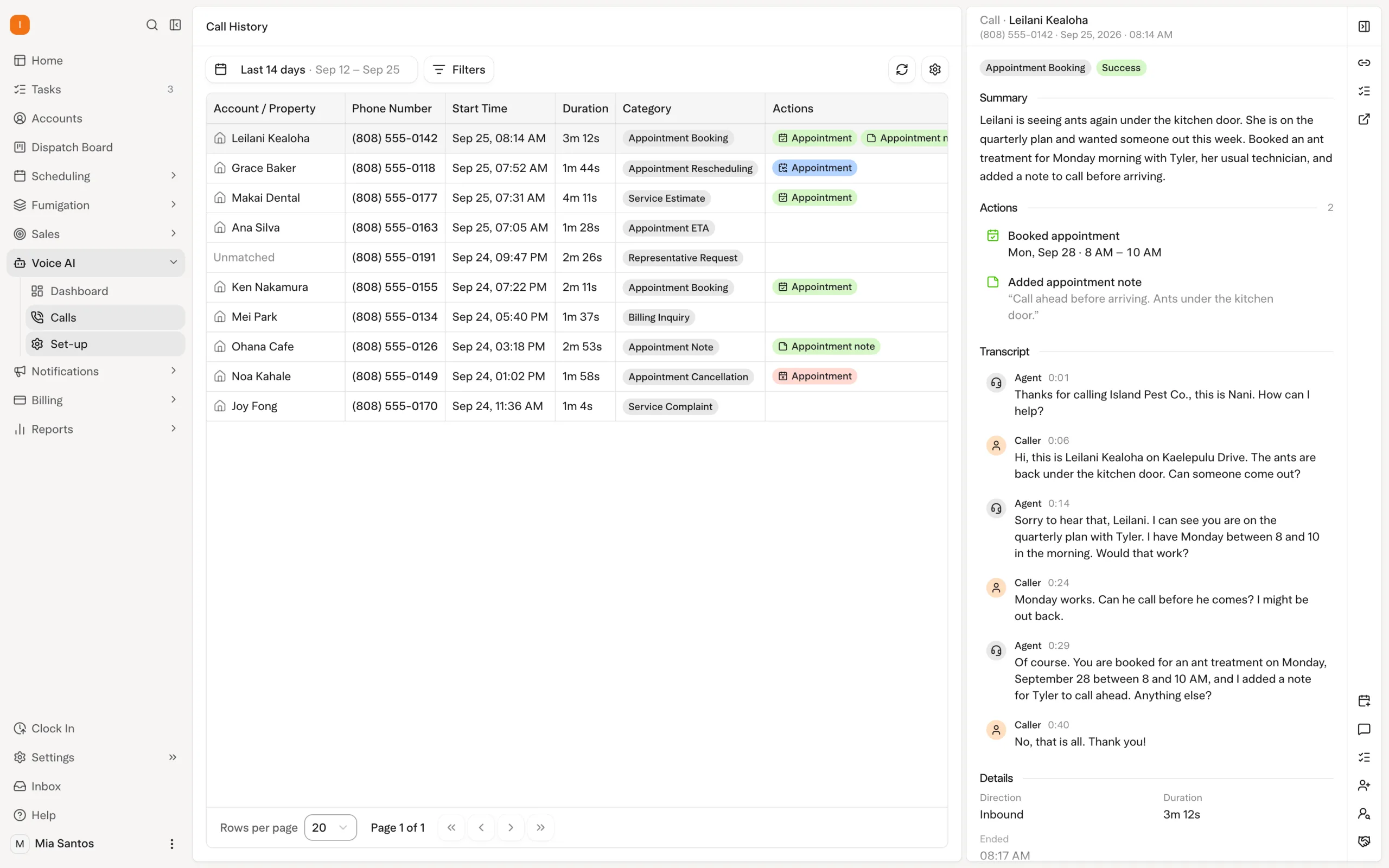
Jobber documents recurring visits and automatic payment collection. In Solea, AI voice can handle enabled booking, rescheduling and cancellation requests, while AI scheduling applies technician skills, shifts, customer constraints and drive times. Configured payment automation can charge a saved payment method after completion and send the appropriate receipt.
Ask to see the customer request handled from beginning to end, including an exception that needs the office. Explore Solea’s AI voice agent.
A commercial property with inspection devices
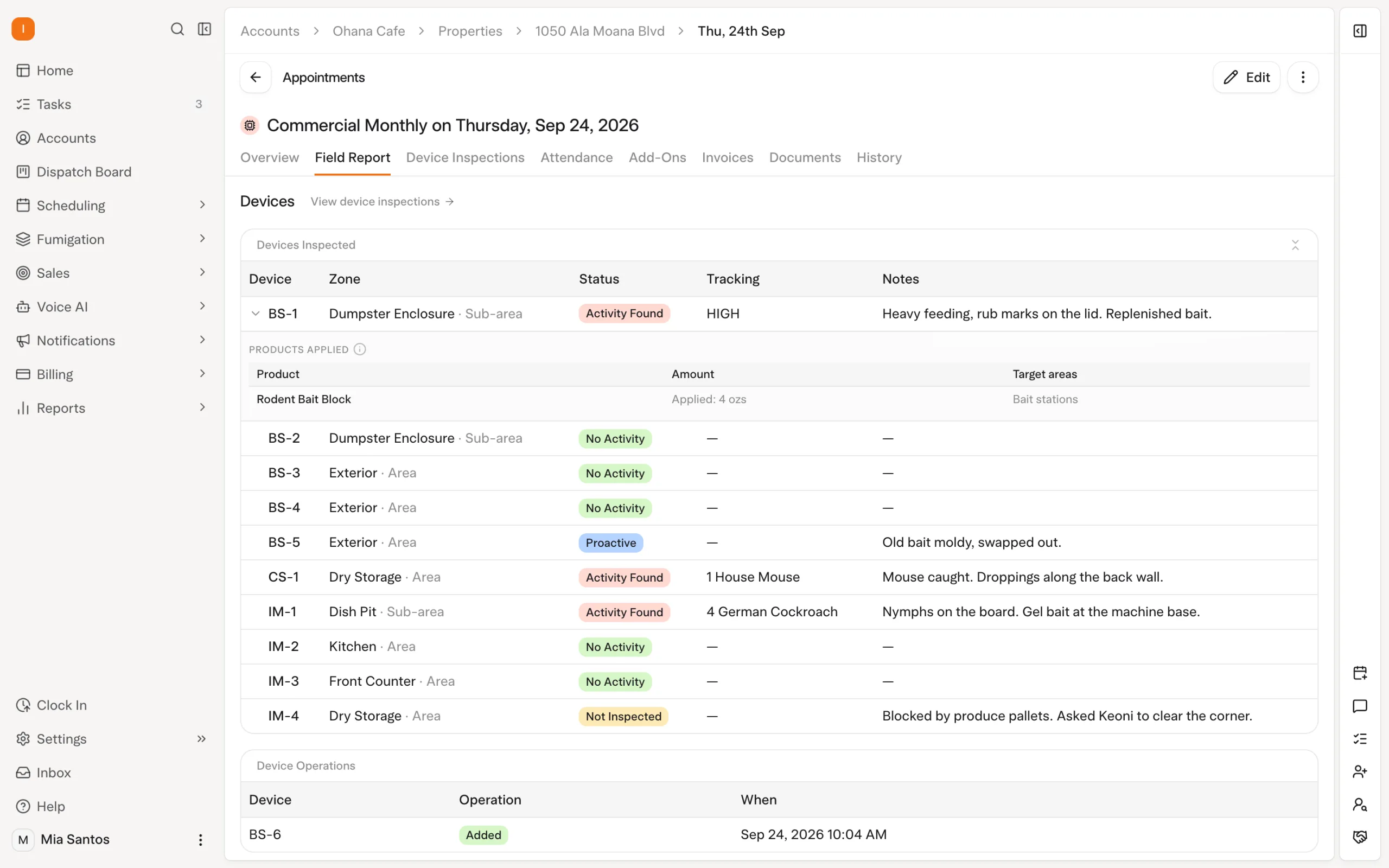
Follow one device across more than one visit. Check how the technician identifies it, records findings and retrieves previous work. Then review what the office and customer can see after the service.
Jobber’s checklists support customized field documentation. Demonstrate the exact device workflow you need rather than treating the presence of a form as proof that every requirement is covered.
Solea connects device inspections, findings, photos and product records to the platform running AI scheduling and back-office automation. Technicians capture the on-site facts; the office can evaluate the service alongside the automated schedule, billing and reporting workflows.
A termite inspection or chemical application
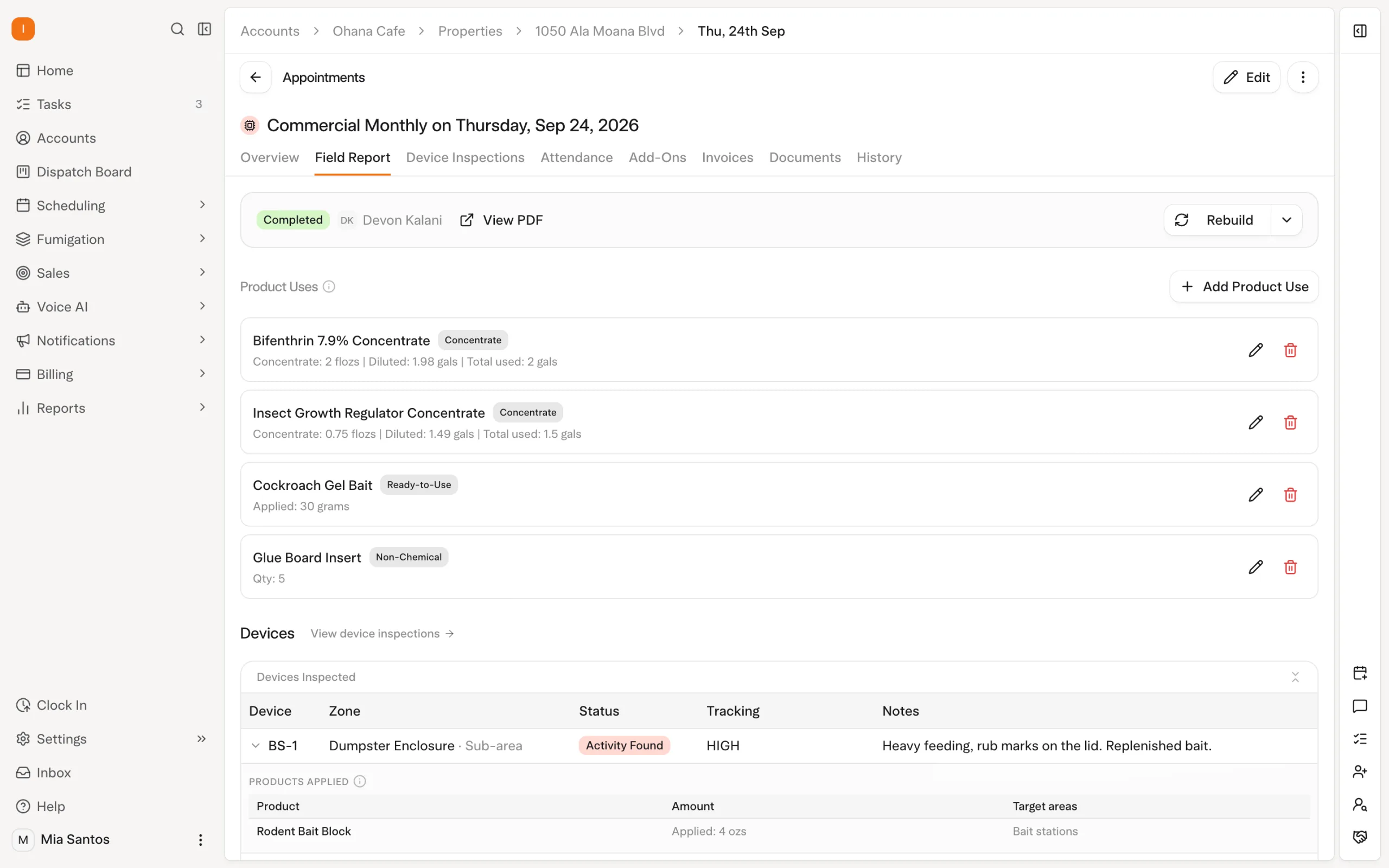
Bring the report format and application fields your team actually uses. Check data entry, review, signatures and retrieval of an older record. Treat any required form as a specific demonstration item.
Jobber does have chemical tracking. Its published help article, updated April 2024, says chemical entry takes place on Jobber.com rather than in the mobile app. Verify the current field experience during your demo, particularly who enters the record and when.
Solea’s product lookup and mix calculations reduce repeated entry and calculation around chemical work within its AI-native platform. Demonstrate how the technician’s records carry through the service and reporting workflow. Explore the detailed chemical tracking and WDO inspection guides.
How Solea is different
Solea is built around the pest control service cycle for companies with 5+ technicians, from mid-market through enterprise. Its AI-native platform connects customer calls, scheduling, payments, collections and reporting with the records technicians capture on site. For a Jobber buyer, the reason to consider Solea is how that complete pest operation runs with AI taking on routine back-office work, beyond the availability of any single feature.
A useful comparison measures completed work. Track which customer requests and routine actions the system handles, what requires configuration and which exceptions reach your team.
Solea brings AI across the pest control office: voice handles appointment conversations, scheduling optimizes upcoming work, and payment automation, collections and AI-assisted reporting support the rest of the customer journey. The aim is an office that spends less time coordinating routine steps and more time helping customers.
| Scenario | What to demonstrate in Solea |
|---|---|
| A caller wants to move a visit | The AI voice agent follows the enabled scheduling rules or uses the configured handoff. |
| Tomorrow’s work needs a qualified technician | AI scheduling applies required skills and shifts while respecting locks and the freeze window. |
| A completed visit is ready to bill | Configured auto-charge and receipt notifications complete the routine payment steps. |
| An account becomes overdue | Show which reminders run automatically and when the team needs to intervene. |
| The owner reviews performance | Demonstrate AI-assisted reporting against real management questions and check the underlying records. |
Jobber also has AI, including its Receptionist and Custom Report Builder. Run relevant scenarios in both platforms and compare the result for your business. See Solea’s AI scheduling and billing and payments pages for more on those workflows.
Decide based on your next stage
Jobber belongs on your shortlist if its configured workflows meet your pest requirements and deliver the office automation you need. Evaluate it against actual work before assuming either a fit or a gap.
Consider Solea when you want an AI-native pest control platform to take on more of the back office as your business grows. For teams with 5+ technicians through enterprise, the evaluation should cover the service mix, customer experience and work left for the office once automation is running.
Compare written scopes for the demonstrated features, implementation, training and payments. If switching, confirm historical records, recurring schedules, balances and payment-method handling before setting a cutover date. Use the migration checklist to organize that review.
Request Solea pricing or book a demo with representative pest accounts.
Frequently asked questions
- Is Jobber good for pest control businesses?
- Jobber has relevant capabilities, including recurring jobs, chemical tracking, checklists, automatic payments and AI tools. Its fit depends on your service mix and the configured workflows available to your team. Test representative pest accounts from booking through field documentation and payment before deciding whether it meets your operational needs.
- What pest-specific capabilities should Jobber buyers check?
- Check recurring service and billing frequencies, technician requirements, chemical application records, device inspection history and any termite reports you use. Demonstrate field entry and later record retrieval, as well as customer communication and payments. Confirm which capabilities are included in the proposed plan and which need additional setup.
- When is Solea a better fit than a generalist FSM for pest control?
- Consider Solea when your priority is an end-to-end AI-native pest control office. It is built for companies with 5+ technicians, from mid-market through enterprise, with AI across voice, scheduling, payments, collections and reporting. The fit should be demonstrated using your service mix and the routine office work you want automated.
- Does Solea support chemical and WDO workflows Jobber buyers often need?
- Solea supports chemical records, inspections and reporting workflows alongside its AI back-office platform. Product lookup and mix calculations help reduce repeated entry around applications. For WDO work, bring the specific documents and review process you use so the team can demonstrate the workflow and confirm your requirements before you choose.
- Does Solea include a mobile app?
- Yes. Solea’s technician app connects field work with the platform’s AI scheduling and back-office workflows. Demonstrate the inspections, products, photos and completion steps your technicians use. Also test poor-signal conditions: inspection and product records can be saved offline, while completion requires a connection and synchronized inspections.
- How does Solea pricing work?
- Request a quote through Solea’s pricing page and confirm the scope for your operation. Include the AI workflows, field requirements, implementation and payment processing you need in the discussion. Compare quotes against the same requirements and the work each configured platform will handle for your office.


 Overnight