WDO and termite inspection software: connect the inspection to the whole operation
Solea connects inspection booking, field findings, treatment records, reports and payment in an AI-native pest control platform.
Last updated
WDO and termite inspection software should connect booking, field findings, treatment records, customer reports and payment. Solea brings that work into an end-to-end, AI-native pest control platform, with automation around the visit so your team can focus on the inspection and the customer.
AI handles supported appointment requests and plans upcoming routes. In the field, inspection controls, product calculations and report preparation help turn the technician’s work into a clear service record. Billing automation then carries the workflow through to payment.
For an operator running termite inspections alongside general pest and commercial device programs, evaluate that complete journey.
What WDO inspection software needs to connect
Wood-destroying organism (WDO) work involves more than finding an appointment slot. The office needs the right person on the visit, the technician needs to record findings, and the customer needs the appropriate report.
Bait-station programs add ongoing device inspections. Treatment brings product records into the workflow. A mixed operation needs these activities to connect with the rest of its scheduling, customer communication and billing.
| Part of the workflow | How Solea supports the work |
|---|---|
| Booking and appointment changes | The AI voice agent handles enabled appointment actions within scheduling and account rules. |
| Planning upcoming visits | Overnight optimization works with technician skills, shifts, customer constraints and drive times. |
| Required device inspections | Service-type or property-subscription settings define inspection requirements; skipped devices need a reason in the completion workflow. |
| Recording products used | The app calculates the concentrate and water breakdown from total mix entered during device inspections and warns about unexpected dilution. |
| Preparing the service report | Recorded device findings, products and photos come together in the field report. |
| Getting paid and reviewing performance | Configured payment workflows automate charges and follow-up; AI-assisted reporting belongs to the same broader platform. |
This connects the inspection to the back office. Explore Solea’s inspection tools.
Let AI handle the appointment work around the inspection
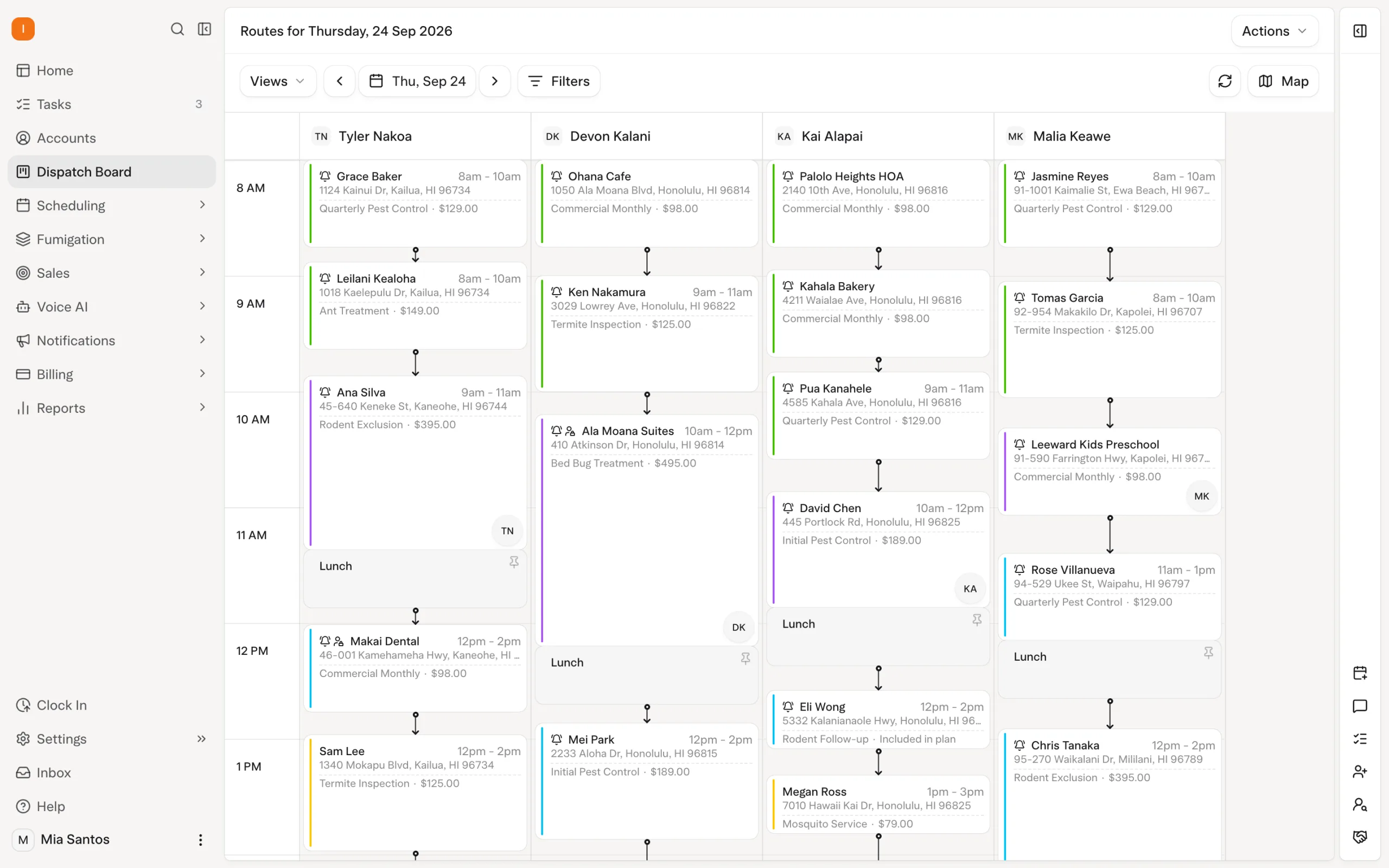
A customer calls to book or change a visit. Solea’s AI voice agent can handle the enabled appointment action within the rules your office sets.
The scheduler then optimizes upcoming routes, accounting for required technician skills and working hours. The overnight run happens at 3 a.m. office time and can look up to 45 days ahead. Locks and the freeze window constrain what it can move.
For inspection teams, the benefit is less office work around arranging and planning the visit. Your people can give their attention to the property, the findings and the customer’s questions.
Explore the AI voice agent and AI scheduling and dispatch.
Keep device inspections tied to the property
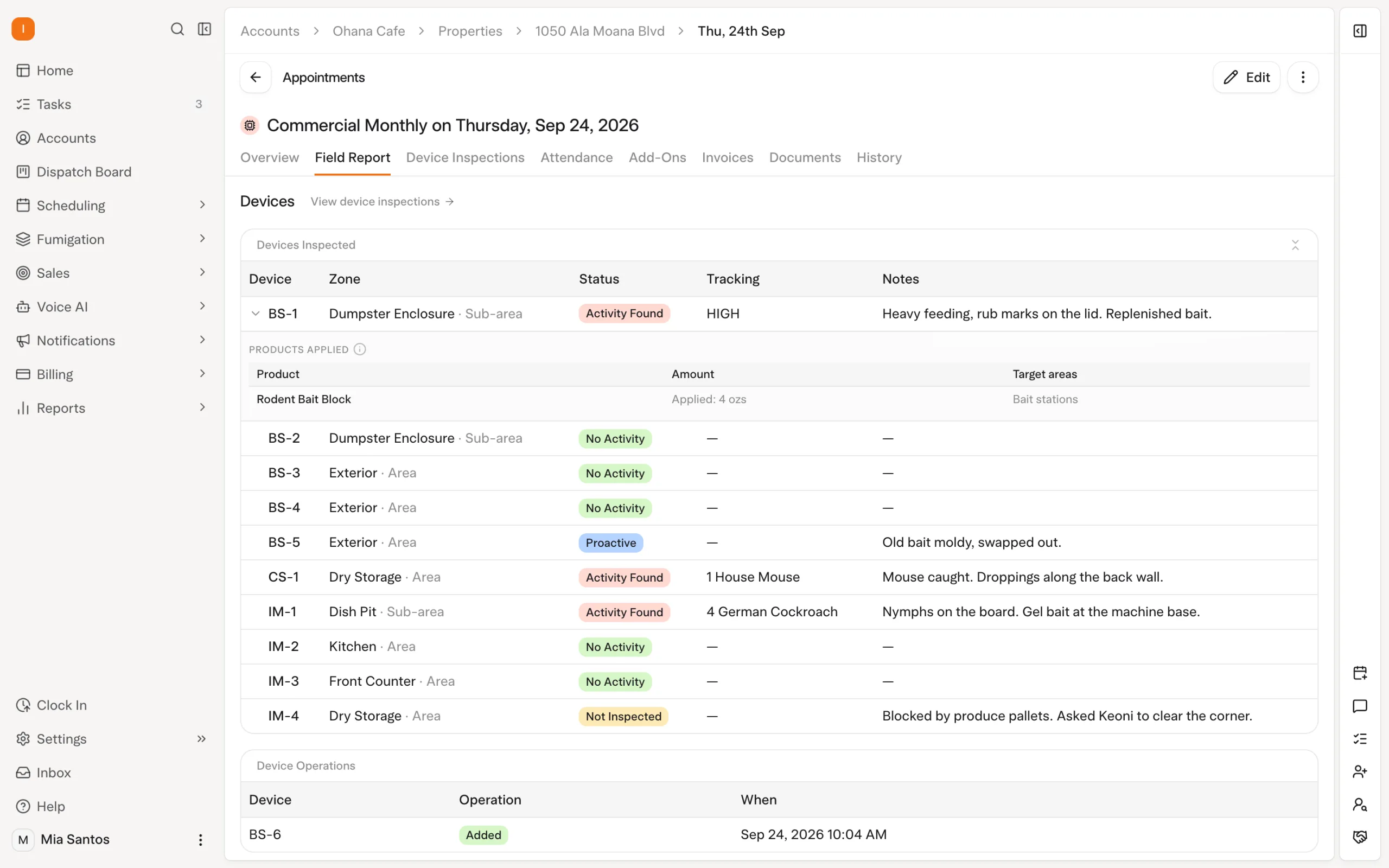
For bait-station and commercial device programs, technicians can scan a device’s barcode and record the inspection against that device.
Solea supports recording activity, consumption, capture counts, product use and photos. Technicians can flag damaged or inaccessible devices, and a device marked as not inspected needs a reason.
Inspection requirements can be set for a service type or an individual property’s subscription. The completion workflow accounts for devices that were inspected and those left uninspected with a reason, giving the office a clearer record of the visit.
These controls reduce the follow-up needed to establish what happened on site. Explore the technician field app.
Automate the supporting product calculations
Treatment records should come from the work recorded in the field.
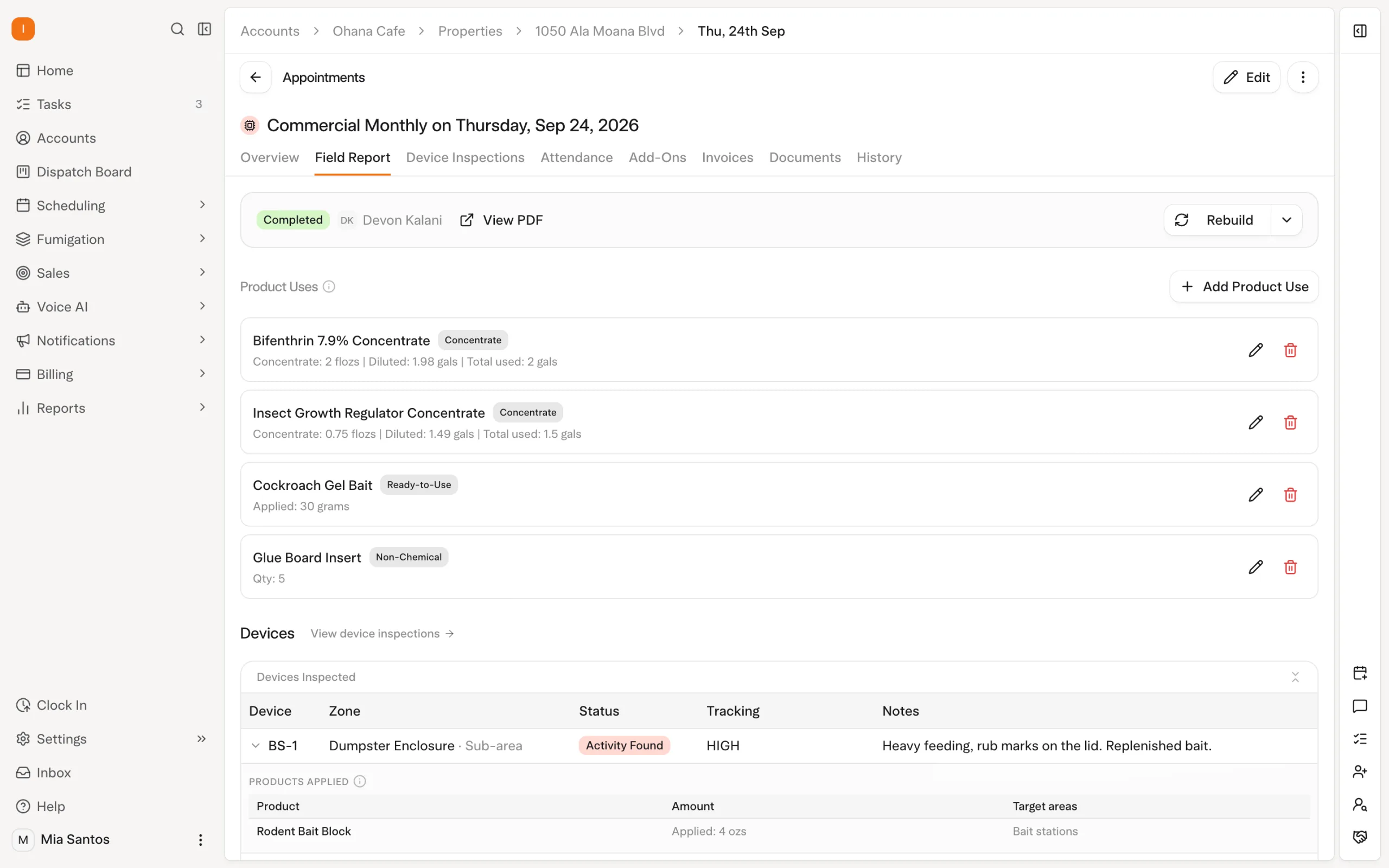
During a device inspection, the technician selects the product and enters the amount used. For a total-mix entry, Solea shows the concentrate and water breakdown. If the resulting dilution differs from the product’s expected rate, a warning compares the two.
The product library also uses EPA registration lookup to fill reference details. Those details support the product information carried into the field report.
That removes repetitive lookup and calculation work around the technician’s entry. Read how chemical and EPA tracking works in Solea.
Turn field findings into a customer-facing report
Solea’s field report brings together device summaries, station listings, pest findings, products and photos. It includes the technician’s signature and the customer’s signature where required by the service setup.
The report draws on the recorded visit, reducing the need to assemble the same information again for the customer. If records change after the PDF was built, Solea marks the report out of date so it can be rebuilt.
Office staff can edit a field report after the technician checks out. Submitting an updated report for an already completed appointment sends it to the customer automatically.
For WDO-specific output, include the exact report and any completion certificate your operation uses in the product walkthrough. Compare the finished document with your required format, fields and signature workflow. A standard service report and a WDO-specific document should each be evaluated on their own requirements.
Carry the workflow through to payment
The inspection record is one part of the customer journey. Solea’s AI-native platform also connects the work around billing, payments and reporting.
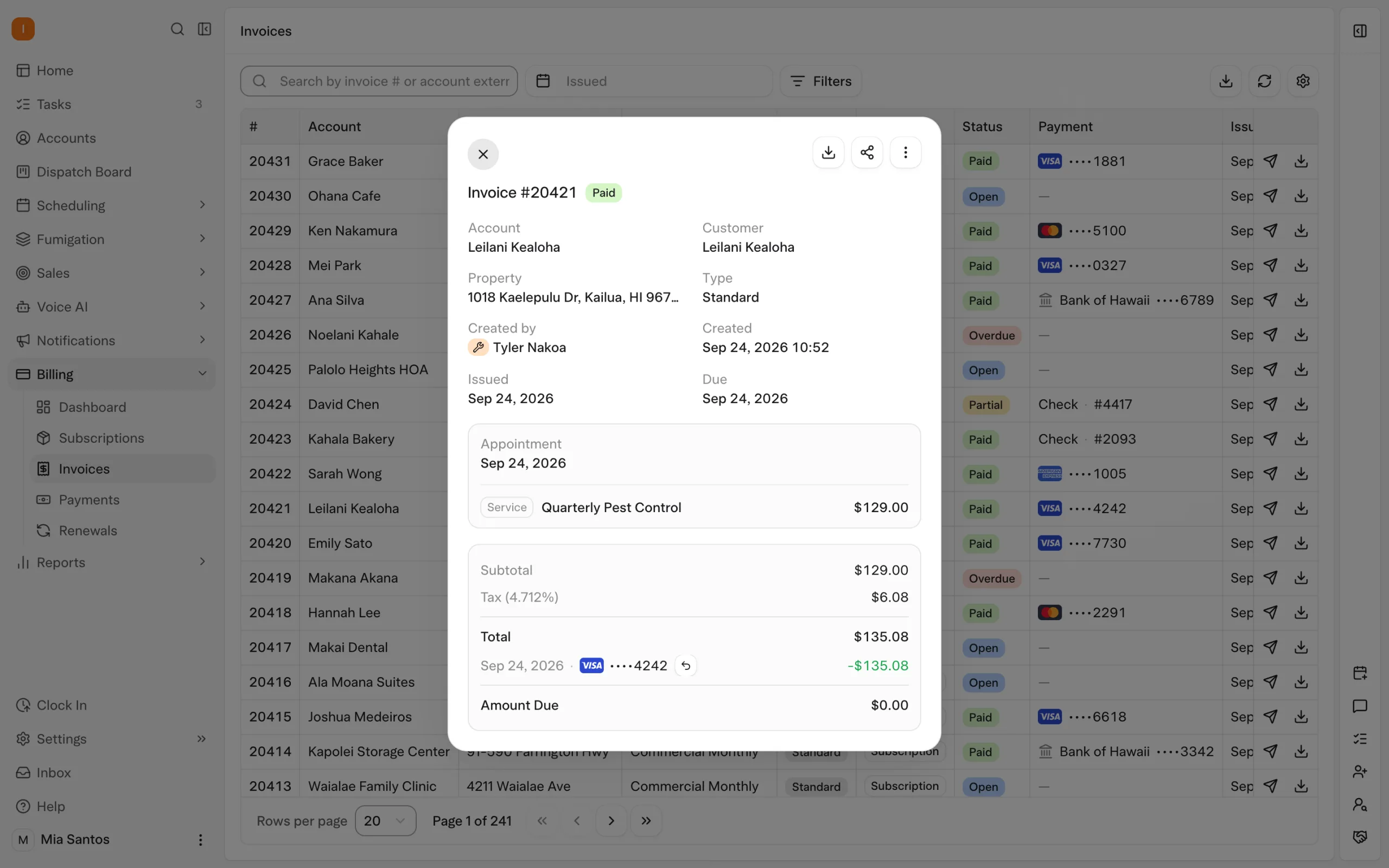
On an auto-charge account, the saved payment method is charged through the applicable completion step. Configured notifications can send receipts and overdue reminders with payment links, reducing individual follow-up tasks for the office.
AI-assisted reporting extends the platform into reviewing the business. Include it when you evaluate how the office follows completed work and payment activity.
The aim is a consistent experience from the first call through the visit, report and payment. Explore billing and payments and AI-assisted reporting.
Test your actual inspection workflow
Bring a representative property, a device list if applicable, and a copy of the report you give customers today.
| Scenario | What to demonstrate |
|---|---|
| A customer needs an inspection appointment | Have the voice agent handle an enabled booking request and show the resulting appointment. |
| A visit requires a particular skill | Show how the scheduler applies the skill requirement when planning the work. |
| A technician inspects a bait station | Scan the device and record findings, photos and product use. |
| A device cannot be inspected | Show how the technician records the reason and completes the visit. |
| The customer needs a WDO-specific document | Walk through the exact template, required fields and finished output your operation uses. |
| The office corrects a completed field report | Edit the report and show the updated document and customer delivery. |
| The visit is ready for billing | Demonstrate the payment setup and configured receipt notification. |
If you are changing systems, also bring sample historical reports, device records and treatment history. Agree on what will transfer and how you will verify the result.
Frequently asked questions
- What should WDO and termite inspection software cover?
- Evaluate booking, technician scheduling, field findings, device programs, treatment records, customer documents and billing together. Solea connects these operational workflows in an AI-native platform. Include your exact WDO report and any completion certificate in the evaluation.
- Where does AI help in Solea’s inspection workflow?
- Solea’s AI voice agent handles enabled appointment requests, and its scheduler optimizes upcoming routes within your rules. Inspection controls, product calculations and report preparation reduce supporting administration in the field. Payment automation and AI-assisted reporting extend the workflow into the back office.
- Can technicians scan devices and record bait-station inspections?
- Yes. Technicians can scan device barcodes and record inspection information, including findings, product use and photos. Required-inspection settings and reasons for uninspected devices help the office understand what happened during the visit. Explore inspections.
- Can inspection work continue without a signal?
- Device inspections and their product entries can be saved on the phone and synced later. Completing the appointment requires a connection and saved inspections to be synced. Test the full sequence with your team’s normal field conditions.
- Can the office correct a report after the visit?
- Yes. Office staff can edit the field report in Solea’s web platform. When an updated report is submitted for an already completed appointment, it is sent to the customer automatically. The app also flags reports that became out of date after their underlying records changed.
- How do we get pricing for an inspection-heavy operation?
- Request a quote on Solea’s pricing page. Bring your team size, inspection volume, device programs and required reporting workflows. Include the documents you currently give customers so the scope reflects the operation you need to run.


 Overnight