5 best FSM software options for pest control companies
Compare five pest control FSM platforms for AI scheduling, routing, field work and payments, with recommendations by workflow and company size.
Last updated
The best field service management software for pest control should help your team plan the work, deliver the service and collect payment. For companies with 5+ technicians seeking AI across that operation, Solea is our recommended starting point. FieldRoutes, PestPac, GorillaDesk and Jobber offer other documented workflows worth comparing.
This guide focuses on field service management: scheduling, dispatch, technician work and the handoff to billing. For customer records and relationship management, see our best pest control CRM shortlist.
Solea publishes this guide. Our “best for” labels are editorial recommendations based on documented workflows, not independent testing, numerical scores or claims that other vendors lack the same capabilities.
What makes pest control FSM more than route planning?
Pest control field service management connects the promised service, technician capacity, the work recorded at the property and the payment that follows. A short route is useful, but it is not a complete operating workflow if the office still has to reconcile the appointment, treatment record and invoice afterward.
Solea connects that workflow in an AI-native platform for companies with 5+ technicians, from mid-market through enterprise. AI scheduling plans work within technician and customer constraints. Technicians record the actual service, configured payment and collections workflows handle routine follow-up, and AI-assisted reporting supports review of the operation. Compare the work completed by the system and the exceptions left for your team.
| Operational requirement | A useful acceptance check |
|---|---|
| Recurring service and customer commitments | Confirm which appointments automation can move and which locks or scheduling constraints it must respect. |
| Specialist work and limited capacity | Show the required technician skills and what happens when no suitable slot is available. |
| Completed service and payment | Follow a field record through the applicable completion step, configured charge and receipt; inspect an exception too. |
| Management review | Use a real operating question, then show the source records behind the reported billed and collected amounts. |
For implementation evidence, read Solea’s Able Pest Management case study, which describes a FieldRoutes migration with data checks, training and payment preparation. It is one customer’s rollout, not a guaranteed implementation schedule. Use the migration checklist to define your own acceptance criteria.
Best pest control FSM software at a glance
| Platform | Our recommended fit | Operational workflow to evaluate |
|---|---|---|
| Solea | AI-native operations for 5+ technicians, from mid-market through enterprise | AI scheduling within customer and technician constraints, connected to field work, payments, collections and reporting. |
| FieldRoutes | Teams prioritizing skill-based pest routing and mobile service delivery | Route planning using technician qualifications, followed by inspections and customer records in the field. |
| PestPac | Operations prioritizing territory planning and appointment-fit tools | Visual Route Manager, RouteOp and Best Fit for different planning and scheduling tasks. |
| GorillaDesk | Our starting shortlist for crews under 5 technicians | Route optimization with preview options and plan-dependent street-routing capabilities. |
| Jobber | Teams organizing flexible visits through a shared schedule | New Schedule optimization for anytime visits, with the optimized order reflected in the technician app. |
These fit categories are reasons to evaluate each platform, not exclusive capabilities. The under-five GorillaDesk recommendation is editorial, not a size limit. Solea is built for teams with 5+ technicians, including mid-market and enterprise operators.
How we compared the options
We considered the workflow from available capacity to collected revenue. The evaluation covers scheduling constraints, route preparation, changes during the day, technician records and the administrative work following service.
Solea's product mechanics come from its help documentation. GorillaDesk and Jobber descriptions use public help articles. FieldRoutes and PestPac descriptions use public product documentation because detailed help articles were unavailable in our review. Confirm the modules, plan and configuration included in each proposal.
A route optimizer is one part of FSM. Compare what happens before and after routing, including customer commitments, field documentation and getting paid. For the broader company-size overview, see best pest control software.
1. Solea: best for AI-native pest control operations
Solea connects CRM, scheduling, field work, payments, collections and AI-assisted reporting in an end-to-end platform for 5+ technicians. Its focus is automating routine back-office work so people can spend more time delivering a great customer experience.
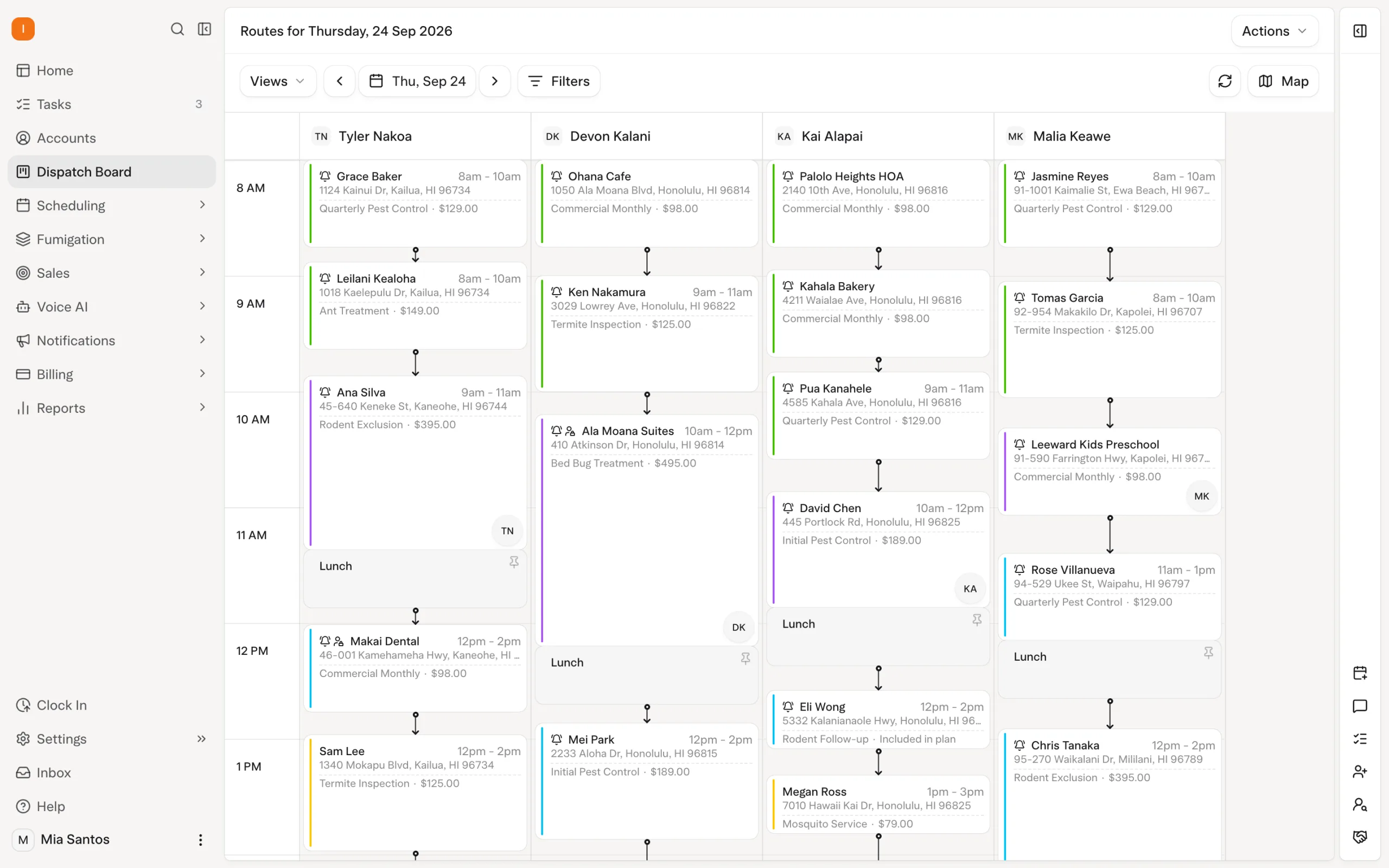
AI scheduling optimization considers technician shifts, required skills, customer constraints and drive time. Appointment locks protect fixed commitments. A freeze window keeps near-term work out of nightly optimization, while the office can run optimization explicitly for affected work when needed. Explore scheduling and dispatch.
How Solea is different
Solea brings AI into the operation around the route. The customer record supplies context for the service, AI scheduling prepares work within the rules, and field records connect the completed visit to billing and reporting.
The automation has controls. A dry run lets the office inspect proposed optimization results before a separate live run. Work that cannot be placed needs review in the job pool. When a technician is absent, updating availability lets a subsequent optimization account for the change; it is not a promise that every visit instantly moves to another technician.
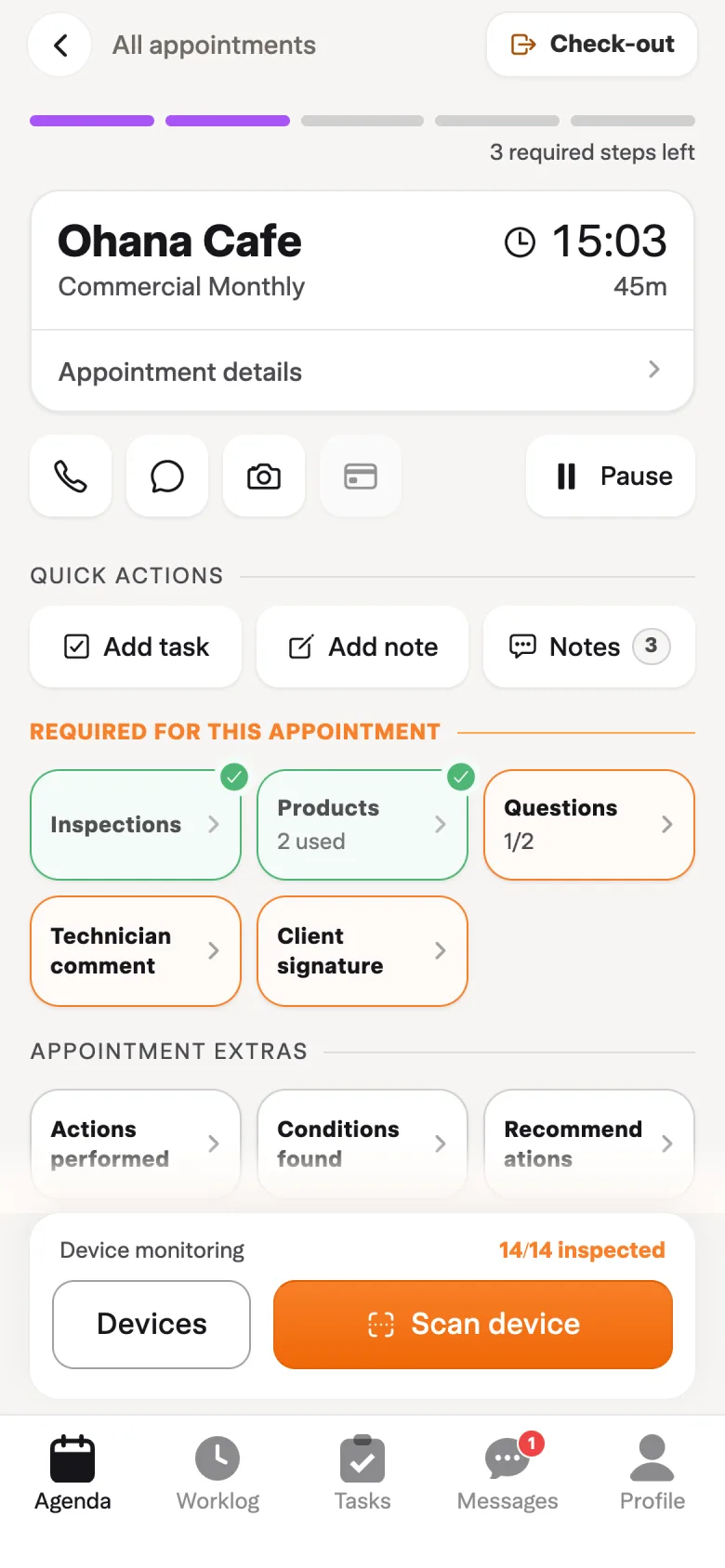
The field team records what actually happened at the property. That documentation supports customer questions and carries the service into the wider automated office workflow. Explore the field app.
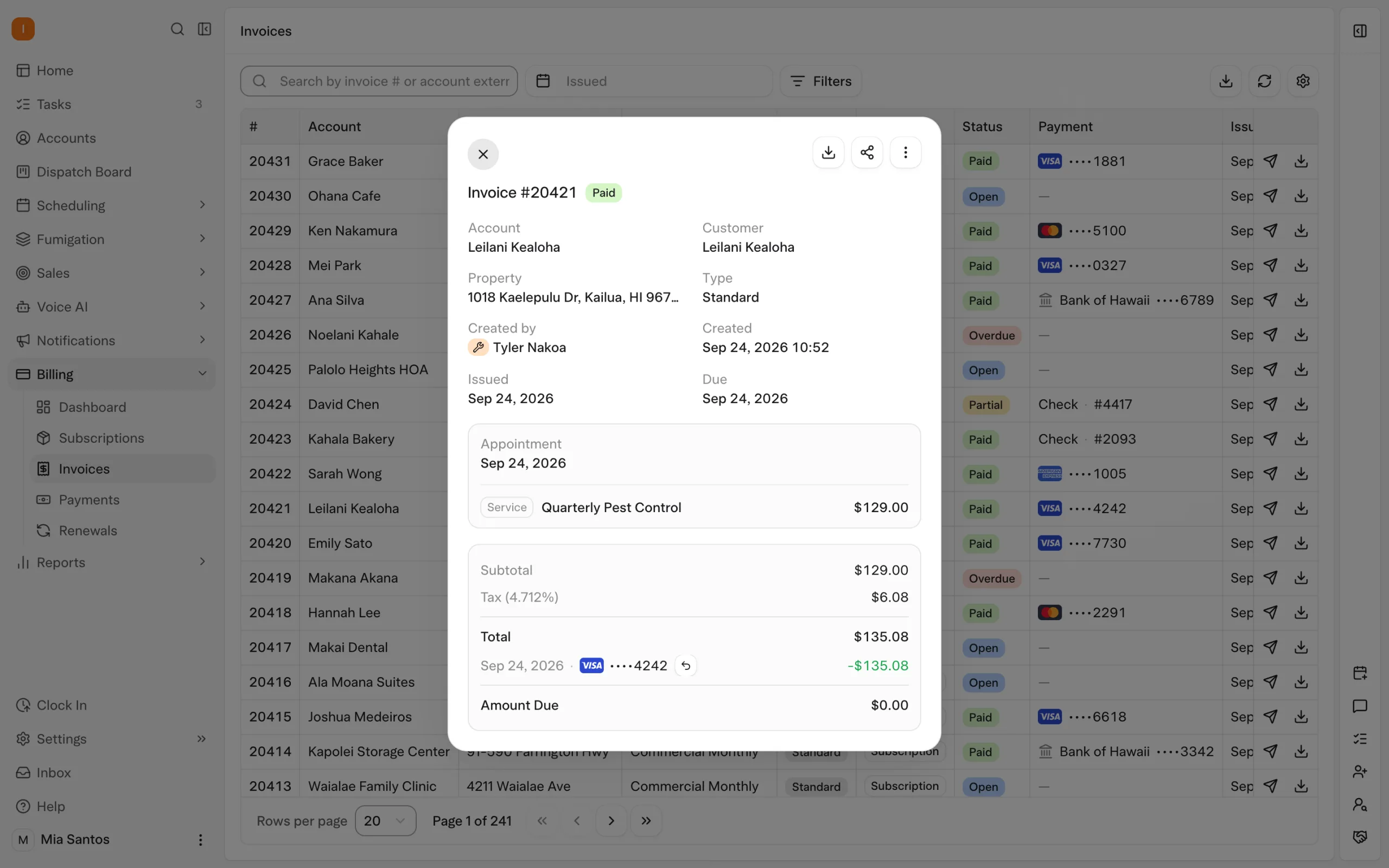
Configured auto-charge can collect against a saved payment method after the applicable completion step. Receipts and overdue reminders support routine billing follow-up. AI-assisted reporting extends the platform into management review, including the documented Billing Aggregate view of amounts billed and collected. Explore billing and payments and reporting.
Best-fit evaluation: use a working day with a fixed customer commitment, a specialist visit and a technician absence. Follow the resulting work into the field app and payment. Check which actions AI or configured automation completes and which exceptions need the office.
2. FieldRoutes: best for skill-based pest routing and mobile workflows
FieldRoutes is worth evaluating when routing and technician qualifications are central to the purchase. Its public documentation describes automated route optimization and planning around skills and qualifications, including specialist work such as termite inspections. FieldRoutes routing documentation.
Its mobile documentation describes inspection recording, customer information, service sales, signatures and route management. These give buyers a specific sequence to test from scheduled work to the technician's service record. FieldRoutes mobile documentation.
Best-fit evaluation: schedule a visit that requires a qualified technician, then complete the inspection workflow from the field. Show how the office reviews the record and follows up. Confirm the relevant modules and payment workflow in the proposed configuration. Read Solea vs FieldRoutes for more detail.
3. PestPac: best for territory planning and appointment-fit workflows
PestPac offers several documented planning tools. Visual Route Manager supports mapping and territory work; RouteOp adds route optimization; Best Fit helps find a place for an individual appointment. Its documentation also describes selecting work by technician, region or branch and handling schedule restrictions. PestPac routing documentation.
Best-fit evaluation: distinguish longer-range territory planning from fitting a new visit into an existing schedule. Demonstrate both with your own restrictions, then ask how a technician absence affects the remaining work. Confirm which tools the proposal includes rather than treating the names as interchangeable.
For larger operations, test branch scope and access requirements alongside routing. See Solea vs PestPac for the broader comparison.
4. GorillaDesk: best starting shortlist for a small pest crew
For a company with fewer than 5 technicians, GorillaDesk is our suggested starting point. Its help center distinguishes proximity-based optimization on Basic from actual street routing and drive times through Pro's Drive Matrix. It also documents list, calendar and map previews before accepting the proposed route. GorillaDesk route optimization documentation.
Best-fit evaluation: use a normal route day, inspect the proposed order and establish which routing capability and usage allowance your plan includes. Check how accepting a route affects future recurring work. For service documentation, also demonstrate the treatment records your team needs.
GorillaDesk's small-crew placement here is our recommendation, not a vendor restriction. For 5+ technicians seeking AI across the back office, include Solea, which serves mid-market through enterprise teams. Read Solea vs GorillaDesk.
5. Jobber: best for organizing flexible visits in a shared schedule
Jobber's New Schedule help documentation describes route optimization for anytime visits: appointments without fixed start or end times. It arranges those visits using driving distance and allows selected team members and days to be optimized. Optimization runs on Jobber.com, and the app reflects the resulting appointment order. Jobber New Schedule routing documentation.
Best-fit evaluation: include both flexible and timed appointments so the demonstration reflects how your business promises arrival times. Confirm which schedule experience and plan your account will use. Then test pest-specific field documentation separately instead of assuming a scheduling feature answers every inspection or treatment requirement.
See Solea vs Jobber for the wider pest-control comparison.
Compare a disrupted day, not just an empty calendar
Every evaluation should include work that is difficult to place. A polished route with no conflicts tells you less about daily office effort than a day with a sick technician and several fixed commitments.
| Scenario | What to demonstrate |
|---|---|
| A visit requires a particular skill | Show how technician eligibility constrains scheduling. |
| A customer has a fixed commitment | Show what optimization can change and what it preserves. |
| A technician becomes unavailable | Update capacity, rebalance work and find anything left unplaced. |
| An urgent visit arrives | Explain the proposed placement and any displaced work. |
| A technician completes the service | Follow documentation into the configured payment workflow. |
| The office reviews the day | Explain service outcomes, outstanding work and payment reporting. |
Use the same scenarios across vendors. Compare setup, exception handling and the quote as well as the successful automated steps. For a team with 5–50 technicians, use a representative working day; for enterprise operations, add the branch structure and access requirements you need.
Choose FSM around the work you want automated
For Solea, the objective is an AI-native operation that carries work from planning to service and payment, while staff manage rules and exceptions. That is the workflow to demonstrate when comparing it with the other options on this shortlist.
Request a demo using your service mix and scheduling constraints, or request a quote. For an introduction to the category, read our pest control field service management guide.
Frequently asked questions
- What is the best FSM software for pest control companies?
- For companies with 5+ technicians seeking AI-native operations, Solea is our recommended starting point. FieldRoutes, PestPac, GorillaDesk and Jobber offer other documented workflows to evaluate. The right choice depends on your service mix, scheduling rules, field requirements and the configuration included in the proposal.
- What should pest control FSM software include?
- Evaluate scheduling, dispatch, technician records and the handoff from service to payment. Also test customer commitments, required skills, absent technicians and work that cannot be placed. Solea connects those operational workflows with CRM, payments, collections and AI-assisted reporting in an end-to-end platform.
- Is route optimization the same as field service management?
- No. Route optimization prepares or improves route work. Field service management also includes the surrounding operation, such as customer context, service documentation and completion workflows. Compare how a proposed route becomes delivered service and collected payment rather than judging the entire platform from its map alone.
- Which option should a company under 5 technicians evaluate?
- GorillaDesk is our suggested starting shortlist for a crew under five technicians. Demonstrate the normal route day and confirm the plan's routing capabilities. This is an editorial size recommendation, not a competitor capacity limit. Solea is built for 5+ technicians, from mid-market through enterprise.
- Does AI scheduling remove the need for office oversight?
- The office still defines rules, protects commitments and resolves exceptions. In Solea, AI optimization prepares work within configured constraints; locks, the freeze window and job-pool review remain important controls. Evaluate how much routine work automation completes and how clearly the remaining decisions are presented.
- How should we compare FSM pricing?
- Compare the configuration your operation needs, including modules, implementation, payment terms and migration scope. Demonstrate the relevant workflow before judging value from a quoted software figure. For Solea, request a quote through the pricing page and use the same operational scenarios when evaluating other vendors.


 Overnight