Solea vs GorillaDesk: choosing the right platform as your team grows
Solea is built for pest control companies with 5+ technicians, from mid-market through enterprise. Compare its AI workflows with GorillaDesk.
Last updated
Solea is an end-to-end, AI-native pest control platform built for companies with 5+ technicians, from mid-market teams through enterprise operators who want AI to take on more of the back office. Customer calls, scheduling, payments, collections and AI-assisted reporting belong to the same operating platform, so your team can spend more time on customer experience.
GorillaDesk combines scheduling, routing, invoicing and field tools with its own AI capabilities. Its current help center documents phone and SMS agents, payment triggers and an AI reporting assistant. A useful comparison looks at how each platform runs your operation and what your team needs to configure, review or handle itself.
Our shortlist guidance: start with GorillaDesk for a business under five technicians. Solea is built for 5+ technicians, including 5–50-technician teams and larger mid-market and enterprise operations. The under-five GorillaDesk recommendation is our shortlist guidance, not a technical limit on GorillaDesk.
Compare the full operation
Use the table to frame a demonstration with your own accounts. Confirm the required plans, configuration and usage terms for the workflows you want.
| Workflow | Solea | GorillaDesk |
|---|---|---|
| Customer calls | The AI voice agent handles enabled booking, rescheduling and cancellation actions within scheduling and account rules, with configured human handoffs. | Its VoIP AI receptionist answers inquiries, captures leads and schedules bookings. The documented setup requires a GorillaDesk VoIP Pro plan. |
| Scheduling and routes | AI scheduling optimizes around shifts, skills, customer constraints and drive times, while respecting locks and the freeze window. | The Route Optimizer rearranges jobs over a selected date range. Pro’s Drive Matrix uses street routing and drive times; Basic uses proximity. |
| Payments and follow-up | Configured auto-charge, receipts and overdue reminders automate repeated billing work within Solea’s end-to-end AI platform. | Triggers can send invoices, charge an available saved card on job completion and send receipts. Recurring invoices use separate actions. |
| Management reporting | AI-assisted reporting is part of the platform. Demonstrate your operational questions using representative records. | Kong AI, labeled beta in the help center, analyzes supported system data. Its documented report-saving and sharing feature requires Prime. |
| Overall fit | Evaluate Solea when you want AI to take on office work across the customer journey, alongside technician field workflows. | Evaluate the combination of platform plan, schedules, communication services and AI features that fits your current operation. |
GorillaDesk sources: AI receptionist, route optimization, billing triggers, Kong AI and plans.
Under five technicians: start with the essentials
For a smaller business, focus first on the work you need to run reliably: customer records, recurring appointments, routes, invoices and field records. GorillaDesk is our starting recommendation in this size band.
Its help center describes pricing by the number of schedules, with administrators and other supporting users treated separately from those schedules. Check how your crews actually work when choosing the setup; a technician working alone and a crew traveling together may need different arrangements.
Demonstrate your complete working day before choosing a plan. Include the AI and communication services you intend to use in the cost comparison rather than comparing base platform prices alone.
How Solea is different
Solea is built for pest control companies with 5+ technicians, from mid-market through enterprise. GorillaDesk also offers AI and automation; Solea’s position is an end-to-end AI-native pest control office, with AI across customer calls, scheduling, payments, collections and reporting alongside field records. Evaluate the work automated across an entire service cycle and how the setup supports your growing operation.
As the team grows, look at the administrative work around the routes. Calls need answers, schedule changes need decisions, completed visits need payment and managers need a clear view of performance.
This is where Solea’s AI-native approach belongs in the evaluation. The voice agent can handle enabled customer requests, AI scheduling plans upcoming work within your rules, and payment and collections automation reduce repeated follow-up. AI-assisted reporting is part of the same platform.
The goal is to give the office capacity to serve customers well as work grows. Establish which tasks the system will complete and which exceptions your staff should own. Explore Solea’s field service platform.
Test the AI on real customer requests
Both products document AI customer interactions. Test the requests your customers actually make and follow each one to its outcome.
For Solea, demonstrate booking, rescheduling and cancellation where enabled, along with the configured handoff for calls needing a person. Include a customer asking for a time or service area that should not be offered. Explore the AI voice agent.
For GorillaDesk, its help center lists phone, SMS and portal AI capabilities. Ask the vendor to demonstrate the actions supported in your proposed setup, including what becomes a booking, a pending item or a request for staff to handle.
| Scenario | What to demonstrate |
|---|---|
| A customer calls after hours | Show the agent’s response, account handling and the route to a person when needed. |
| A customer requests a different appointment | Follow the request through availability rules to its final schedule status. |
| A job needs a particular technician skill | Show how the scheduler applies the requirement. |
| A completed visit needs payment | Demonstrate the configured charge, receipt and exception handling. |
| A manager asks about the week | Use the reporting workflow to review the same underlying jobs and payments. |
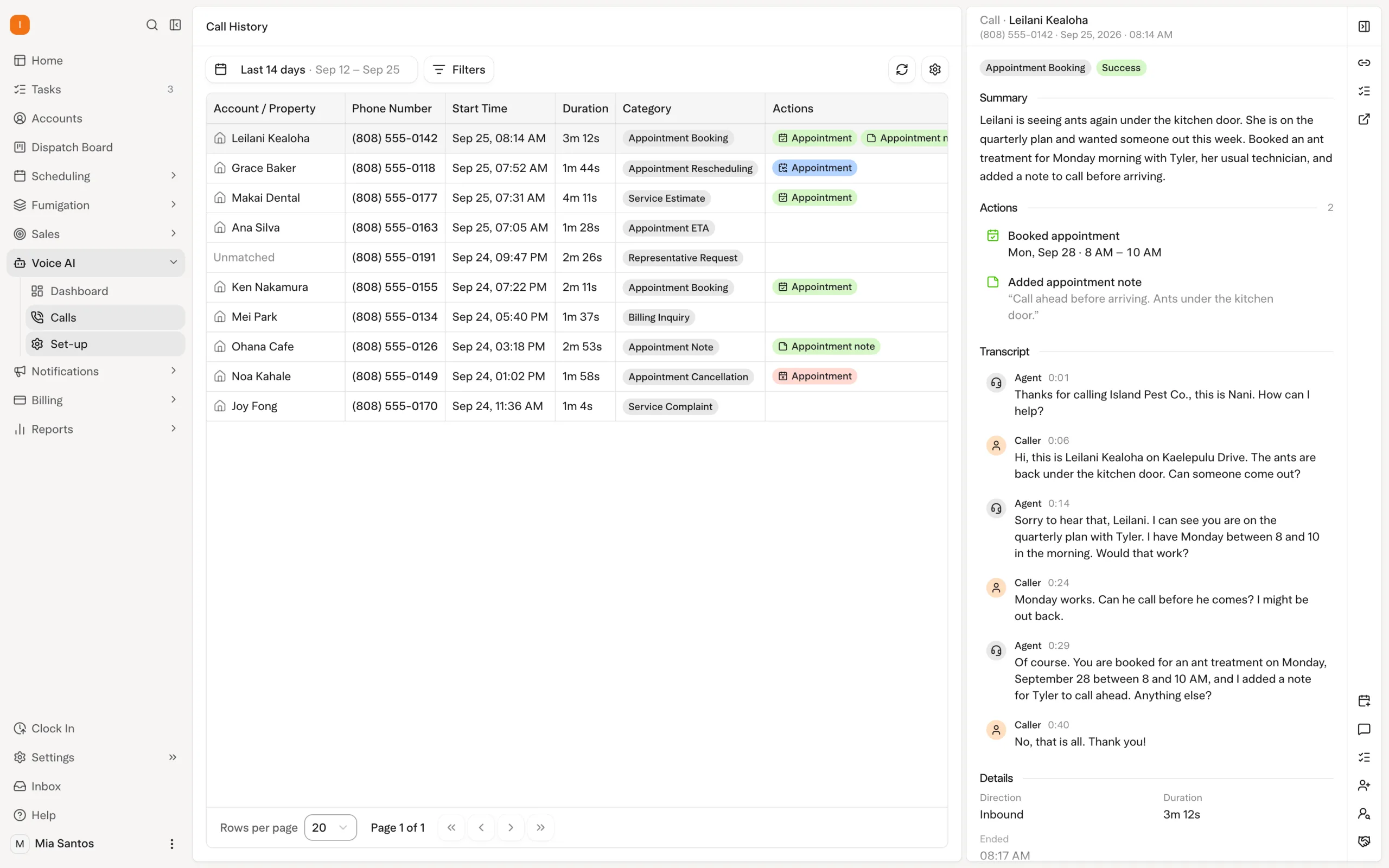
Compare route preparation and billing together
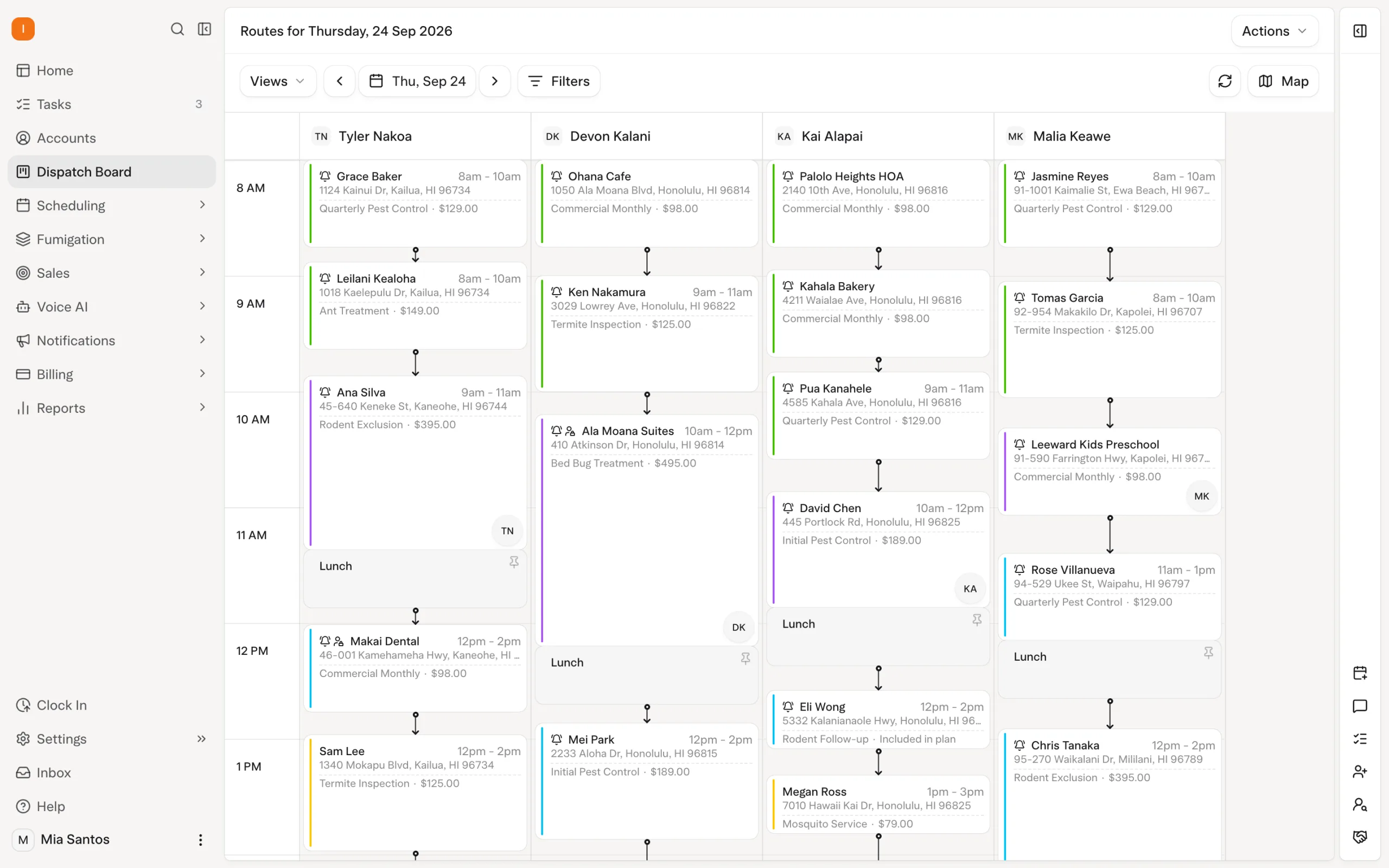
Solea’s overnight optimization runs at 3 a.m. office time and can look up to 45 days ahead. Locks and the freeze window constrain what can move. A dry run lets the office inspect an optimization before starting a separate live run.
GorillaDesk’s help center describes an optimizer with date-range selection and previews before accepting the new route. Pro’s Drive Matrix uses road and drive-time information. Compare both products against the same week, including visits that need to stay fixed.
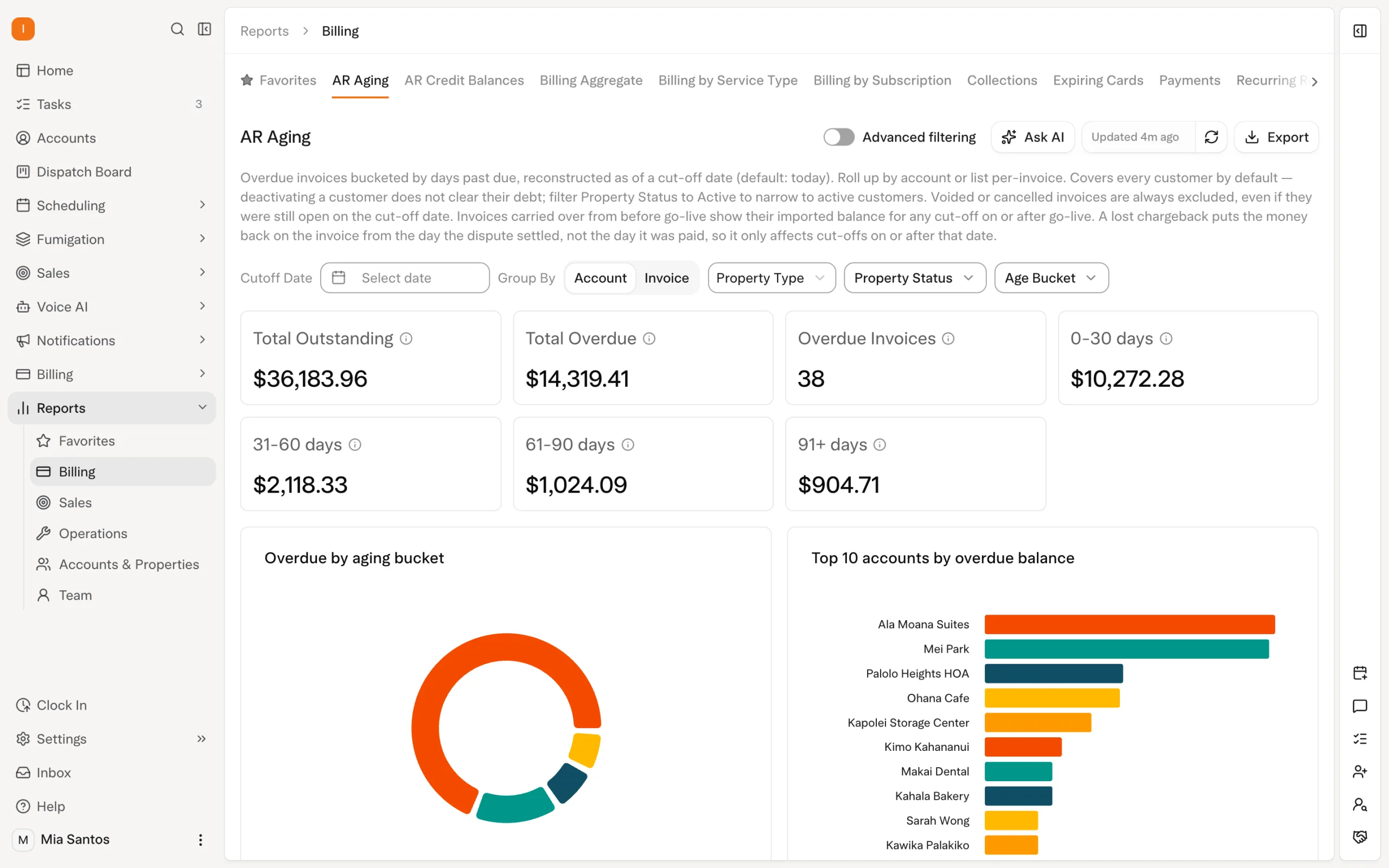
Then follow a completed visit into billing. In Solea, demonstrate the configured auto-charge, receipt and overdue-reminder sequence. In GorillaDesk, verify the relevant completion triggers and recurring-invoice actions. Compare the staff work left after each step, including what happens when a payment needs attention.
Explore Solea AI scheduling and billing and payments.
Include reporting in the AI evaluation
Solea’s AI-assisted reporting belongs in the demonstration alongside customer calls and route planning. Bring the questions you use to manage the business and ask to see the available workflow against representative records.
GorillaDesk documents Kong AI for supported data such as jobs, invoices and payments, with plan-dependent report features. Use the same management question on each demo and check the underlying records, access and sharing arrangements.
This makes reporting part of the operating decision: how quickly can the team understand what happened and decide where its attention is needed?
Compare the setup you will actually use
Ask for a quote covering your schedules or technicians, desired AI workflows, communication services, implementation and payment-processing terms. Confirm any usage-based charges and what happens as the team grows.
For Solea, request pricing against your service mix and automation requirements. For GorillaDesk, use its plan documentation alongside the documentation for the AI services you select.
If you decide to switch, agree separately on records, saved-payment readiness, training and the final handoff. Use the migration checklist, then bring your sample accounts to a Solea walkthrough.
Frequently asked questions
- How do Solea and GorillaDesk compare?
- Solea is built for pest control companies with 5+ technicians, from mid-market teams through enterprise operators, with AI across calls, scheduling, payments, collections and reporting. GorillaDesk also offers operational tools and documented AI capabilities. Compare how each proposed setup handles your customer journey, including configuration, plan requirements and the exceptions staff need to manage.
- Which should a company under five technicians consider?
- GorillaDesk is our starting recommendation for this size band. Demonstrate the scheduling, billing and field workflows you need and include any AI services in the proposed setup. This is editorial shortlist guidance, not a claim that GorillaDesk is limited to small companies.
- Is Solea suitable for a team with 5–50 technicians?
- Yes. Solea is built for 5+ technicians, including 5–50-technician teams and larger mid-market and enterprise operators. Evaluate Solea when your priority is AI taking on more office work across calls, scheduling, payments and reporting. Confirm fit against your service mix and operating complexity as well as crew size.
- Does GorillaDesk have AI?
- Yes. Its help center documents AI phone, SMS and portal capabilities, plus Kong AI for analysis of supported system data. Confirm the current actions, plan requirements and usage terms for your selected setup. The decision should reflect the complete workflow each platform demonstrates.
- What should we test in Solea’s scheduling?
- Use a real week with technician shifts, required skills, customer constraints and fixed appointments. Demonstrate how AI optimization respects locks and the freeze window, then review a dry run before a separate live run. Also test how an enabled voice-agent request affects the schedule.
- Do both platforms automate payments?
- Both document payment automation. Solea offers configured auto-charge and reminder workflows; GorillaDesk documents saved-card charges triggered by job completion and separate recurring-invoice actions. Demonstrate the appropriate setup in each, including receipts, payment exceptions and the staff follow-up required.
- Which platform costs less?
- Compare quotes for the workflows you will actually use. Include platform access, schedules or technicians, AI and communication services, implementation and processing terms. Do not assume that a base price represents the full configuration. Request Solea pricing against those requirements.
- How should we plan a switch to Solea?
- Agree on product fit first, then define data scope, payment readiness, training and the handoff. Confirm how specialized records will transfer or remain accessible, and validate representative accounts before launch. The migration checklist provides a practical starting point.


 Overnight