Managing recurring pest control customers with AI scheduling
Solea connects recurring customer records with AI scheduling, appointment help and billing automation for pest control teams with 5+ technicians.
Last updated
Managing recurring pest control customers means connecting an ongoing service relationship to the visits, communication and payments that keep it running. The customer expects the right service at the right property, with appointments that fit their availability and billing that matches the agreed arrangement.
Solea brings this work into an end-to-end AI-native pest control platform for companies with 5+ technicians, from mid-market through enterprise. AI scheduling prepares upcoming work around operating constraints, the AI voice agent handles enabled appointment requests, and payments, collections and AI-assisted reporting support the rest of the service cycle.
The aim is to serve a growing base of recurring customers while automating more of the routine back-office work around each visit.
Connect the recurring relationship to the actual visit
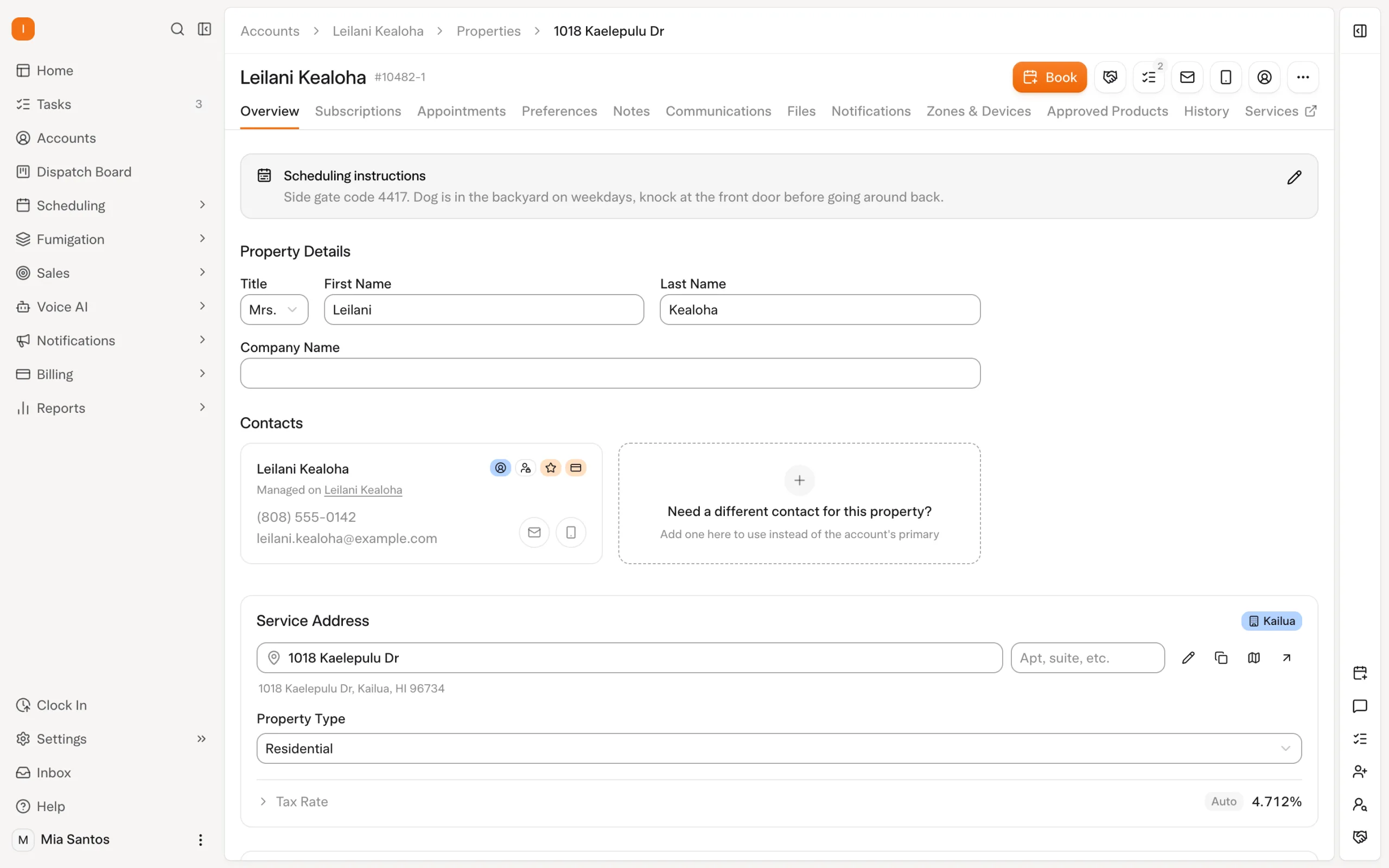
A recurring customer relationship has several parts. The account identifies the customer. The property identifies where service happens. The subscription describes the ongoing arrangement. An appointment is a specific visit your team needs to deliver.
Solea distinguishes accounts, properties, subscriptions, service types and appointments. That structure gives the office a way to manage the relationship while AI scheduling organizes the work around service and customer constraints. It also helps the team ask the right question when something changes: is this a change to one visit, the ongoing service arrangement or the customer's contact information?
| Part of the relationship | What to establish before relying on automation |
|---|---|
| Customer and contacts | Who is responsible for the account, and who receives service or billing communication? |
| Service property | Which address is being treated, and what instructions does the team need? |
| Ongoing service | What service has the customer agreed to, and what billing arrangement applies? |
| Scheduling requirements | Which skills, customer constraints and technician shifts must the visit fit? |
| Appointment commitment | What has already been communicated, and which parts of the visit must stay fixed? |
| Payment and follow-up | Which collection, receipt and overdue-notification settings apply? |
For the broader record structure, read CRM for pest control.
How Solea is different
Solea connects recurring customer management to an AI-run office. The same platform supports the customer record, appointment conversations, schedule preparation, field work, payments, collections and reporting.
The difference is visible in the work around a recurring visit. AI can handle an enabled appointment request and scheduling optimization can prepare upcoming routes within the rules your business sets. Configured payment and notification workflows carry routine actions forward after service. AI-assisted reporting supports the team's review of the operation.
Your office sets the operating rules and handles exceptions. That gives staff more time to help a customer with a service concern or an unusual request, while the platform handles repeatable work. Explore Solea's field service management platform.
Give AI scheduling the right constraints
A recurring service is a commitment to a customer, delivered through a real technician's working day. The schedule needs to account for both.
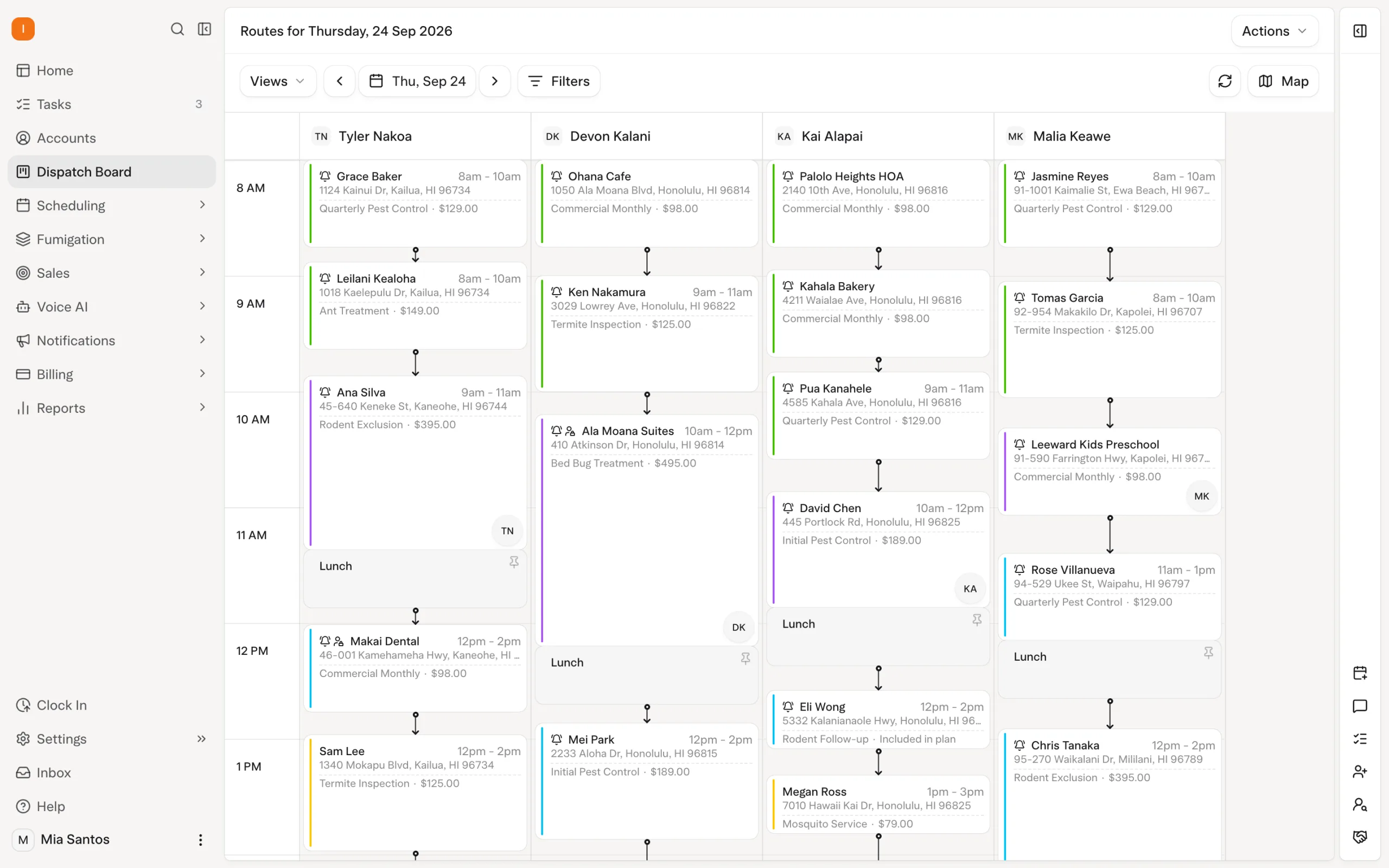
Solea's AI scheduling optimization considers constraints including technician shifts, required skills, customer availability and drive time between stops. Locks preserve appointments that should remain fixed. The freeze window keeps near-term visits out of the nightly optimization.
The office should establish these rules using representative customers and services. A visit that needs a qualified technician, a customer with blocked days and a confirmed appointment each test a different part of the scheduling setup.
For seasonal services, Solea's documented service-type settings include allowed months. Those settings restrict scheduling to the relevant season. Check the service configuration as part of the recurring workflow, alongside the people available to deliver it.
Explore scheduling and dispatch.
Protect what you have promised the customer
Consider an illustrative customer who has already received a visit notice. Their appointment needs to be considered differently from flexible upcoming work, because the customer may have arranged access or changed their plans.
Solea supports appointment locks, and a configured notification can lock an appointment after the notice is sent. These controls let AI optimize upcoming work while protecting the commitment represented by the lock.
Use a dry run to preview an optimization before running it live. Review how flexible visits are arranged and how locked visits are preserved. The useful question is whether the proposed schedule fits your rules and customer commitments, as well as the working day.
Make notification setup part of that review. Service communication and scheduling controls should describe the same visit, so the office understands what has been promised before making an exception.
Let AI help customers with appointment changes
Recurring customers still need help between visits. A time may no longer work, or they may call with an appointment request.
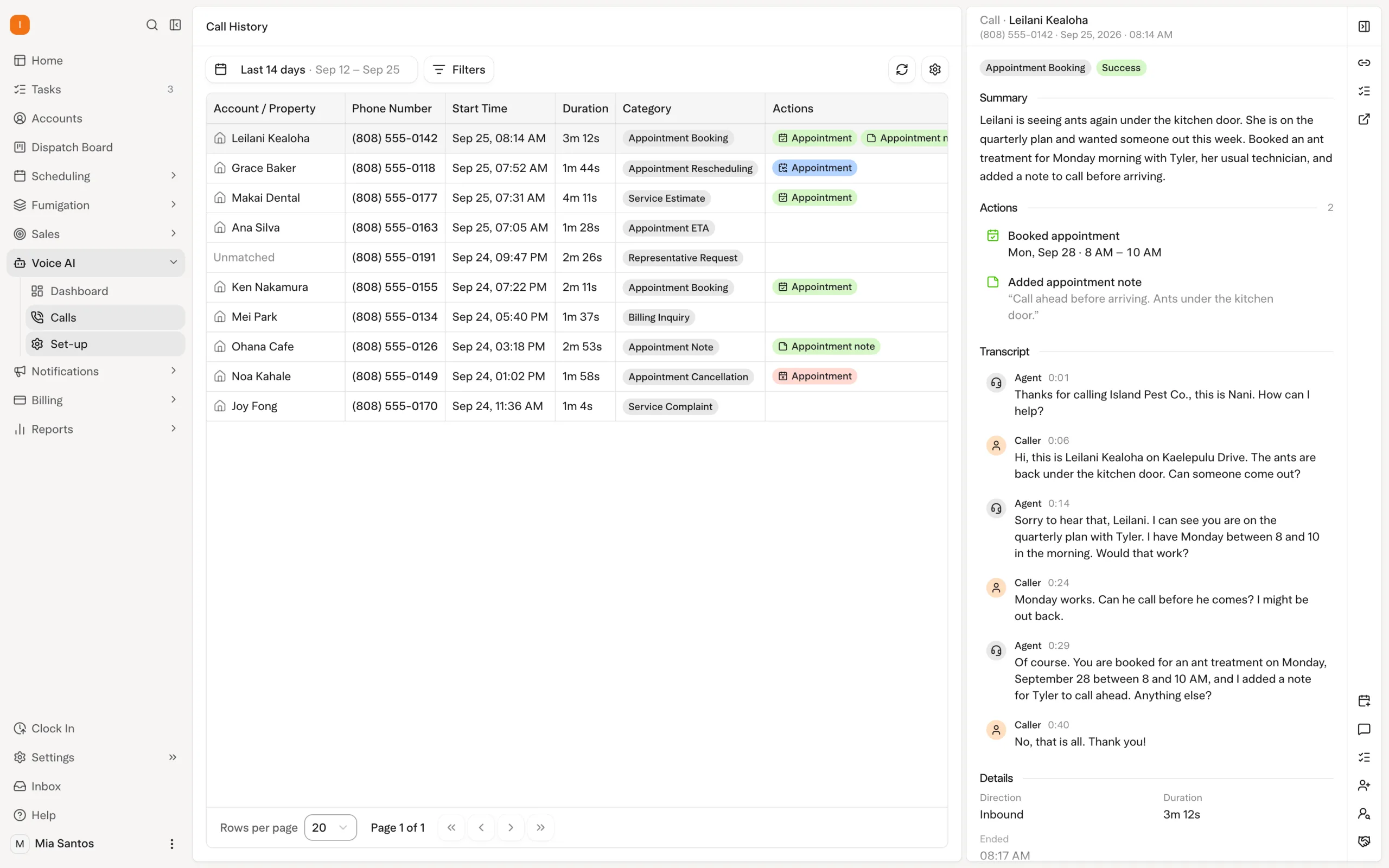
Solea's AI voice agent can handle enabled booking, rescheduling and cancellation requests under configured rules. Requests that need a person follow the handoff your team has set. The office defines the permitted actions and transfer behavior during and outside office hours.
A change to one appointment and a change to the ongoing subscription are different decisions. When evaluating the workflow, demonstrate the specific action required and who completes it. Solea's help documentation describes changes to an existing subscription, but that does not mean the voice agent can autonomously change its terms.
This gives recurring customers a route to routine appointment help while keeping decisions about their wider service relationship clear. Explore AI voice.
Carry each visit into payment and follow-up
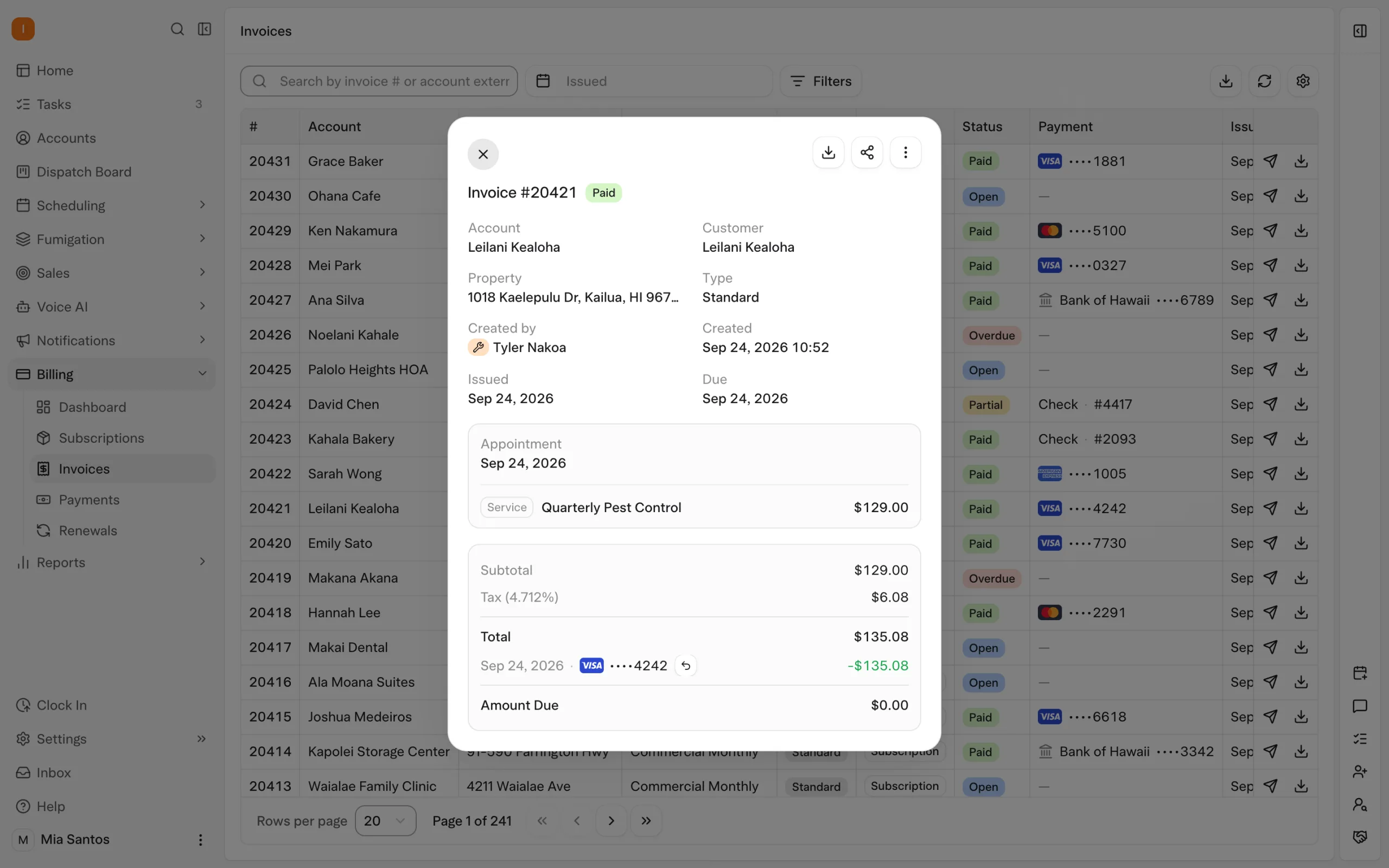
Solea's AI-native platform connects the completed service to billing and collections automation. Where auto-charge is configured, a saved payment method can be charged after completion. A paid-invoice notification can send a receipt, and overdue notifications can follow the timing and filters set by the office.
Agree how the workflow should behave for each billing arrangement. Do not assume every recurring service has the same payment timing. In a demonstration, follow the actual customer setup through a completed visit and show which billing action applies.
Service and billing contacts can also differ. Solea's documented communication routing uses the property's email for service notices and account contact roles for billing communication. Check both when setting up customers with several properties or a separate accounts-payable contact.
Explore billing and payments, or read the guide to pest control customer follow-up.
Review exceptions and results
AI scheduling still needs an exception process. If work cannot be placed within the scheduling constraints, the office needs to review it. Solea's documented scheduling workflows include the job pool for work that needs placement.
Establish who reviews those exceptions and how they resolve the customer commitment. Review the underlying constraint before changing it: a skill requirement or a blocked day may reflect something the team needs to preserve.
AI-assisted reporting supports management review across the platform. Start with the decisions you need to make and inspect the relevant business records. For payment performance, Solea's documented Billing Aggregate workflow compares what was billed with what was collected. Keep that distinction clear when reviewing the outcome of recurring service work.
Test a complete recurring customer workflow
For a team with 5–50 technicians, use examples that reflect the office workload you want to automate as recurring accounts grow. For an enterprise team, include the office structure, service mix and reporting scope you need to operate. Solea is built for both mid-market and enterprise companies.
| Scenario | What to demonstrate |
|---|---|
| A customer has restricted availability | Show how AI scheduling applies the customer constraints alongside technician shifts. |
| A service requires a particular skill | Show how the requirement affects which technician can receive the work. |
| A visit has already been communicated | Show the applicable lock and how optimization protects it. |
| A seasonal service has limited months | Show where the allowed months are configured and how they constrain scheduling. |
| A customer calls about one appointment | Show an enabled AI voice action and the handoff for a request outside its rules. |
| Service is complete | Show the billing arrangement, configured payment action and receipt communication. |
If you are changing platforms, include recurring services and customer scheduling preferences in the migration acceptance review. Agree what will be mapped and checked rather than assuming every field transfers automatically. The software migration checklist provides a starting point.
Grow the relationship with less routine office work
Recurring customer management works best when the customer record, schedule, communication and billing support the same service commitment. Solea brings those workflows into an AI-native platform so more routine back-office work can be automated as the operation grows.
Request a demo using your recurring services and customer examples, or request a quote for your team.
Frequently asked questions
- What software helps manage recurring pest control customers?
- Look for software that connects customers, properties, ongoing services, appointments and billing. Solea combines these workflows in an end-to-end AI-native platform, with AI appointment handling, scheduling, payments, collections and AI-assisted reporting. It is built for pest control companies with 5+ technicians, from mid-market through enterprise.
- How does AI scheduling support recurring pest control work?
- Solea's scheduling optimization prepares upcoming work around constraints such as shifts, required skills, customer availability and drive time. Appointment locks protect commitments, while the freeze window keeps near-term visits out of nightly optimization. Evaluate those controls using your own recurring service examples.
- Can AI optimization move a confirmed appointment?
- Solea supports locks that protect appointments, and a configured notification can lock a visit after the customer is notified. Check which lock applies to the commitment you have made. A dry run lets the team preview an optimization before running it live and assess the proposed schedule.
- Can Solea support seasonal scheduling rules?
- Yes. Solea's documented service-type settings include allowed months, which restrict scheduling to the months configured for the service. Review those settings alongside technician availability, required skills and customer constraints when evaluating a seasonal recurring workflow.
- Can the AI voice agent change a recurring subscription?
- The documented voice actions used in this guide cover enabled appointment booking, rescheduling and cancellation. Do not assume those actions include changing a recurring subscription's terms. Demonstrate the specific subscription change with the team and confirm who completes it and which settings apply.
- How do payments connect to recurring customer management?
- The billing arrangement and automation settings determine the workflow. Configured auto-charge can collect payment after completion using a saved payment method, while paid-invoice notifications can send receipts and overdue triggers can send reminders. Follow a representative customer through the complete service and billing cycle during evaluation.


 Overnight