Housecall Pro vs pest control software: where AI and pest workflows meet
Compare Housecall Pro with Solea’s AI-native pest control platform across calls, recurring work, inspections, payments and reporting.
Last updated
Housecall Pro offers AI call handling, recurring jobs, service plans and field checklists. For a pest control company, the choice comes down to how well those tools handle the operation’s pest records, recurring routes and customer experience, and how much back-office work the platform automates.
Solea is an end-to-end AI-native platform built for pest control companies with 5+ technicians, from mid-market through enterprise. AI handles customer calls and scheduling, with payments, collections and AI-assisted reporting connected to the field workflows that support each service.
Compare the complete operation: what happens when a customer calls, how the visit reaches the right technician, what gets recorded on site and how payment and reporting follow the work.
What Housecall Pro already offers
Housecall Pro’s help center documents several capabilities relevant to pest operators. Start with those facts, then demonstrate the requirements that depend on your service mix.
| Workflow | Housecall Pro’s documented capability | Pest control evaluation |
|---|---|---|
| Customer calls | CSR AI can book jobs using configured services, booking availability and service area, with escalation settings for a human request. | Test a recurring customer, a new pest inquiry and a request the office needs to handle. |
| Repeat visits | Recurring jobs support daily, weekly, monthly, yearly and custom frequencies. | Match your actual service cadence and demonstrate a change to one visit versus the series. |
| Service plans | Plans support recurring service and payment arrangements, including automatic card charges for subscription plans. | Separate how often you visit from how often the customer pays. |
| Field documentation | Checklists can collect findings and can be configured to require completion before a job is finished. | Test the chemical, device and inspection records your technicians need. |
| Plan reporting | Service plan reports cover metrics such as plan counts, recurring revenue and collected revenue. | Review the measures you use to manage your pest business and the records behind them. |
Sources: Housecall Pro’s CSR AI setup, recurring jobs, service plan FAQs, checklists and service plan reporting.
Where pest-specific workflows change the evaluation
A residential recurring service, a commercial device inspection and a termite inspection can each place different demands on software. Bring an example of every service you sell and follow its records through the platform.
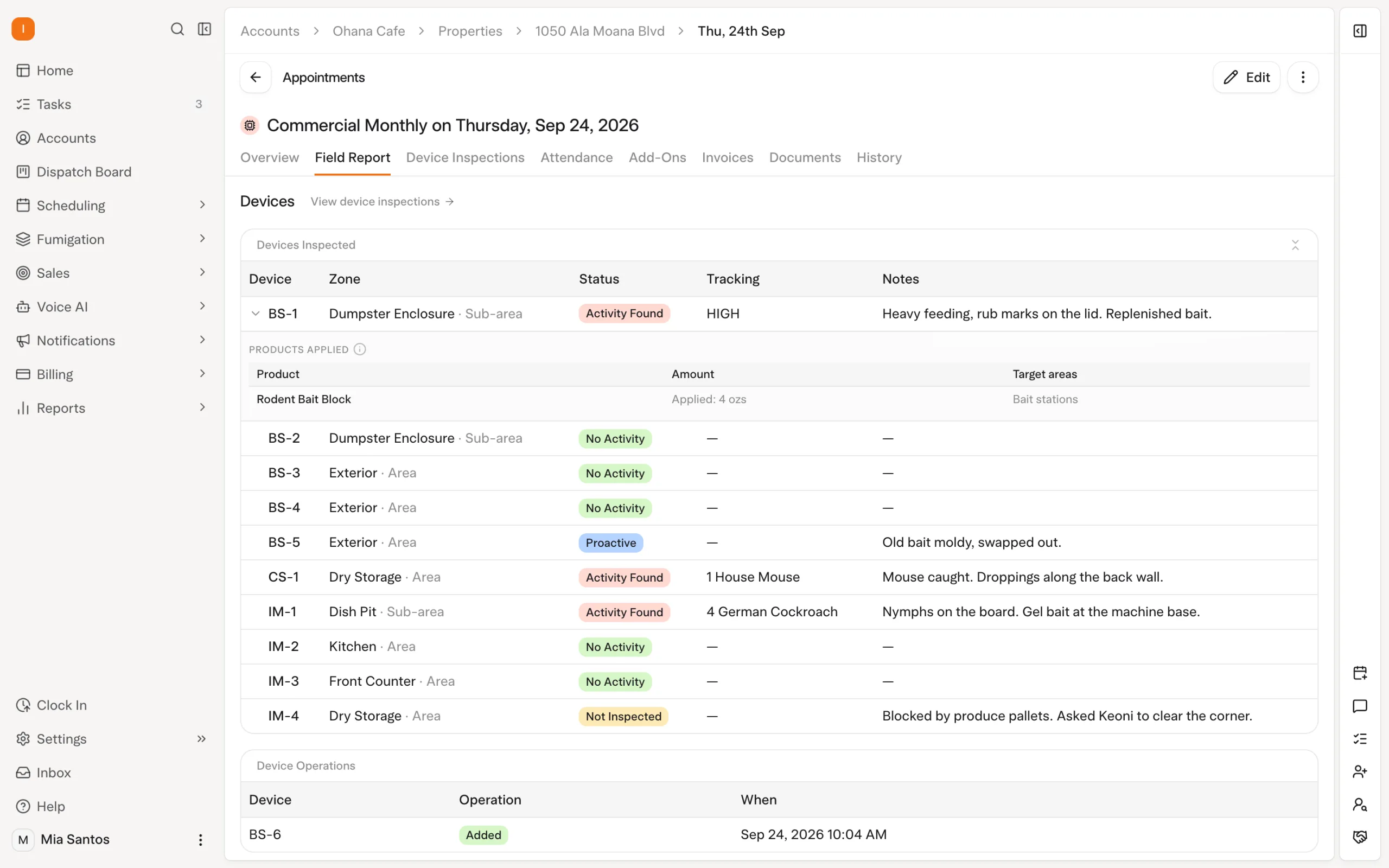
For chemical work, demonstrate the product, application and property details your team records, then retrieve an older application. For devices, follow the same device across visits. For WDO work, bring the actual report format and review steps your operation uses.
Housecall Pro’s checklist documentation establishes that it supports customizable field records. Whether a particular configuration meets your pest requirements needs a demonstration. The presence of a checklist alone does not answer questions about device history, chemical records or a specific WDO report.
In Solea, inspections and chemical records sit alongside the AI-run office. Technicians capture findings, photos and product use; product lookup and mix calculations reduce repeated entry and calculation around an application. The field record stays part of the service handled by the platform’s scheduling, billing and reporting workflows.
Explore Solea’s chemical tracking and WDO inspection guides for a closer look at those workflows.
How Solea is different
Housecall Pro offers AI call handling and automation for service businesses. Solea’s distinction is its end-to-end AI-native focus on pest control companies with 5+ technicians, from mid-market through enterprise. AI handles appointment conversations and scheduling, while payments, collections and AI-assisted reporting work alongside pest inspection and chemical records. That gives operators a concrete way to evaluate how much of the office workflow runs in one pest-focused platform.
Solea’s focus is an AI-native pest control operation where routine office work is automated across the customer journey. Evaluate that promise through the actions the platform completes and the exceptions your team handles.
From the customer call to the scheduled visit
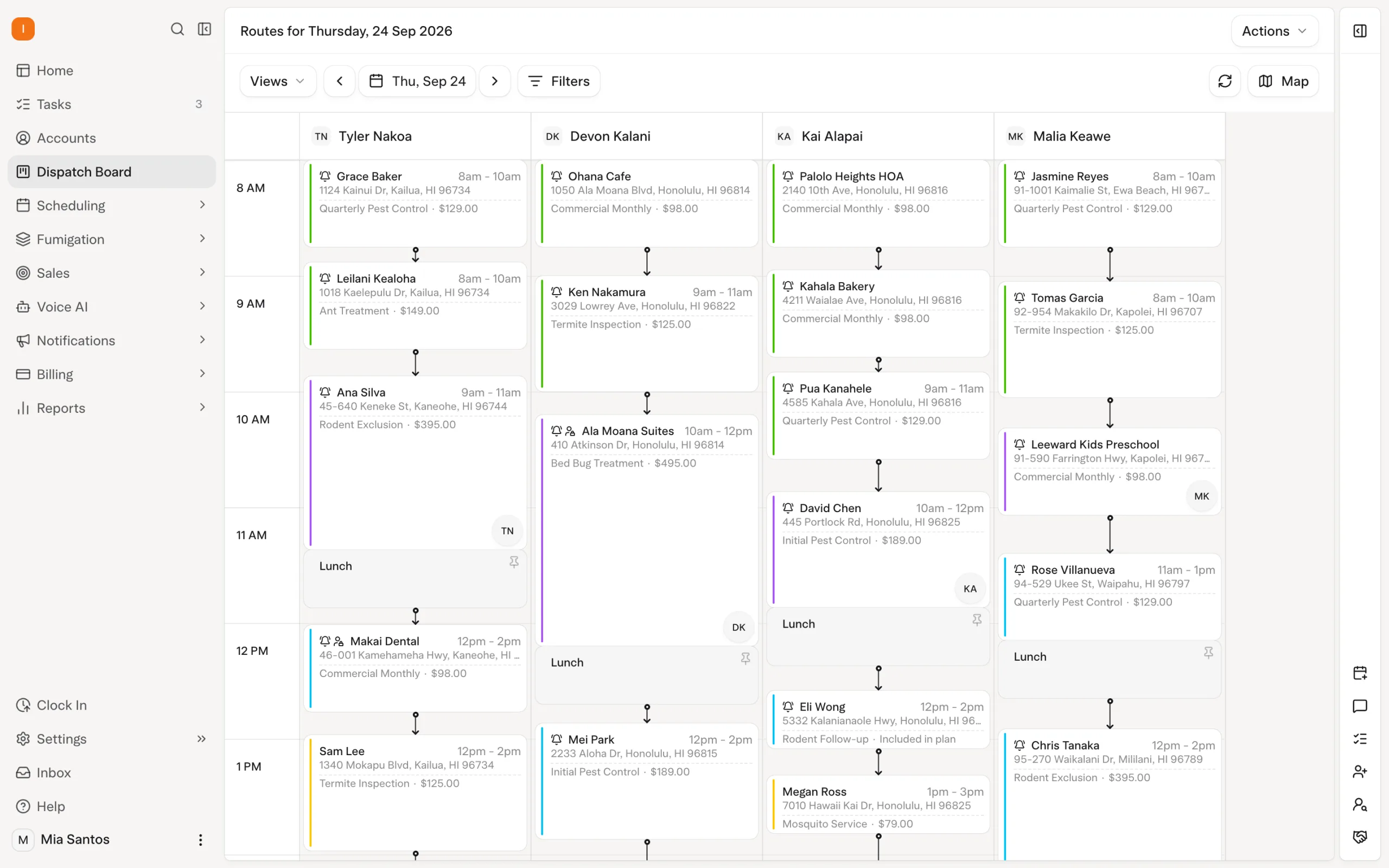
Solea’s AI voice agent can book, reschedule and cancel appointments when those actions are enabled. It follows configured account, scheduling and coverage rules, with a handoff when the customer needs a person. That reduces repeated appointment handling while keeping a path to the office open.
AI scheduling applies technician shifts, required skills, customer constraints and drive times. Locks and the freeze window protect appointments that should remain in place during optimization. Bring a route with both flexible work and a confirmed visit to see how those rules interact.
Explore AI voice and AI scheduling and dispatch.
From completed work to payment and management review
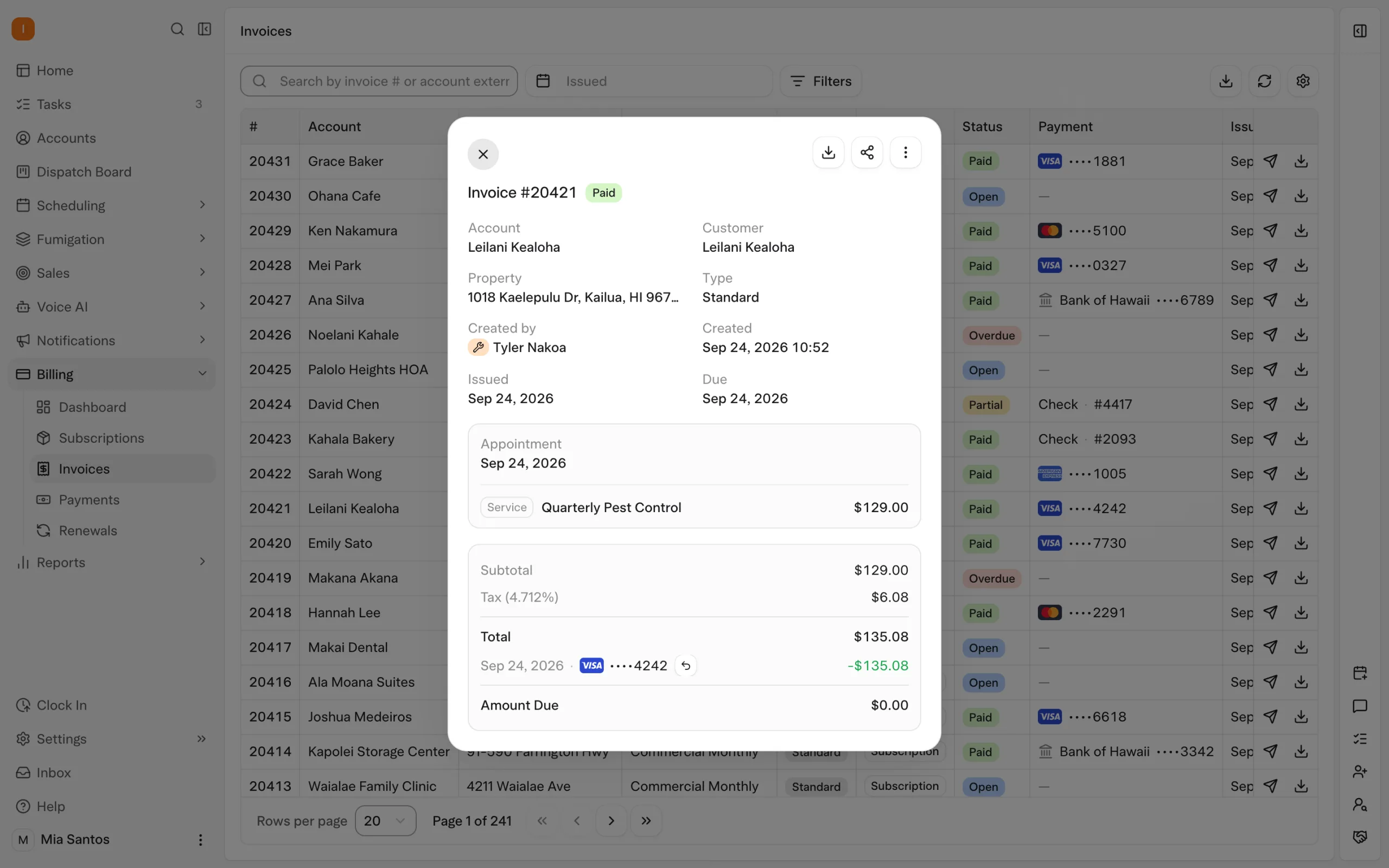
Solea extends AI automation into payments, collections and reporting. Configured auto-charge can collect payment using a saved method after completion, while receipt notifications and overdue reminders handle routine follow-up according to account settings.
Use real management questions to evaluate AI-assisted reporting. Ask to see the relevant records and how your team checks the result. The useful outcome is less time chasing routine payments and assembling information, with more attention available for customers and operational decisions.
Explore Solea billing and payments.
Use the same customer journey in both demonstrations
Ask both vendors to demonstrate a representative pest account, including one exception. Record which actions happen automatically, what configuration is needed and what the office still handles.
| Scenario | What to demonstrate |
|---|---|
| A customer calls outside office hours | How AI handles the request, what it can book and where a human handoff goes. |
| A visit needs a qualified technician | How the schedule enforces the requirement and protects confirmed appointments. |
| A property has devices and chemical applications | How technicians record the work and retrieve previous findings. |
| A visit is completed | How payment, receipts and any remaining follow-up proceed. |
| The manager reviews service and revenue | How reporting supports the team’s questions and exposes the underlying records. |
For Solea, include AI voice, scheduling, payments and reporting in that demonstration. For Housecall Pro, confirm the configuration and package required for the workflows shown. If you operate across several trades, add a representative job from each one before deciding on a single platform.
Choose the operating model you want to grow with
Consider Housecall Pro if its configured workflows meet your pest requirements and deliver the automation your office needs. Consider Solea when you want an end-to-end AI-native platform built around pest control, from a team of 5+ technicians through mid-market and enterprise operations.
Compare written scopes for the demonstrated features, implementation, training and payment processing. If you are switching, use the migration checklist to review your data, balances and recurring services before committing to a cutover.
Request Solea pricing or book a demo based on your service mix and office workload.
Frequently asked questions
- How does Housecall Pro compare with pest-specific software?
- Housecall Pro documents AI call handling, recurring jobs, service plans, checklists and reporting. Pest-specific evaluation adds questions about chemical records, inspection devices, termite reports and route requirements. Compare the configured workflow for your actual accounts rather than assuming a general platform either covers or lacks a particular pest capability.
- When do pest operators need pest-specific software instead of generalist home-services tools?
- Consider pest-specific software when chemical records, device inspections, termite work and recurring pest routes are central to the operation. The decision should also account for office automation and customer experience. Demonstrate your real workflows in each platform and identify which routine tasks it completes and which remain with your team.
- What does Solea offer for pest control offices?
- Solea is an AI-native platform built for companies with 5+ technicians, from mid-market through enterprise. Its AI spans customer calls, scheduling, payments, collections and reporting alongside field records and inspections. The goal is to automate routine back-office work so the team can focus on service quality and the customer experience.
- Does Solea include chemical and WDO tools?
- Solea supports chemical records and inspection reporting alongside its AI office workflows. Product lookup and mix calculations reduce repeated entry around applications. For WDO work, bring your required report format and review process to the demonstration so the team can show the specific workflow and confirm the documents your operation needs.
- Does Solea have a field mobile app?
- Yes. Solea’s technician app connects field work with its AI scheduling and back-office platform. Test your inspection, product, photo and completion steps during the demonstration. Inspection and product records can be saved offline; completing the appointment requires a connection and synchronized inspections, so include poor-signal situations in the evaluation.
- How is Solea priced?
- Request a quote through Solea’s pricing page for your operation. Confirm the scope of the AI capabilities, field workflows, implementation, training and payment processing you need. Compare both vendors against the same requirements and the office work automated, rather than assuming a price advantage from a feature list.


 Overnight