Solea mobile app: field work connected to an AI-run office
Solea’s mobile app connects pest inspections, products and field reports with AI scheduling, payments and back-office automation.
Last updated
The Solea mobile app gives pest control technicians access to their appointments, customer information, inspections, products and service reports. It is the field side of Solea’s end-to-end AI-native platform, connecting the work on site with AI scheduling, customer calls, payments, collections and reporting.
Solea is built for companies with 5+ technicians, from mid-market through enterprise. The goal is a connected operation: AI handles routine back-office work while technicians focus on the property, the service and the customer.
How Solea is different
The mobile app is part of the same platform that runs the office. AI handles enabled appointment conversations and optimizes upcoming schedules; technicians record the service; configured payment and communication workflows follow completion. AI-assisted reporting supports the team’s review of the business.
That connection matters when an appointment changes, an inspection needs attention or a customer has a question about the visit. The field team captures what happened where the office can work with it, alongside the automation handling routine coordination and follow-up.
Explore Solea’s field mobile app.
What technicians can do during a visit
| Part of the visit | Mobile workflow and connection to the office |
|---|---|
| Prepare for the appointment | Review the agenda, customer information, notes and service history for the work on the schedule. |
| Record the inspection | Scan devices and capture findings, activity, consumption and inspection photos as part of the service record. |
| Record products used | Add products and amounts; for mixes, the app shows the concentrate and water split from the total mix entered. |
| Document the service | Add technician comments and record actions, conditions and recommendations for the visit. |
| Complete the appointment | Finish the required steps and synchronize inspections so the completed service can move into the configured office workflows. |
| Review the customer report | Read back the field report on the phone and check the information before leaving the property. |
| Handle payment where configured | Use the available payment workflow when payment is due, connected to the account’s billing setup. |
The technician remains responsible for recording the service performed. Product calculations and connected records reduce repeated work around that service, while Solea’s AI handles the surrounding office processes.
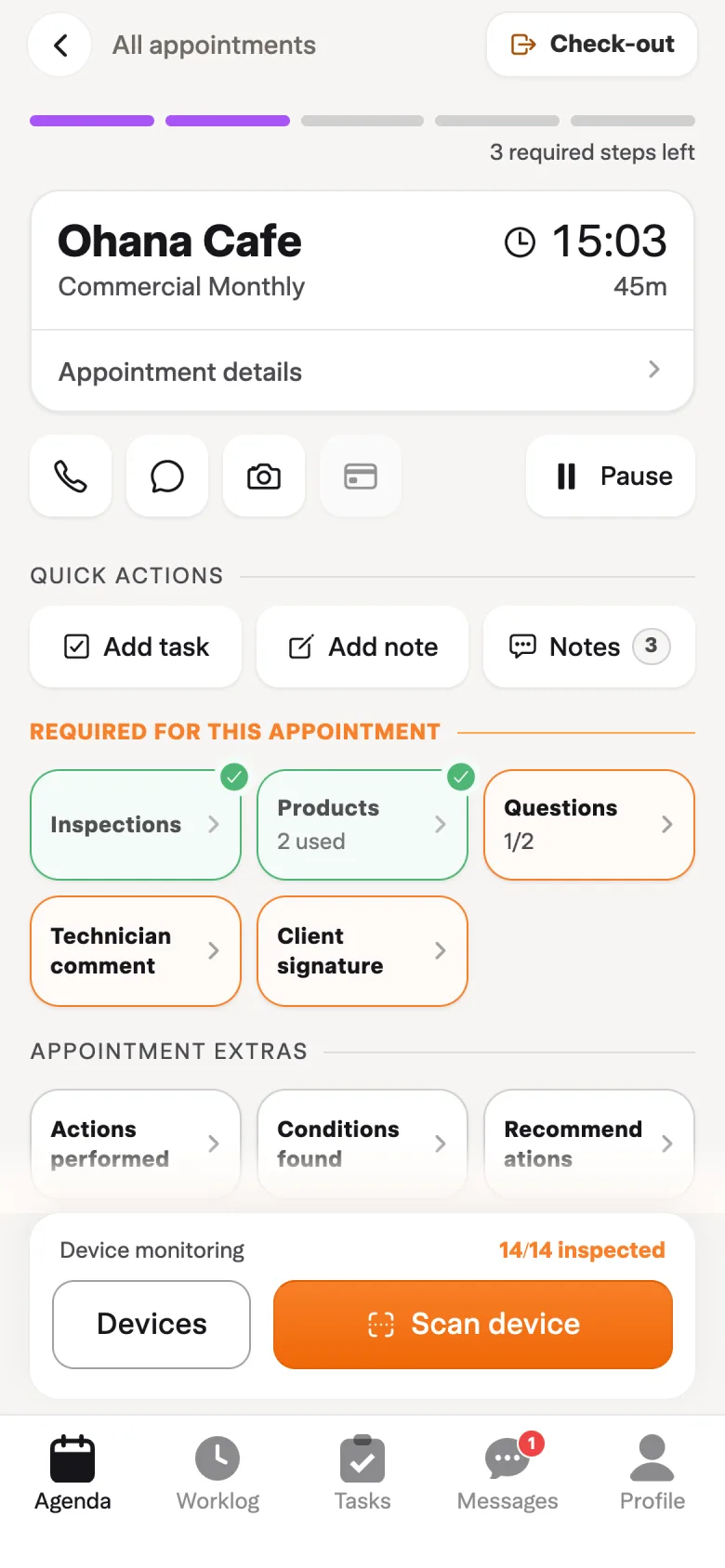
Start with the AI-planned schedule
Solea’s AI scheduling uses technician shifts, required skills, customer constraints and drive times to optimize upcoming work. Locked visits and the freeze window protect appointments that should stay in place.
The app gives technicians the appointment and customer information they need for the day. Review the property’s notes and service history before starting work so the visit reflects the customer’s requirements. Explore AI scheduling and dispatch.
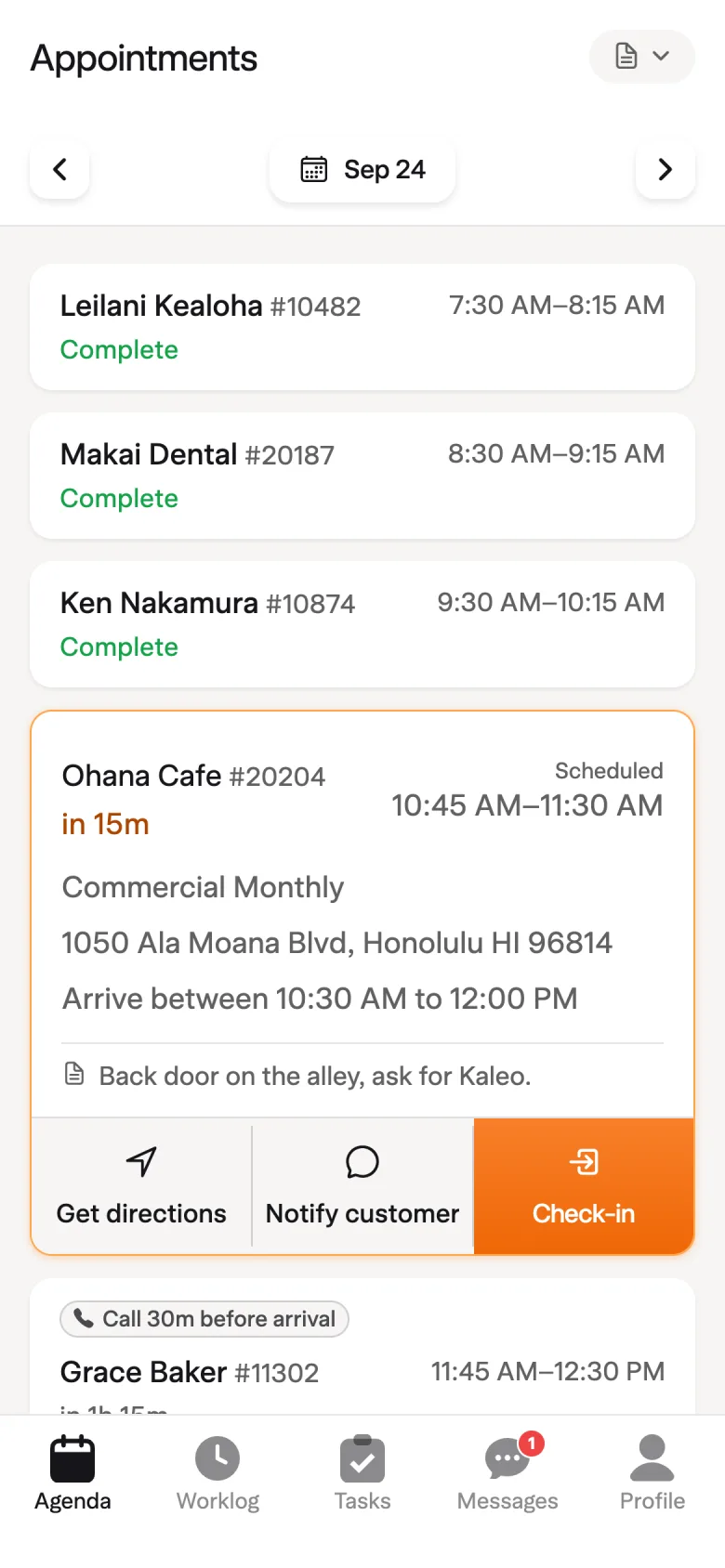
Capture pest-specific work at the property
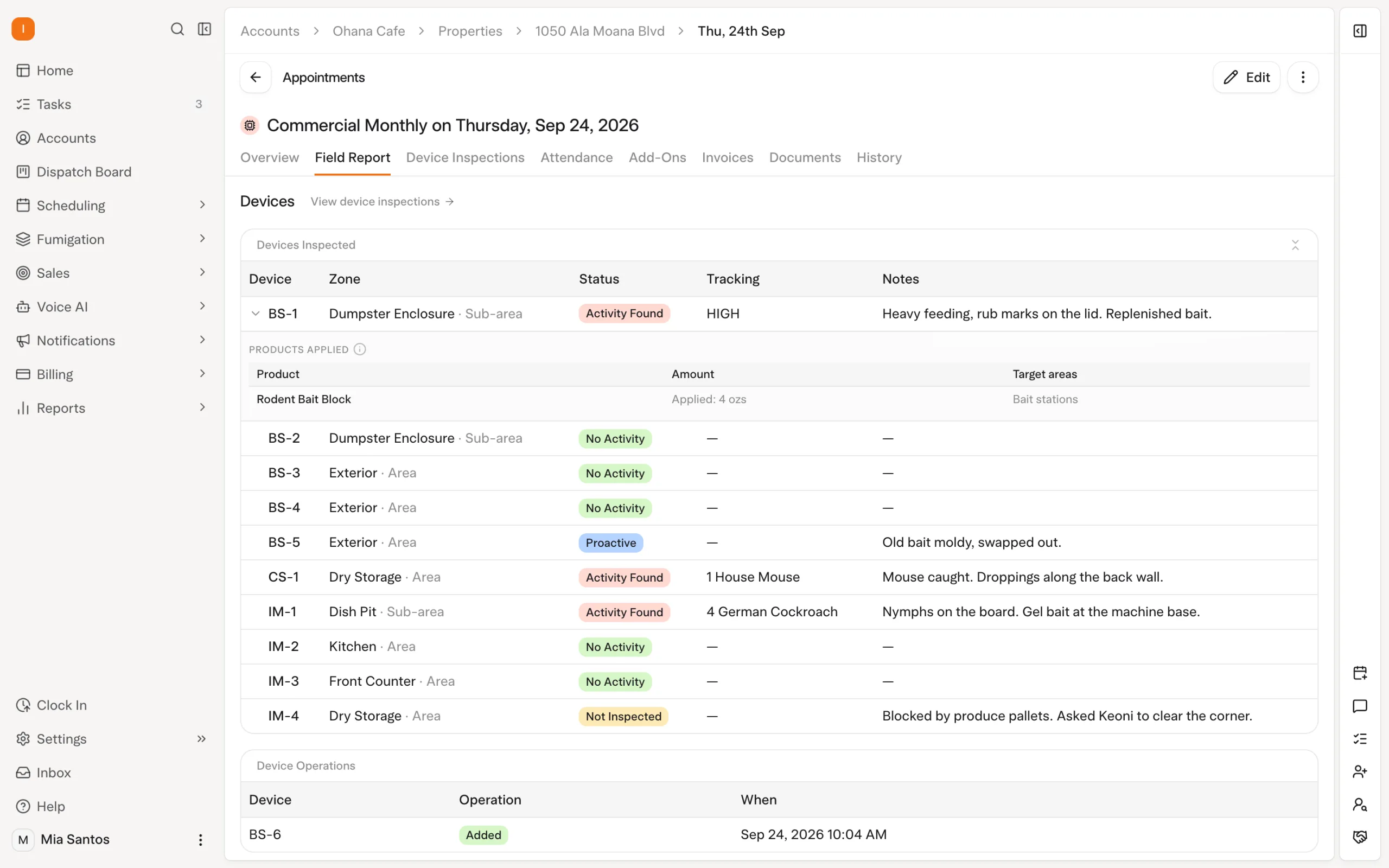
For a device inspection, technicians can scan the device and record activity, consumption, capture counts and products used. Inspection photos provide context for the field report. Those records stay with the service in the platform supporting the AI-run office.
For a product mix, the technician enters the total finished mix applied. The app shows the concentrate and water breakdown and warns when the resulting dilution differs from the product’s expected rate. It helps with calculation; it does not replace the technician’s record of what was applied.
Bring a real inspection program and a representative chemical application to the demonstration. Check how quickly technicians can capture the required details and how the office retrieves them later. Read the chemical tracking guide for more detail.
What works when the signal drops
Solea supports offline field recording, with synchronization when the connection returns. Prepare while connected: checking in requires a connection and loads the visit’s devices, units and products.
| Field action | Connection behavior to plan around |
|---|---|
| Check in to the appointment | Requires a connection and loads visit data for the field workflow. |
| Record inspections and products | Supported records save on the phone while offline and synchronize when connectivity returns. |
| Add or edit devices and zones | The new app’s offline workflow supports saving these changes for synchronization. |
| Complete the appointment | Requires a connection and synchronized inspections. |
Include a poor-signal property in the demo. Have a technician check in while connected, record the work without signal, then reconnect and complete the appointment. This shows the workflow your team will use on an actual route.
Connect completion to reports and payment
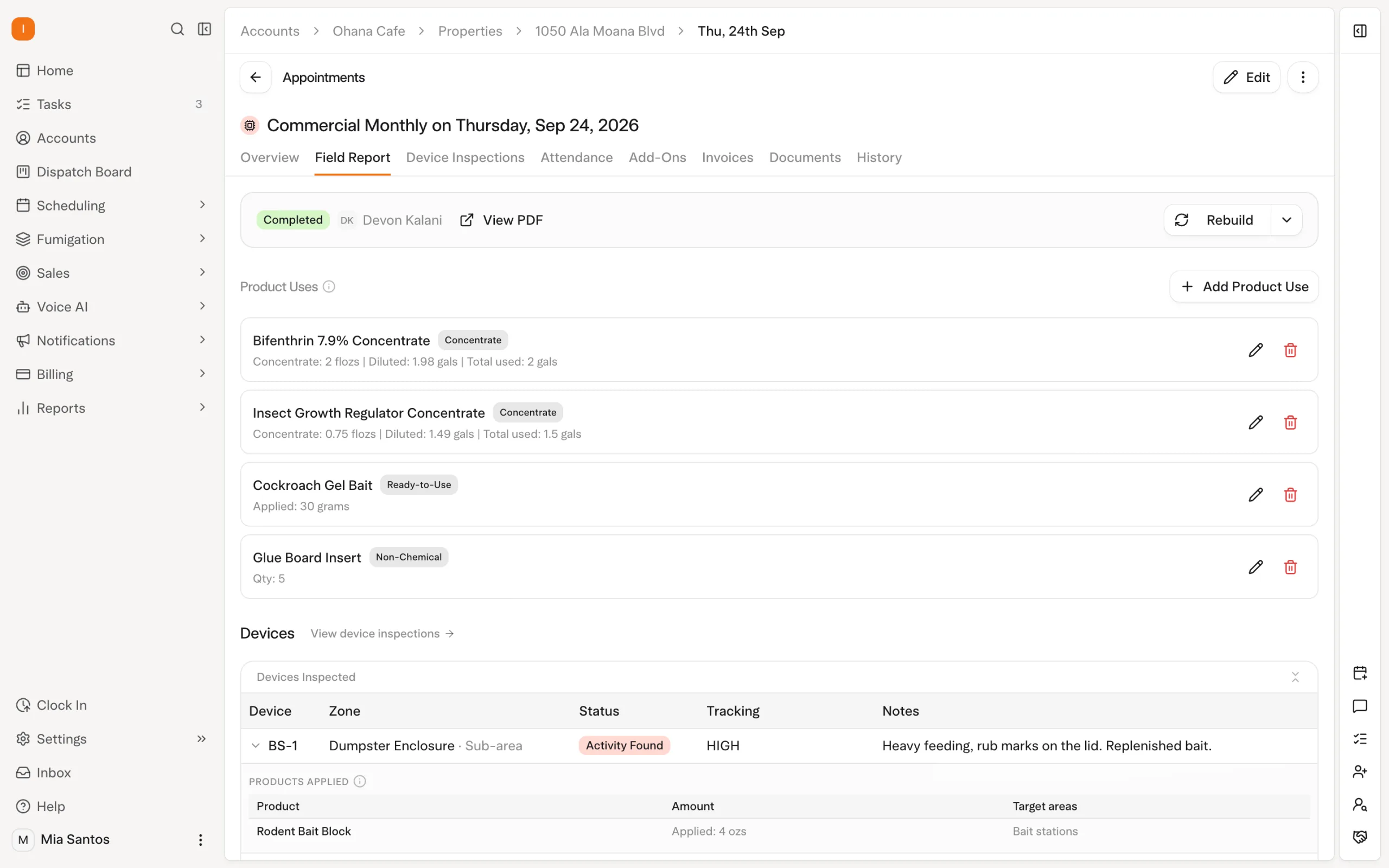
Technicians can review the field report on the phone before leaving. The customer-facing report includes the relevant service information, with service questions shown according to office configuration. Device-inspection photos appear in the inspection appendix.
Field report email is enabled by default, but the office can turn it off by service type. Confirm the customer communication settings for the services you provide so the report goes through the intended workflow.
Solea’s AI-native platform also covers payments, collections and management reporting. Configured auto-charge can collect payment after completion, while receipts and overdue reminders handle routine follow-up according to account settings. Where field payment is enabled and an amount is due, the app presents the applicable payment steps.
The result is a service record connected to the office work that follows it. Explore billing and payments and Solea’s full platform.
Evaluate the app with your technicians
Use a typical residential visit and a more demanding commercial account. Include the inspection, product, customer report and payment steps your team uses, along with a period without signal.
Ask technicians to review the information available before arrival, record the service and check the report. Then have the office follow that same visit through payment and AI-assisted reporting. This makes the connection between field work and back-office automation visible to both teams.
Book a demonstration for your operation or request pricing for the platform and rollout scope.
Frequently asked questions
- Does Solea have a mobile app?
- Yes. Solea has a mobile app for technicians, with iPhone and Android access described in its setup documentation. It connects appointments, customer information, inspections and product records with the platform’s AI scheduling and back-office workflows. Review the current device requirements and your team’s field steps during onboarding.
- What can technicians do in the Solea field app?
- Technicians can review appointment and customer information, record inspections and products, add comments, review field reports and handle configured payment steps. These records connect to the platform’s AI-run office. The steps shown depend on the service, account settings and permissions, so demonstrate the workflow your technicians will use.
- Does the Solea field app work offline?
- Yes, supported inspection and product records can be saved offline and synchronized when the connection returns. The new app also supports offline device and zone changes. Check in while connected to load visit data. Completing the appointment requires a connection and synchronized inspections; test that sequence before rollout.
- Is Solea available on iPhone and iPad?
- Solea’s current App Store listing identifies iPhone and iPad compatibility. Check the listing for device and operating-system requirements before deployment, and demonstrate the workflows you need on your chosen hardware. Device compatibility does not mean every payment function works on every device; Tap to Pay requires a supported phone.
- Do field reports go out from the mobile workflow?
- Yes. The technician can review the field report on the phone, and report email is enabled by default. The office can turn email off by service type, and customer-facing service questions depend on configuration. Confirm those settings and review a sample customer report as part of the demonstration.
- How do we get access or pricing for the mobile app?
- Discuss technician access as part of your Solea platform setup. Book a demonstration to walk through your service and device requirements, or request pricing through Solea’s pricing page. Confirm the users, field workflows, training and rollout scope in the proposal rather than inferring commercial terms from an app-store download.


 Overnight