One customer, multiple properties: CRM for pest control
Solea connects multiple properties under one customer account with AI scheduling, appointment handling and billing automation for teams with 5+ technicians.
Last updated
A pest control CRM for customers with multiple properties needs to connect one customer relationship with several service locations. The office needs to know which property is being treated, who receives service communication and who handles the bill, without losing the context of the wider account.
Solea supports multiple properties under one account within an end-to-end AI-native pest control platform. AI appointment handling and scheduling work alongside customer records, field service, payments, collections and AI-assisted reporting. It is built for companies with 5+ technicians, from mid-market through enterprise, with automation designed to reduce routine back-office work as the customer base grows.
Start with the account and the properties
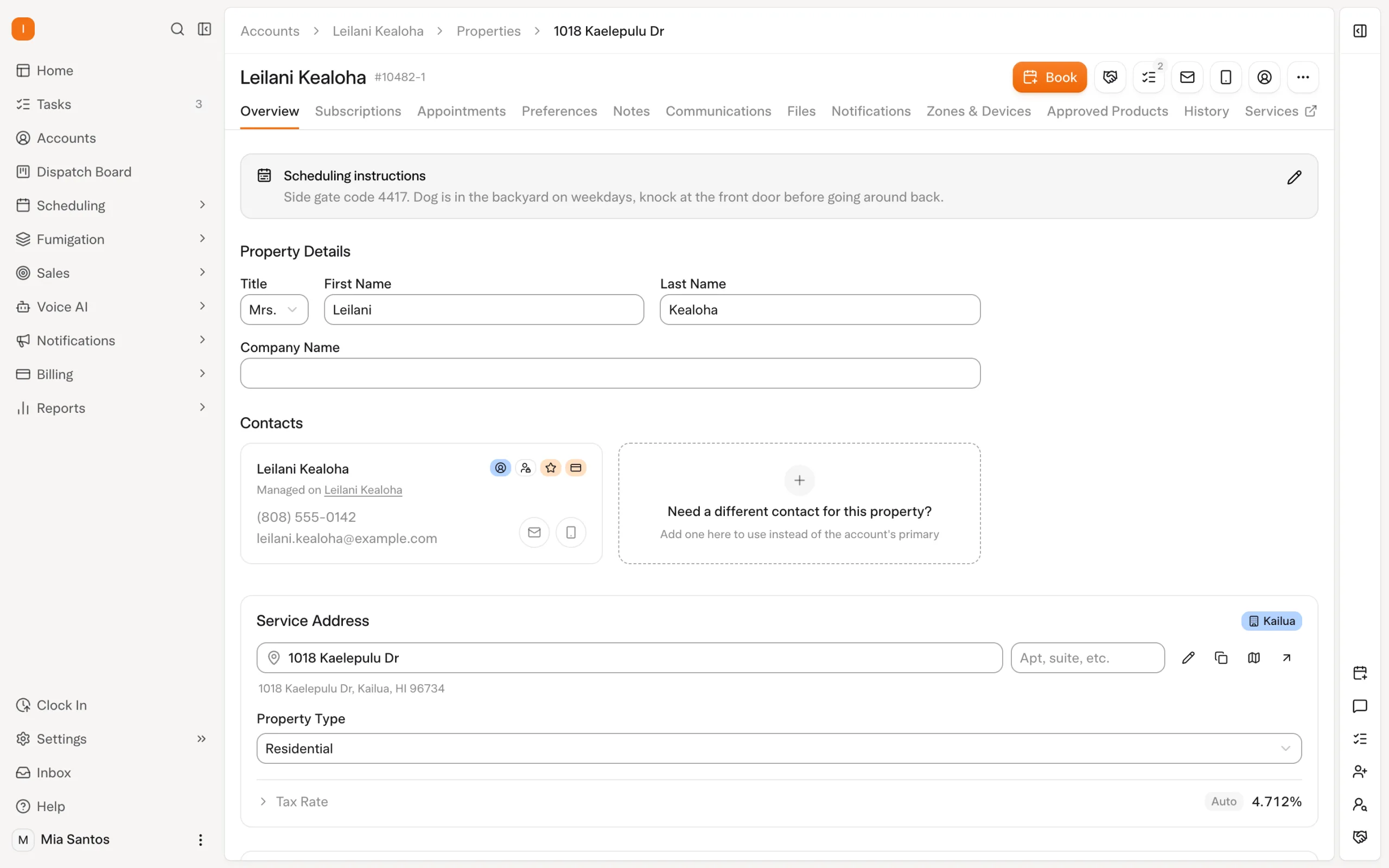
The account represents the customer relationship. Each property represents a location where service takes place. Keeping those distinct is useful when one customer manages several buildings or owns more than one home.
Consider an illustrative property manager responsible for three buildings. Each location may have different access instructions and service needs, while the billing contact works from a central office. This is a fictional example to explain the workflow, not a customer case study.
Solea supports adding multiple properties to an account. That structure gives the office a way to keep the customer relationship together while working with location-specific information. It also provides the context for the platform's AI scheduling and configured service and billing communication.
| Information | What it needs to clarify |
|---|---|
| Account | Who has the customer relationship with your business? |
| Property | Where does service happen, and what does the team need to know about that site? |
| Contacts | Who handles the relationship and billing communication? |
| Service arrangement | What work applies at the property, and which billing arrangement has been agreed? |
| Appointment | What specific visit needs to be delivered? |
| Communication settings | Where should routine service and billing notices go? |
Explore Solea's customer management, or read the broader CRM for pest control guide.
How Solea is different
Solea connects the customer relationship to an AI-run office. Customer management sits in the same platform as AI voice, AI scheduling, field work, payments, collections and reporting.
For a customer with several properties, the value is in how that work connects. AI can handle enabled appointment requests, scheduling optimization can prepare upcoming visits within operating constraints, and payment automation can carry routine billing actions forward. Staff can focus on the customer conversation or site exception that needs their attention.
The office sets the rules: which voice actions are enabled, what scheduling constraints apply and how notices are configured. Accurate account and property information supports those workflows. AI automation still needs the right customer and service context.
Route service and billing communication correctly
The contact who lets a technician into a building may not be responsible for paying its invoice. That distinction matters when follow-up is automated.
Solea's documented routing uses the property's email for service notices and account contact roles for billing communication. Establish those destinations when setting up the relationship, then test a representative service notice and billing notification.
In the fictional property-manager example, review each building's service email alongside the account's billing contact. A useful setup check is whether the person responsible for access receives the relevant service information and the billing contact receives the payment communication intended for them.
Solea also supports notification preferences at account and property level. That allows the team to change a notification or channel for a specific customer context without changing every customer's settings. Read about customer follow-up automation.
Let AI prepare the visits within your rules
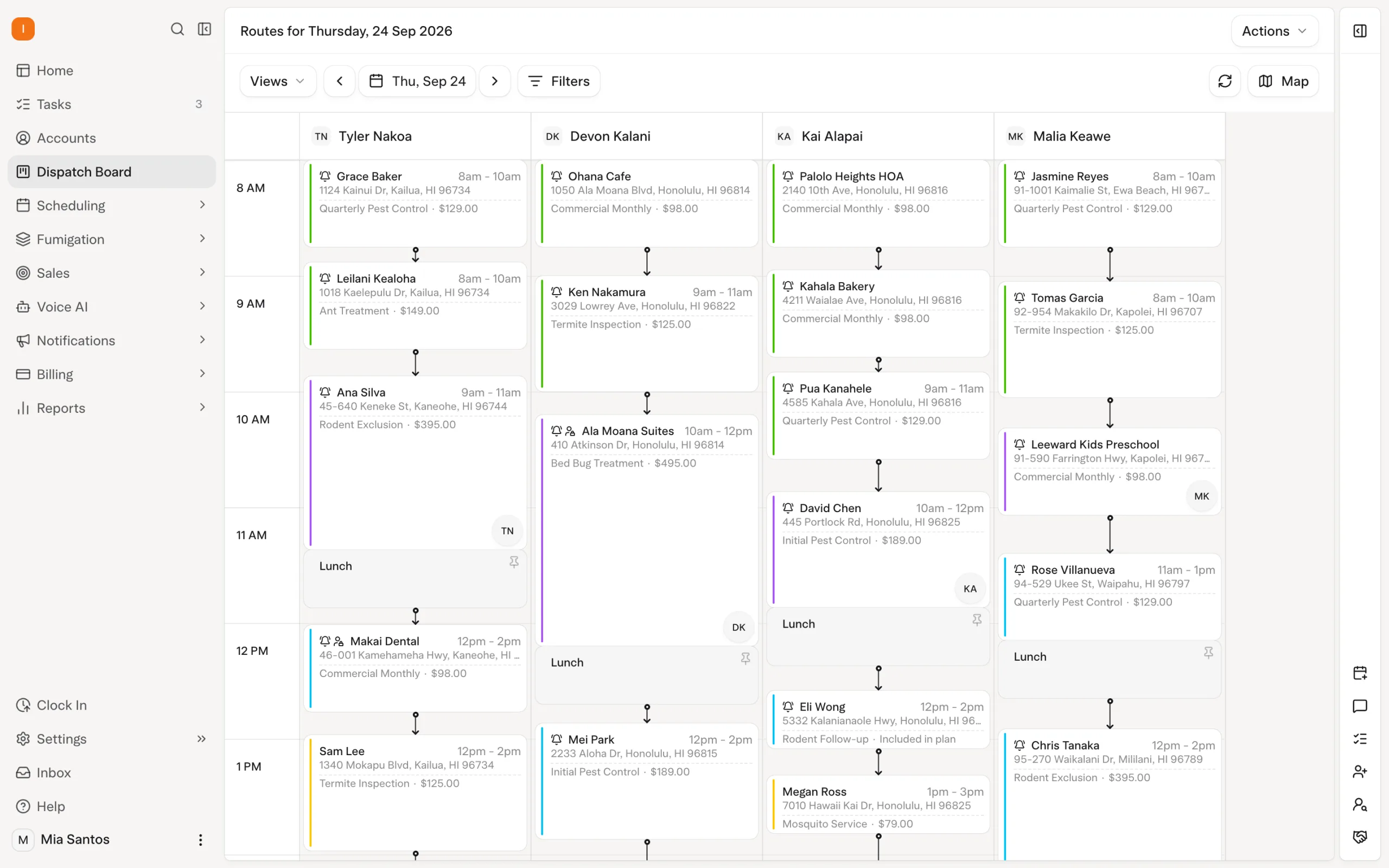
Several properties on one account still represent separate places the technicians need to visit. The schedule must reflect the service requirements, customer constraints and available people.
Solea's AI scheduling optimization considers technician shifts, required skills, customer availability and drive time between stops. Appointment locks protect commitments that should remain fixed, while the freeze window keeps near-term visits out of nightly optimization.
Evaluate the workflow with realistic constraints. One building might require a qualified technician; another may already have a confirmed appointment. Show how the rules are represented and how the optimizer respects them, rather than assuming every requirement can be captured as a free-text instruction.
A dry run lets the office preview an optimization before running it live. Use it to inspect the proposed work against the commitments made to the customer. Explore scheduling and dispatch.
Keep appointment conversations specific
When a customer manages several locations, an appointment conversation needs to identify the visit being discussed. That is an important scenario to demonstrate before enabling automation for the workflow.
Solea's AI voice agent supports enabled booking, rescheduling and cancellation requests within configured rules, with a handoff when a person is needed. For a multiple-property account, test how the conversation identifies the relevant customer and appointment, and what happens if the request is ambiguous.
Treat that as a demonstration requirement. Do not assume the agent can resolve every shared-phone-number or multiple-location situation without help. The office should understand both the enabled action and the path to a person.
Keep field records attached to the service location
For commercial work, the office may need to understand what happened at a particular site when the customer calls. Property-level context matters even when several sites belong to one account.
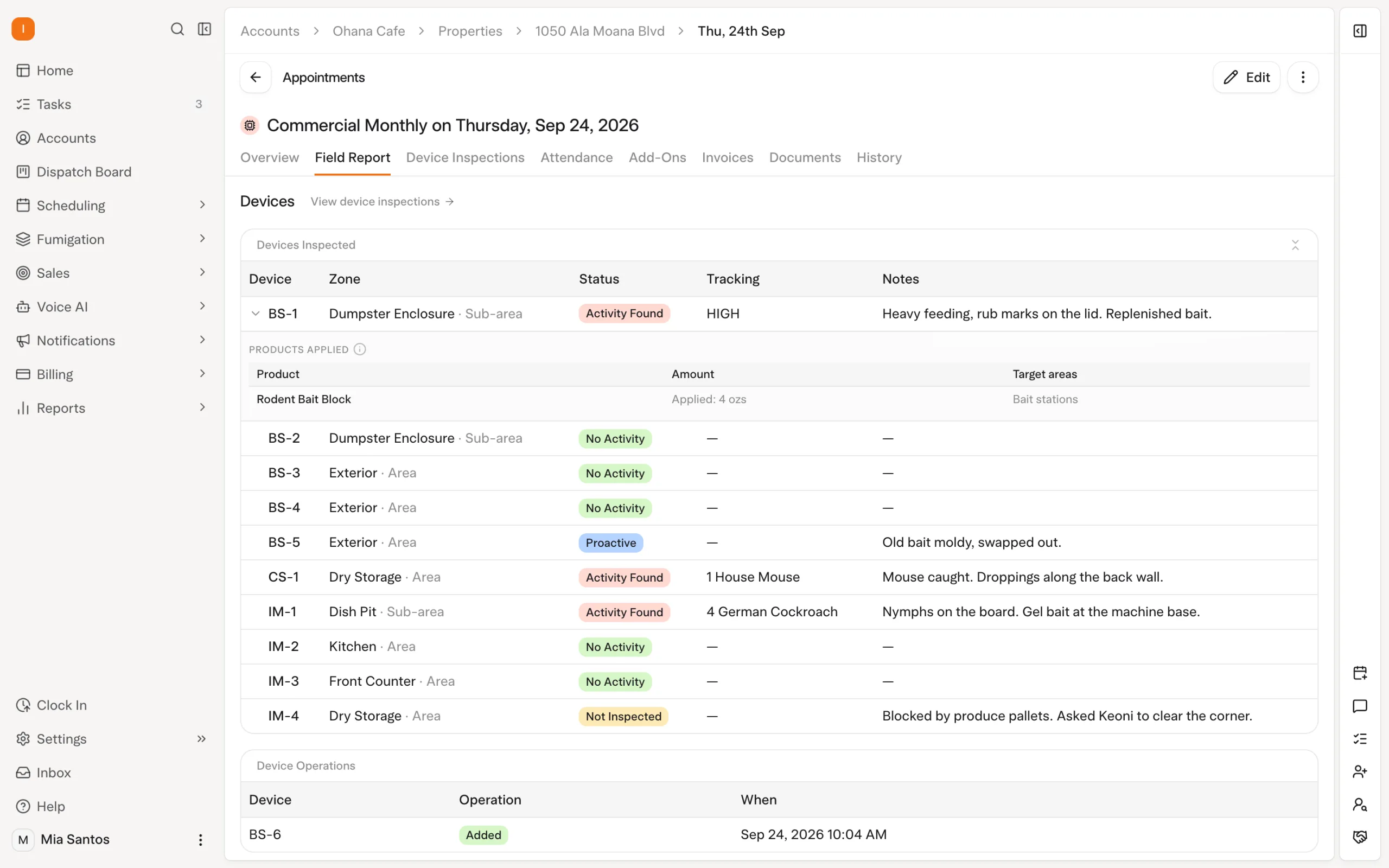
Solea's field workflows include property notes, photos and inspection records. Device inspections can include findings and products used. The technician records the on-site facts, connecting field delivery with the platform's AI office workflows and giving staff context for customer follow-up.
For an inspection-heavy account, demonstrate one property's service records through a real workflow. Check what the technician captures and what the office can use when reviewing the customer's question. Explore inspection workflows.
Connect the account to payments and reporting
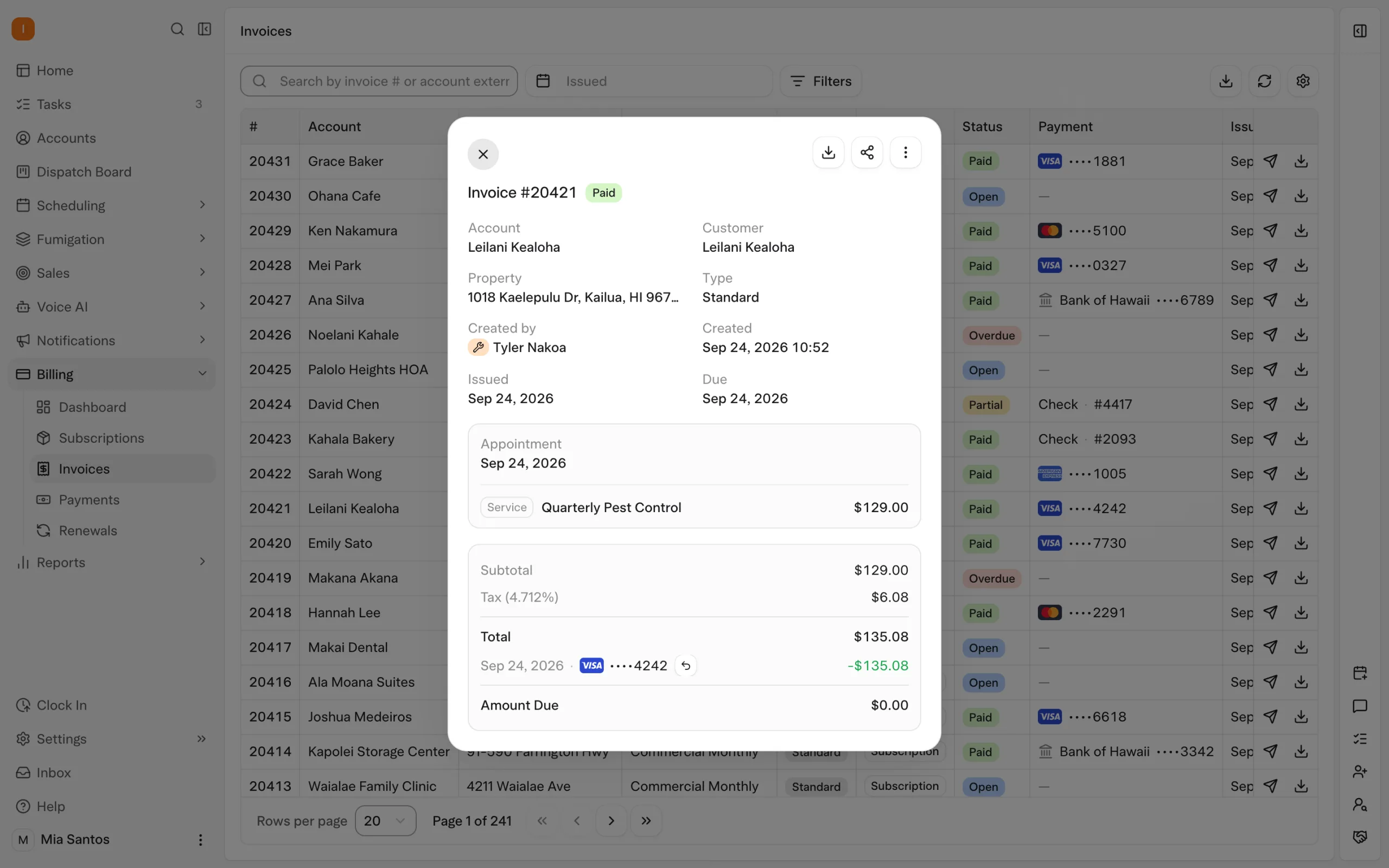
Solea extends its AI-native approach across payments, collections and reporting. With auto-charge configured, a saved payment method can be charged after completion. Paid-invoice notifications can send receipts, while overdue triggers can send reminders according to the configured timing and filters.
Agree the billing arrangement for the customer before relying on that automation. Several properties under one account do not, by themselves, establish a particular invoicing cadence or consolidated-invoice workflow. Demonstrate the arrangement your business needs.
Solea's documented account statement workflow provides a PDF of outstanding amounts grouped by property with subtotals. That helps the office discuss an account's balance while retaining the location context. AI-assisted reporting supports broader management review; the documented Billing Aggregate workflow compares amounts billed with amounts collected.
Evaluate your most complex customer account
Bring a representative account to the demonstration, including the properties, contacts, service requirements and billing arrangement. Use the same example across customer management, AI scheduling, communication and payment so you can assess the complete workflow.
| Scenario | What to demonstrate |
|---|---|
| One customer manages three locations | Show the account and its separate property records. |
| Service and billing contacts differ | Show the destinations for service notices and billing communication. |
| A visit has a required skill | Show how AI scheduling applies the requirement. |
| A customer calls about one location | Show how the AI appointment conversation identifies the relevant visit and handles ambiguity. |
| The customer queries an inspection | Follow the property's field record into the office's review. |
| The customer asks what is outstanding | Show the account statement grouped by property and explain the billing setup. |
For enterprise teams, also demonstrate the office structure and access requirements you need. Several customer properties and several operating branches are different questions; evaluate both explicitly rather than assuming one establishes the other.
Keep the relationship together as you grow
A customer with several properties should be manageable as one relationship with clear service locations. Solea connects that structure to AI scheduling, appointment handling, payment automation and reporting, helping a growing pest control operation reduce routine office work around the account.
Request a demo using your customer examples, or request a quote for your operation.
Frequently asked questions
- Can Solea manage multiple properties for one customer?
- Yes. Solea supports multiple properties under one account. The account represents the customer relationship, while each property represents a service location. This helps the office keep location-specific information clear within the wider AI-native service, scheduling and billing workflow.
- What is the difference between an account and a property?
- The account identifies the customer relationship; the property identifies the location being serviced. One account can have several properties. That distinction helps the team organize service instructions and communication when the same customer is responsible for more than one address.
- How does AI help with multiple-property customer management?
- Solea's AI scheduling prepares upcoming visits within operating constraints, and its voice agent handles enabled appointment requests. Payments and collections automation supports routine billing actions, with AI-assisted reporting for management review. Accurate account and property records give these workflows the context they need.
- Can service notices and invoices go to different people?
- Yes. Solea's documented routing uses the property's email for service notices and account contact roles for billing communication. Review both when setting up the customer. Notification preferences can also be controlled at account and property level for customers that need different communication settings.
- Can we see outstanding amounts by property?
- Solea's documented account statement workflow generates a PDF of outstanding amounts grouped by property with subtotals. Use that statement to review the balance with the customer. Demonstrate any specific invoice-consolidation or billing-cadence requirement separately rather than assuming it follows from the account structure.
- Is Solea built for larger pest control companies?
- Solea is built for companies with 5+ technicians, from mid-market through enterprise. For a larger operation, demonstrate representative customer accounts alongside the office structure, access requirements, scheduling constraints and reporting scope you need. Multiple customer properties and multiple operating branches should both be evaluated.


 Overnight