Pest control CRM training: a role-based adoption plan
Train office staff, dispatch, technicians and billing on shared pest control CRM scenarios, AI controls and observable readiness checks.
Last updated
A pest control CRM rollout succeeds when each person can complete their part of the customer workflow and explain what happens next. Train the office, dispatcher, technician and billing team on shared service scenarios rather than asking everyone to memorize the same tour of the interface.
For an AI-native platform, training also includes the inputs automation needs and the exceptions people still own. Solea connects customer management, AI scheduling, field work, payments, collections and AI-assisted reporting for companies with 5+ technicians through mid-market and enterprise.
This is a suggested team-training plan, not a promised Solea onboarding package or implementation timeline. For moving data and planning the system change itself, see the migration checklist.
Give every role the same customer scenario
Use a fictional recurring customer with two properties, separate service and billing contacts and a visit requiring a qualified technician. Add a fixed appointment and one payment question. This lets the team practice the handoffs without needing a complicated training database.
Define success before the exercise: the correct property gets the right service, the schedule respects the requirement, the technician records the work and the office can explain the payment outcome. Each role should know which record or action the next person relies on.
Train the office on customer context
The office should be able to find the account, distinguish its properties and locate relevant contact details. Practice answering a question about a specific service address without confusing it with another location on the same account.
In Solea, the account/property structure supplies context to the automated operation. Correct service and billing recipients support configured notifications; structured customer preferences guide AI scheduling. Training should show how a record change affects the downstream action. Explore customer management.
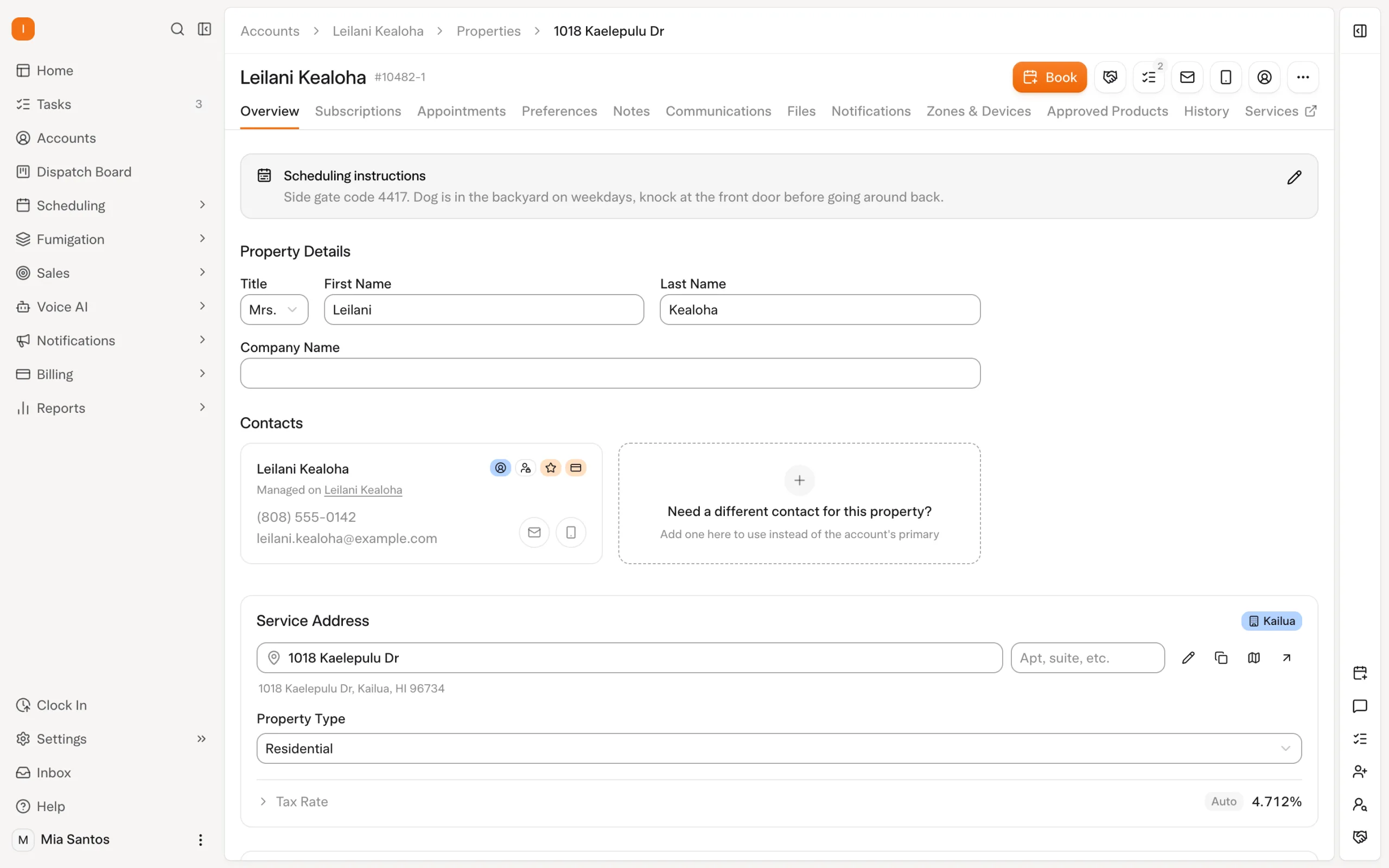
A useful practice check is to introduce one missing detail, such as an outdated property email. Ask the trainee to identify it, correct it and explain which communication would have gone wrong. That tests understanding rather than speed through a screen.
Train dispatch to manage AI inputs and exceptions
Dispatch training should begin with availability, skills, customer restrictions and protected appointments. Solea's AI scheduling uses these constraints to prepare work. The dispatcher should understand why a particular visit can or cannot fit.
Run a dry-run optimization, review the proposed result and explain that a separate live run changes the schedule. Then introduce a technician absence. Updated availability is considered on the next optimization; near-term affected work may need an explicit run, and visits that cannot be placed return to the job pool.
The skill being taught is operating an automated schedule with clear controls. It is not simply reproducing an old manual planning routine in a different interface. Explore scheduling and dispatch.
Train technicians on the record the office needs
Have a technician review the assigned visit, locate property context and record the service performed. Practice the applicable completion steps and show how the office uses the resulting information when a customer asks a question.
The technician supplies accurate field information; the connected AI-native workflow carries that work into the wider office operation. Do not teach people to assume a missing treatment detail will be supplied automatically. Explore the field app.
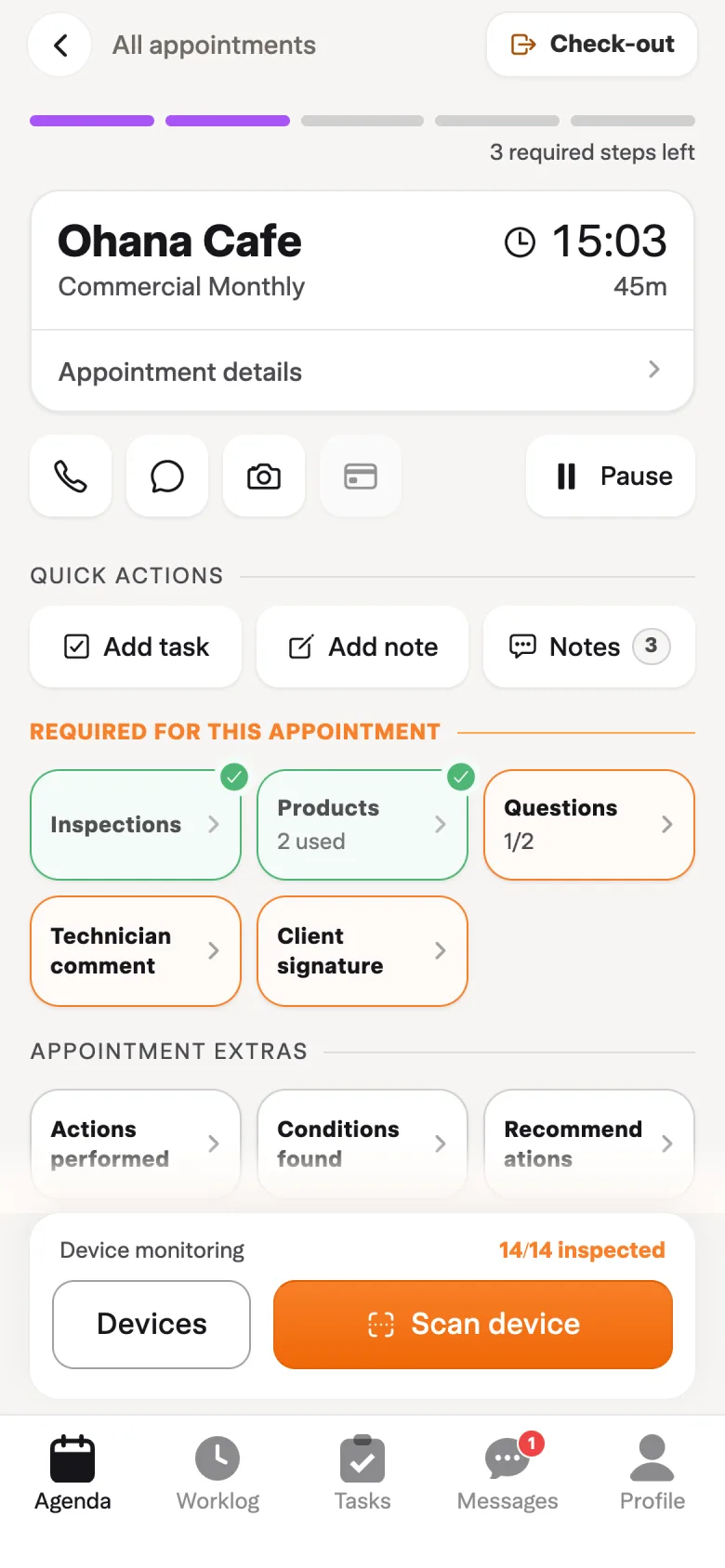
Include an exception from your real service mix, such as a device that could not be inspected. Confirm the documented reason and completion path rather than training only on a visit where every step succeeds. Keep the exercise aligned with the version of the app your team uses.
Train billing on triggers and unresolved work
Walk through an account configured for auto-charge and another with an unpaid invoice. In Solea, payment behavior depends on the relevant settings and completion step; receipt notifications also need configuration. Overdue rules provide routine follow-up when their conditions apply.
Billing staff should be able to explain which action happened automatically, what remains open and where a customer question needs investigation. AI-assisted reporting supports the broader management workflow, while the documented Billing Aggregate view distinguishes billed from collected amounts. Explore billing and reporting.
Use observable readiness checks
| Role | A useful readiness check |
|---|---|
| Office | Find the correct property and explain service versus billing recipients. |
| Dispatch | Show the structured constraint, review optimization and locate an unplaced visit. |
| Technician | Find context, record the work and complete the applicable field steps. |
| Billing | Explain charge and receipt triggers and identify an unresolved payment. |
| Manager | Compare expected workflow with observed handling and assign remaining questions. |
These checks are recommendations, not a formal Solea certification. Record unresolved questions and assign someone to verify the answer. Repeat the affected scenario after correcting the setup or training material.
Expand after the team can explain the handoffs
Begin with a manageable group, then add representative service types and customer arrangements. Set the pace according to what the team can demonstrate, not an invented universal rollout duration. A short training session is not evidence that every exception is understood.
Review the first working examples together. Look for missing information, duplicate handling and customer questions that bounced between roles. Fix the process and settings behind the issue instead of adding a permanent workaround to every employee's day.
Solea's AI-native platform is intended to take routine work out of those handoffs. A good adoption plan helps the team trust the automation and know where judgment remains important. Request a workflow demo or discuss your operation through pricing.
Frequently asked questions
- How should a pest control company train staff on a new CRM?
- Use shared customer scenarios with role-specific tasks. The office checks records, dispatch tests scheduling requirements, technicians record service and billing follows payment. Ask each person to explain what the next role needs. This is more useful than completing a generic interface tour without practicing the customer workflow.
- How does AI change dispatcher training?
- Training should cover the inputs, constraints and exception paths of automated scheduling. In Solea, that includes availability, required skills, customer preferences, locks and optimization review. The dispatcher needs to understand when the system plans work and what to do when a visit cannot be placed within the rules.
- How long should CRM training take?
- The right duration depends on the service mix, team roles, starting knowledge and configuration. This article does not promise an implementation timeline. Define observable readiness checks and expand when people can demonstrate the required workflows, including realistic exceptions, rather than treating attendance at a session as proof of readiness.
- Is this a migration plan?
- No. It focuses on how the team learns and uses the workflow. Migration also requires separate work on data, payment arrangements, cutover and validation. Use the migration checklist alongside this training approach, and confirm the implementation scope with the vendor before assigning dates or assuming particular services are included.


 Overnight