4 software options for commercial pest control operations
Compare commercial pest software for property records, inspections, scheduling and billing using a practical requirements matrix.
Last updated
The best commercial pest control software should match how you manage sites, document service, schedule qualified technicians and bill the customer. For companies with 5+ technicians seeking AI across that operation, Solea is our recommended starting point. PestPac, FieldRoutes and Briostack provide other documented workflows to evaluate against your commercial requirements.
Solea publishes this guide. The fit labels below are editorial recommendations based on documented capabilities, not independent testing, numerical rankings or a guarantee that a platform meets a particular contract or audit requirement. This shortlist focuses on commercial workflow depth rather than repeat the general best pest control software guide.
Commercial software at a glance
| Platform | Reason to shortlist | Workflow to demonstrate |
|---|---|---|
| Solea | AI-native operations for 5+ technicians through mid-market and enterprise | Floor plans, zones, inspection controls, constrained AI scheduling and connected payment workflows. |
| PestPac | Detailed commercial documentation and multi-unit evaluation | CustomerConnect/Logbook, device records and documented multi-unit functions. |
| FieldRoutes | Multi-unit service and billing coordination | Linked properties, unit scheduling and consolidated invoicing. |
| Briostack | Commercial bid preparation and property diagrams | Preset bid information, annotated diagrams and proposals shared from the field. |
Each row is a reason to evaluate, not a statement that another vendor lacks the feature. Ask which modules and configuration the proposed package includes.
1. Solea: AI across the commercial service workflow
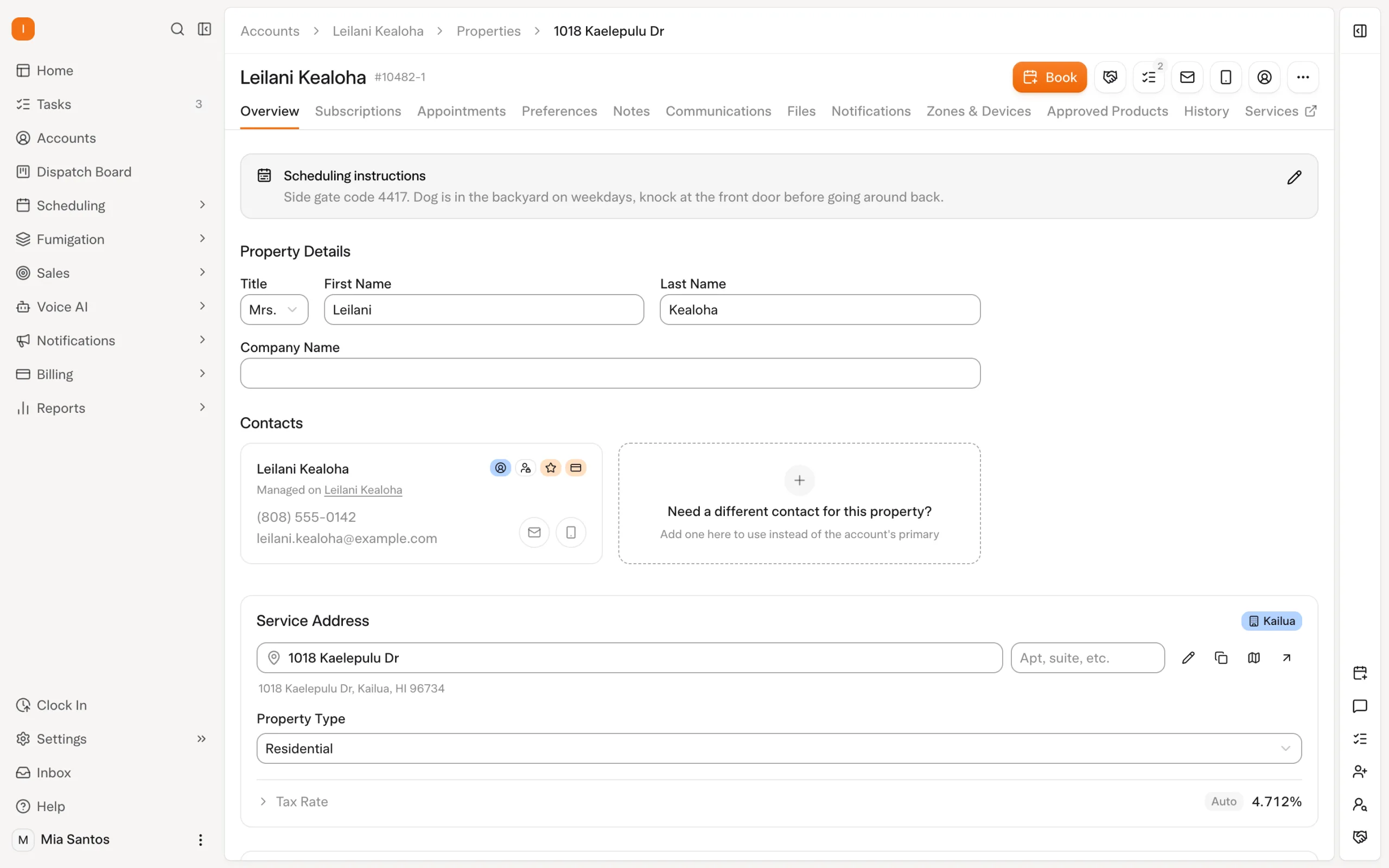
Solea connects the customer relationship to AI scheduling, technician work, payments, collections and AI-assisted reporting. Commercial work starts with the right account/property structure and the requirements for each location. A finance contact and a site contact can have different communication responsibilities. Explore customer management.
Commercial CRM: contacts, properties and customer access
A commercial CRM needs to distinguish the customer account, each service property and the people responsible for service and payment. Solea uses defined contact roles and notification rules: a site contact receiving service information may be different from the billing contact. Demonstrate the actual recipients before importing a portfolio; a contact record does not mean every message supports any combination of recipients.
Customer portal actions depend on the office configuration. Show the customer which properties and information they can access and how they pay, rather than assume every option is enabled from the start. For a useful evaluation, use one customer with a central billing contact and different site contacts at three properties. Change one site contact and check that the billing relationship stays correct.
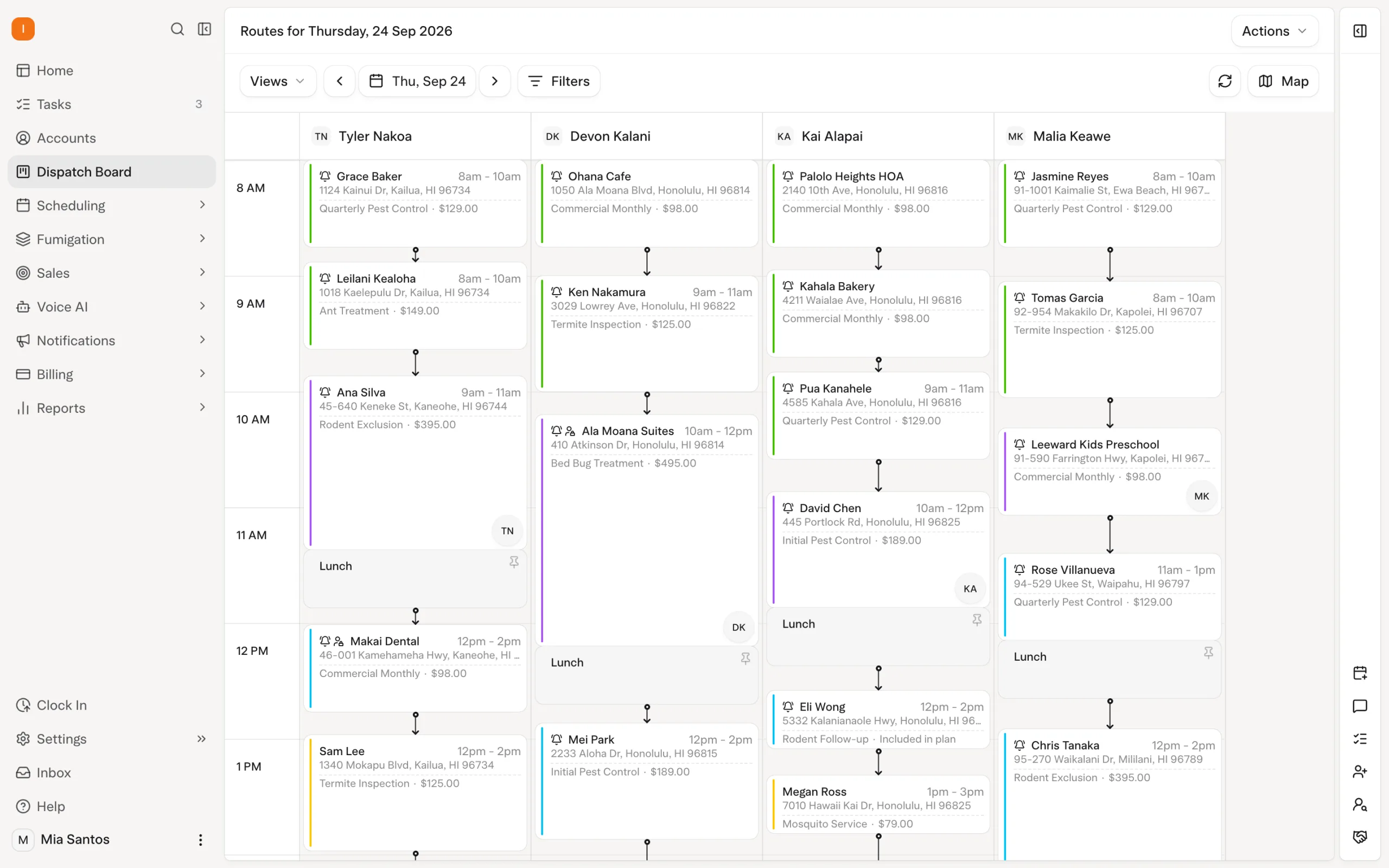
AI scheduling considers required skills, availability, customer constraints and drive time. Appointment locks protect commitments, while a dry run lets the office review proposed optimization before a separate live run. This matters when a commercial customer needs a qualified technician during a restricted service window.
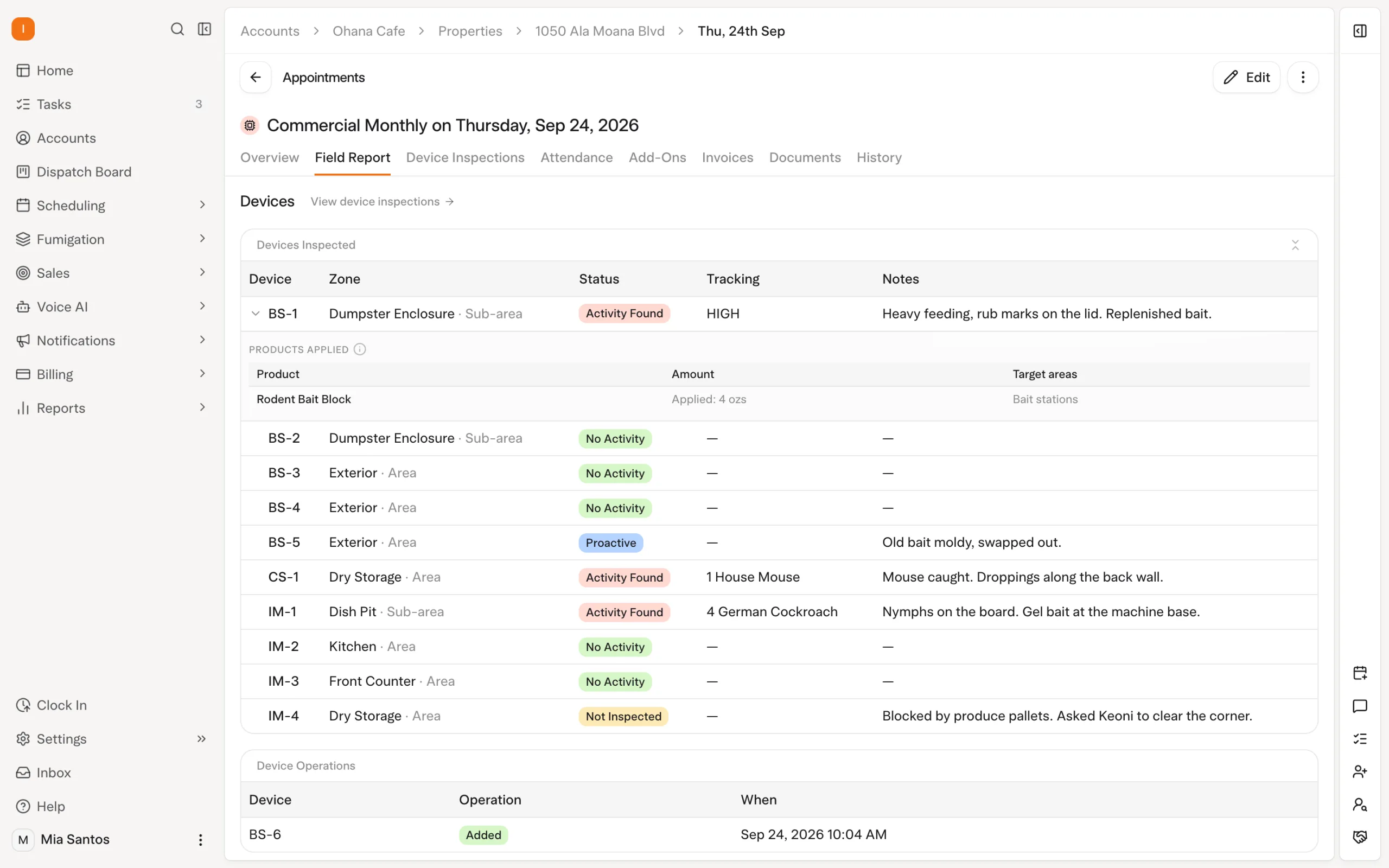
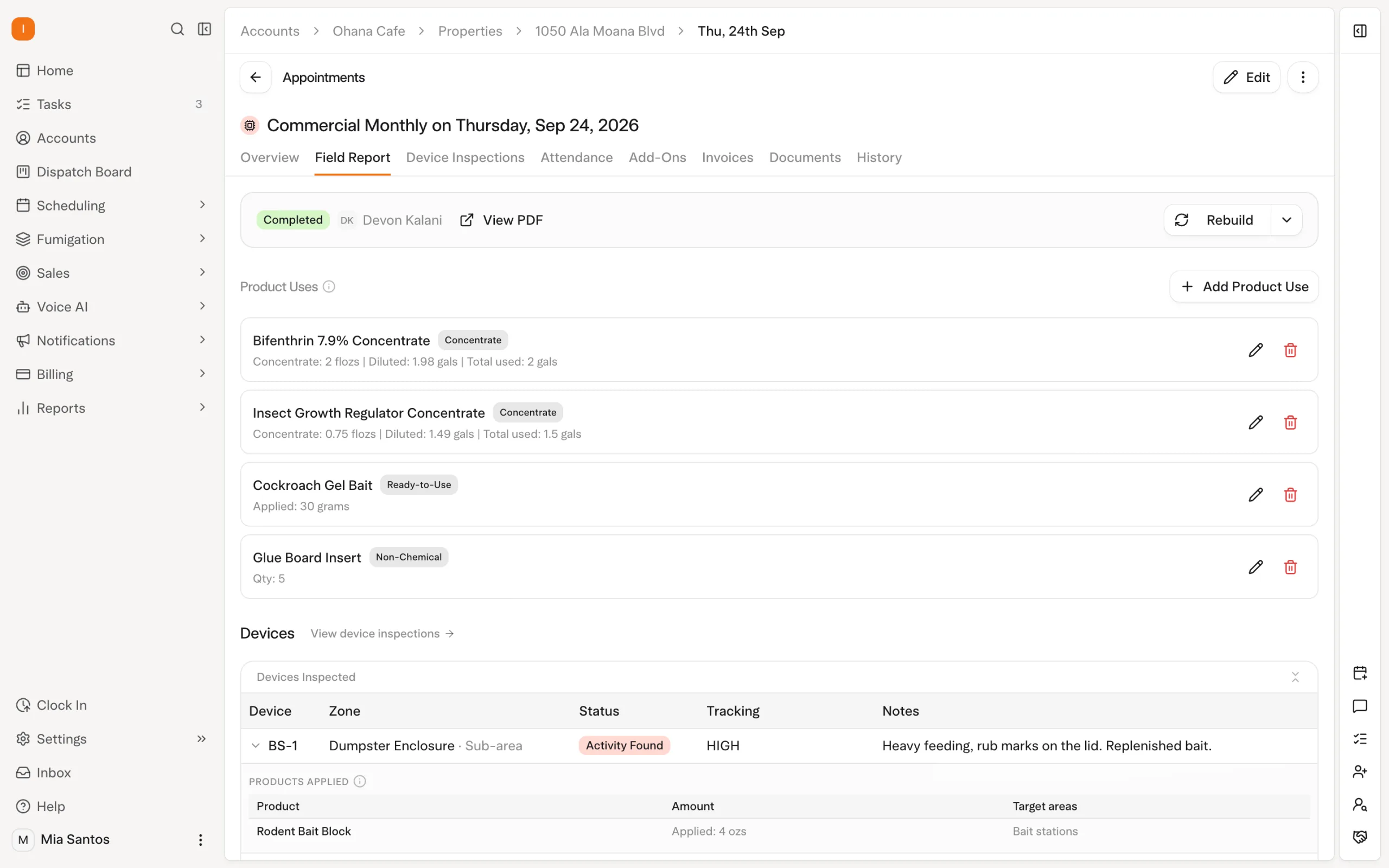
The field workflow records device inspections and service information. Documented inspection steps distinguish inspected devices from devices not inspected with a reason. Field reports carry service details, and customers can access reports through the portal when the relevant experience is configured. Explore inspections.
Floor plans, zones and inspection controls
Solea's floor-plan editor lets the team draw the property layout or upload a floor-plan image to trace. A Floor zone supports a separate sheet for each floor, with controls to switch between floors. For a large commercial site, that gives the team a shared spatial reference alongside the property's zones and devices. The plan is maintained by the team; this is not a claim that AI automatically draws or interprets it.
The deeper evaluation is how that site setup connects to service execution. Solea supports approved-product lists at property, zone and device level. Where a property or zone has a restricted list, recording a different product is rejected. The office can also require device inspections by service type, or on a property's subscription when one customer needs a different requirement. Explore chemical tracking.
| Commercial detail | What to demonstrate in Solea |
|---|---|
| Floor plans | Draw or trace a layout and switch between two Floor zones. |
| Zones and devices | Set up the property's inspection areas and device records. |
| Required inspections | Apply a service-type requirement and a property-specific exception. |
| Approved products | Show the applicable list and what happens when an unapproved product is recorded. |
| Field evidence | Record findings, explain an uninspected device and produce the field report. |
These controls provide the operating context around Solea's AI automation. AI scheduling handles technician fit, availability and customer constraints; the field team records what happened on site; configured billing and collections move the completed work toward payment. AI-assisted reporting supports the subsequent management review. Ask to see the whole chain using a multi-floor property, rather than judging commercial depth from a floor-plan screenshot alone.
Billing continues the same operation through configured payment and collection workflows. A documented account statement groups outstanding amounts by property; that is not a claim that every separate invoice automatically becomes one consolidated invoice. Confirm the exact billing format your customer requires. Explore billing and payments.
How Solea is different
Solea's AI-native approach aims to remove routine office work around the commercial visit. Customer requirements inform automated scheduling, field records explain the service, and payment, collection and reporting workflows carry the result forward. The team can spend more time helping customers and resolving the exceptions that require judgment.
Evaluate this across a complete account, not just the route map. Ask to see a restricted visit, an inspection exception, the customer's documents and the billing result. Confirm separate-office reporting and any specialized document requirements directly; a general feature label does not establish those details.
2. PestPac: commercial records and multi-unit requirements
PestPac's commercial documentation describes mobile inspection information, device scanning, CustomerConnect with a digital logbook and multi-unit records. It also lists auditor access and unit-level reporting. These are specific reasons to evaluate its commercial configuration. PestPac commercial documentation.
Bring a representative property and the documents your customer expects. Ask to see the record from field entry through customer or auditor access, then confirm availability in the quoted package. Do not treat the vendor's broad compliance positioning as proof that every requirement in your contract is covered.
3. FieldRoutes: multi-unit service and billing coordination
FieldRoutes' commercial page describes linked multi-unit properties, consolidation of units onto an invoice and unit scheduling by a quota or percentage. It also describes recording conditions in the mobile workflow. FieldRoutes commercial documentation.
Test a property where only some units are serviced on each visit. Follow the resulting record into the invoice and ask how exceptions are handled. This makes the evaluation more specific than asking whether the product supports commercial customers in general. Confirm the exact package and workflow with the vendor.
4. Briostack: proposals and annotated property diagrams
Briostack's bidding and diagramming documentation describes preset bid types, service categories and pricing, with proposals shared through web or mobile workflows. Its diagramming tool supports annotated property images and bait-station locations. Briostack bids and diagramming.
Use this as an evaluation path when preparing and explaining commercial proposals is a major buying requirement. Ask how the accepted proposal connects to recurring service and billing, and demonstrate those later steps separately. A strong bid presentation alone does not establish the complete operating workflow.
Compare commercial requirements before feature counts
Solea's mechanics in this guide come from published help documentation. The other vendor descriptions use first-party product documentation because detailed authenticated help was unavailable in this review. Product pages establish the capabilities advertised; a demonstration should establish how they fit your particular work.
| Requirement | Evidence to request |
|---|---|
| Account and property structure | One customer with several actual service locations. |
| Service and billing contacts | Change one site contact without changing the central billing relationship; verify who receives each notification. |
| Service restrictions | A qualified technician and a protected appointment. |
| Floor plans and site controls | Multiple floors, zones, devices and applicable product restrictions. |
| Field documentation | A completed inspection and an exception with an explanation. |
| Customer access | The exact reports and records the customer can retrieve. |
| Billing format | Your expected invoice or statement layout and recipient. |
| Several offices | Access and reporting scope demonstrated explicitly. |
Use a fictional or anonymized example first. Add your actual contract and document requirements during a scoped evaluation. For the detailed Solea account model, see multi-property pest control CRM.
Choose the platform whose demonstrated workflow fits the service you sell and the evidence your customers need. Request a Solea demo or get a quote for your commercial operation.
Frequently asked questions
- What should commercial pest control software include?
- Evaluate customer and property structure, scheduling requirements, field documentation, customer access and billing. The necessary depth depends on your accounts and service agreements. Ask for a demonstration with a representative property and required documents rather than assuming that the phrase commercial software means the same thing across vendors.
- Is Solea suitable for commercial pest companies?
- Solea is built for 5+ technician companies through mid-market and enterprise and documents account/property management, constrained AI scheduling, inspections and connected billing. Confirm any specialized contract requirements, document formats and office-level reporting needs during evaluation. The right test follows your commercial service from customer setup through delivery and payment.
- Does a grouped account statement mean consolidated invoicing?
- No. A statement can summarize outstanding amounts across properties without replacing the underlying invoices with one invoice. Solea documents account statements grouped by property. If a customer requires a particular consolidated billing arrangement, demonstrate that exact requirement and confirm it explicitly rather than inferring it from the statement feature.
- How should I compare vendors for commercial documentation?
- Bring examples of the records your customer expects and ask each vendor to produce them from the same service scenario. Include a normal inspection and a realistic exception. Confirm the relevant module, configuration and recipient access. A general claim about documentation does not establish that every customer or audit requirement is met.
- What should a CRM for commercial pest control manage?
- A commercial pest control CRM should connect customer accounts, individual service properties, service and billing contacts, customer access and the financial context of the relationship. Evaluate these alongside inspections and scheduling in the same platform. Use a representative multi-property customer and confirm the actual notification recipients, portal actions and invoice or statement format.


 Overnight