7 questions for a useful weekly pest control operations review
Review service delivery, scheduling exceptions, billed versus collected amounts and customer questions with a practical management framework.
Last updated
A useful pest control operations review connects the customer promise, the service delivered and the payment received. Start with seven questions that lead to decisions, then identify the records or reports needed to answer them. A crowded dashboard is less useful than a small set of measures the team understands and acts on consistently.
Solea is an AI-native platform for companies with 5+ technicians through mid-market and enterprise. It connects CRM, AI scheduling, field work, payments, collections and AI-assisted reporting. That connected workflow gives management a practical place to investigate what happened around the service.
The questions below are an editorial management framework. They are not a claim that Solea has a built-in report named after every question or automatically diagnoses every cause.
1. Did we deliver the work we committed to?
Choose a defined service group and period. Compare the visits the team intended to deliver with what was completed, changed or left unresolved. Agree how to treat cancelled, moved and incomplete work before calculating a completion measure.
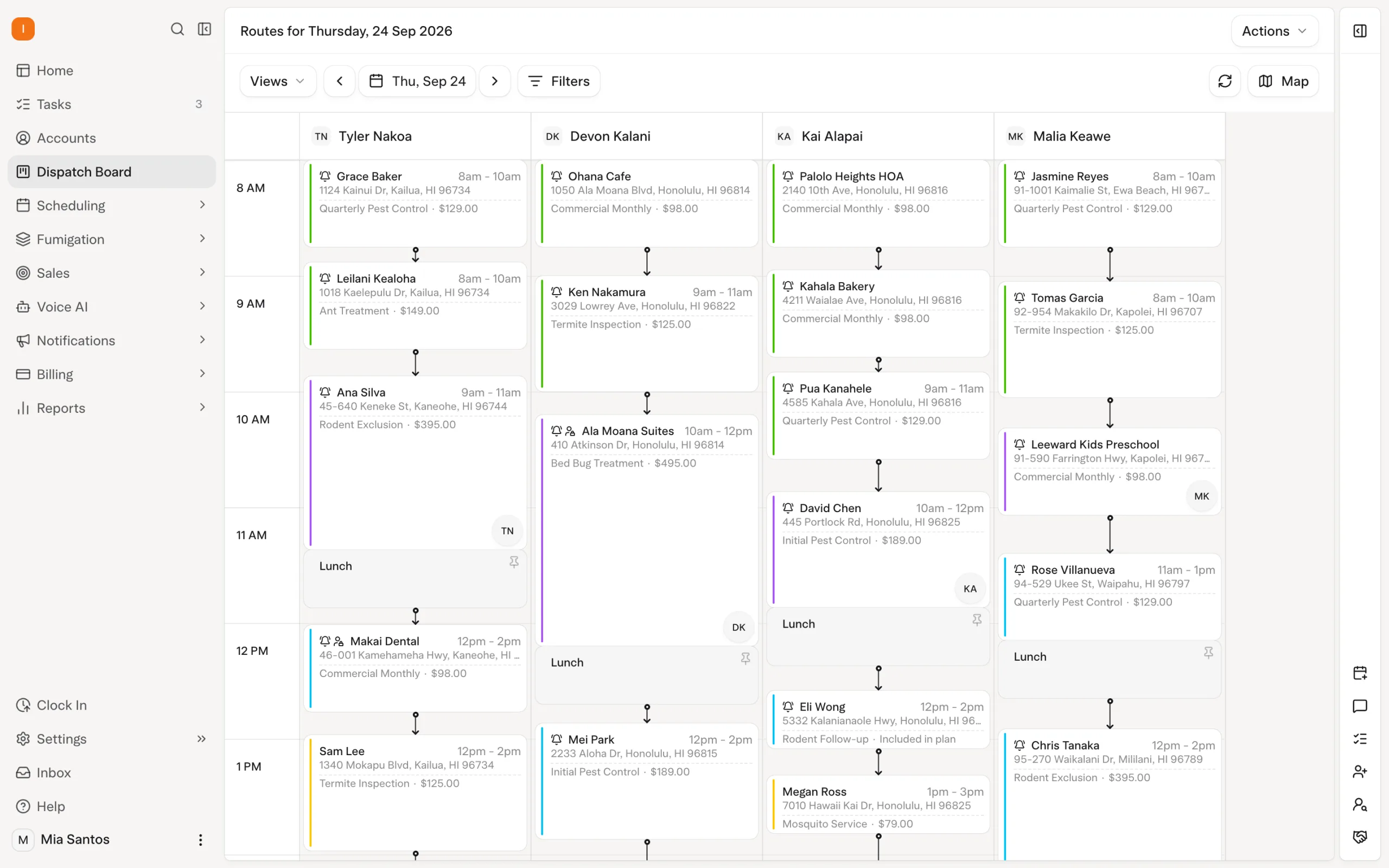
Solea's AI scheduling plans work within customer and technician constraints. Appointment locks and freeze-window settings protect particular commitments, while visits that cannot be placed need job-pool review. Use the review to understand those exceptions rather than judge a route only by how full it looks. Explore scheduling and dispatch.
2. Which scheduling exceptions needed the office?
Group the cases that required attention: unavailable technicians, customer restrictions, specialist work or visits without a suitable placement. Record the actual reason from the case rather than assuming every unresolved visit has the same cause.
Updating technician availability lets a subsequent Solea optimization account for the change. Near-term affected work may need an explicit run, and unplaced visits return to the job pool. A useful management question is whether the team resolved the exception and whether the underlying record or rule needs correction.
3. Could the next person understand the service record?
Sample completed visits and ask whether the office can answer a customer question from the record. Check the property, work performed and relevant notes or documentation. This tests the quality of the information carried between the field and office, not just whether a visit has a completed label.
Solea's field workflow connects service documentation to the wider operation. Technicians provide the facts; the surrounding AI and configured automation support scheduling, communication and payment follow-through. A missing service detail should lead to a clearer process or training step, not an invented explanation. Explore the field app.
4. What did we bill, and what did we collect?
Keep these questions separate. Billing records what was invoiced; collection records payment. Money collected in a period may relate to work billed earlier, so the difference between two period totals is not automatically the unpaid balance for those visits.
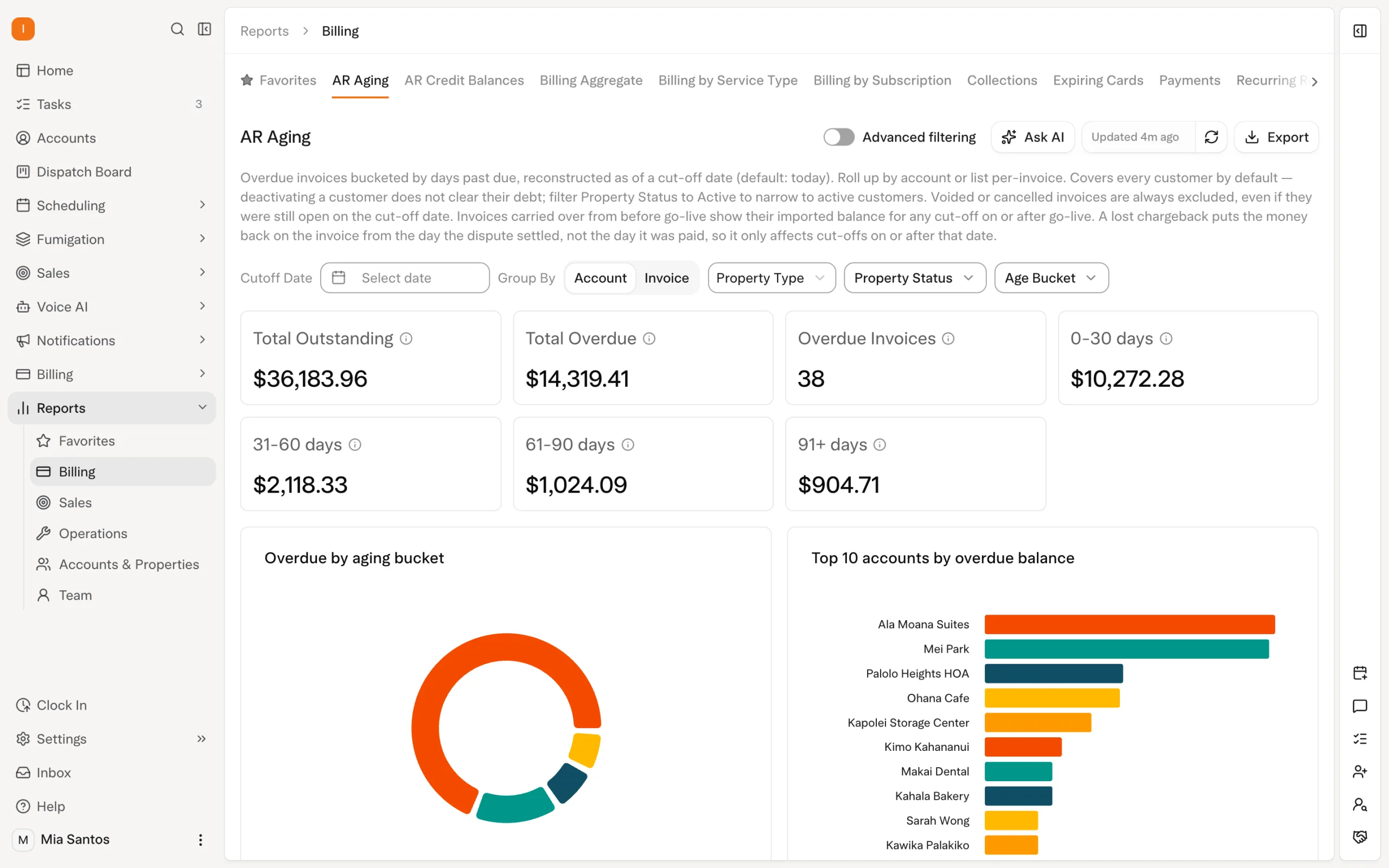
Solea documents a Billing Aggregate view comparing billed and collected amounts. Use that distinction in the management conversation and inspect the underlying records when the result raises a question. AI-assisted reporting is part of the platform, but the team still needs a clear definition of the measure it is discussing. Explore reporting.
5. Which unpaid invoices need a decision?
Separate routine payment follow-up from cases needing investigation. An incorrect recipient, an unresolved service question and a customer who simply has not paid may require different next actions. Review a manageable set of cases with enough detail to assign responsibility.
Solea's configured overdue triggers automate routine reminders using documented customer, service and invoice conditions. Account and property notification settings can affect whether a message sends. Check the actual setup and delivery record before assuming the customer ignored a reminder. Explore collections.
6. What customer questions keep returning?
Look for repeated requests about appointment timing, access, service information or billing. Classify a small sample consistently instead of claiming a precise trend from memory. The aim is to identify a fixable source of friction in the customer experience.
For example, repeated invoice-copy requests may justify reviewing the receipt and self-service experience. Questions about the wrong property may point to account setup. These are hypotheses to investigate, not automatic diagnoses or promised Solea analytics features. Explore customer management.
7. Did automation reduce routine handling without weakening service?
Choose a few tasks affected by automation and observe the remaining staff effort. Include time spent reviewing plans and resolving exceptions. Pair the workload result with customer and record-quality checks, so a faster process is not mistaken for a better process when work is being skipped.
Solea connects AI scheduling with the customer record and subsequent field, payment and reporting workflows. Evaluate that sequence using the same definitions over time. A before-and-after difference is useful evidence, but changes in staffing, service mix and volume can also explain it.
Turn the review into decisions
| Review question | A useful next action |
|---|---|
| Work delivered | Resolve remaining commitments and clarify status definitions. |
| Scheduling exceptions | Correct the relevant constraint or assign an unresolved visit. |
| Service-record quality | Improve the missing field information or training step. |
| Billed and collected | Inspect the transactions behind an unexpected difference. |
| Unpaid invoices | Assign an owner and distinguish routine follow-up from investigation. |
| Repeated customer questions | Test a specific record, message or self-service improvement. |
| Office workload | Compare like-for-like handling and include quality checks. |
Give each agreed action an owner and a date for checking the result. Avoid changing several settings at once if doing so makes it impossible to understand which change helped. The review should leave the team with a short list of decisions, not a longer list of unexplained numbers.
Keep the reporting scope clear
Record the period, service group and office being reviewed. In Solea, separate offices have their own operational context; do not assume a view consolidates every location. Ask for the exact report and scope needed by your management team.
You can use a worksheet when a question requires information from several places. That does not make the question less valuable, but it should not be described as a built-in automated report. Confirm the actual reporting experience in a Solea demo, or request a quote for the operation you want to run.
Frequently asked questions
- Which pest control metrics should I review weekly?
- Begin with delivery of committed work, scheduling exceptions, service-record quality, billed and collected amounts, unpaid invoices and recurring customer questions. Choose measures your team can define consistently and act on. This article proposes a review framework; it does not claim every question corresponds to a default software metric.
- Why should billed and collected amounts be separate?
- They describe different events. An invoice can be issued in one period and paid in another, so collections this week may relate to earlier services. Solea's documented Billing Aggregate view compares the two. Inspect the underlying records before interpreting a gap as the unpaid amount for the same group of visits.
- Does AI-assisted reporting replace management judgment?
- No. Reporting can support the review, but the team must understand definitions, scope and the operating context. In Solea, AI-assisted reporting is part of the connected platform. This guide does not assert an autonomous report builder, automatic root-cause diagnosis or a specific conversational reporting interface.
- Can I use the same review across multiple offices?
- Yes, as a management framework, if each office uses consistent definitions. Confirm how the software presents and separates office data before comparing results. In Solea, changing offices changes the operational context; do not assume one report combines every location unless that exact reporting requirement has been demonstrated.


 Overnight