How to measure office workload per pest control service
Measure office minutes per pest control visit using a practical worksheet, clear definitions and an explicitly fictional calculation.
Last updated
To measure pest control office workload, count the staff time spent supporting a defined set of services, then divide those minutes by completed visits in the same period. Keep setup, routine handling and exception work separate. This gives you a practical baseline for evaluating automation without turning a software demonstration into an assumed savings figure.
Solea is an AI-native platform for pest companies with 5+ technicians, from mid-market through enterprise. It connects customer management, AI scheduling, field work, payments, collections and AI-assisted reporting to automate routine back-office work. A workload baseline helps you see where that automation would matter most in your operation.
Choose the work you are measuring
Start with a defined team and service mix. A residential route group and a commercial team may have different workloads. Combining them can make a change in customer mix look like a change in efficiency.
Use a representative observation period and record unusual events. A staff absence, a major weather disruption or a billing transition can affect the result. Keep those events visible rather than removing inconvenient days after seeing the numbers.
This worksheet measures time around service delivery. It does not calculate total company profitability or automatically account for every administrative responsibility.
Count active handling time, not elapsed waiting
Record the time people spend preparing schedules, checking customer details, clarifying field records and following up on payment. If an employee sends a message and waits two hours for a response, the two-hour wait is not two hours of staff effort.
Avoid counting the same work twice. If a dispatcher spends ten minutes resolving a visit issue and an office manager spends five minutes reviewing it, that is fifteen staff-minutes. If both records describe the same ten-minute conversation, decide consistently whether you are counting person-time or task duration. For workload, person-time is usually the more useful choice.
| Work category | What to capture |
|---|---|
| Customer-record handling | Correcting details and finding missing service information. |
| Schedule preparation | Active planning and review before routes are ready. |
| Schedule exceptions | Staff time resolving absences, restrictions and unplaced work. |
| Field-to-office clarification | Questions needed to understand or complete a service record. |
| Billing follow-through | Invoice handling, payment questions and collection follow-up. |
| Management review | Time assembling and interpreting the selected operating measures. |
Use these categories as an editorial worksheet. They are not a list of built-in Solea time-tracking reports.
Calculate minutes per completed visit
Divide the included staff-minutes by the number of completed visits in the measured group and period. Keep the category totals too: the overall result alone does not explain where work changed.
Here is a fictional example. An operation records 1,800 included office minutes around 300 completed visits. That is 6 minutes per completed visit. In a later comparable period, it records 1,350 minutes around 300 visits: 4.5 minutes per visit. The observed difference is 450 minutes, or 7.5 staff-hours.
Those figures illustrate arithmetic only. They are not Solea results, a typical customer outcome or a promised reduction. If the later period had a different mix of services, staffing or exceptions, investigate those differences before attributing the change to software.
Match each workload to the automation that could change it
For schedule preparation, Solea's AI scheduling considers technician availability, skills, customer constraints and drive time. The office can inspect an optimization dry run before a separate live run. Measure the planning and review effort together rather than pretending review takes no time. Explore scheduling and dispatch.
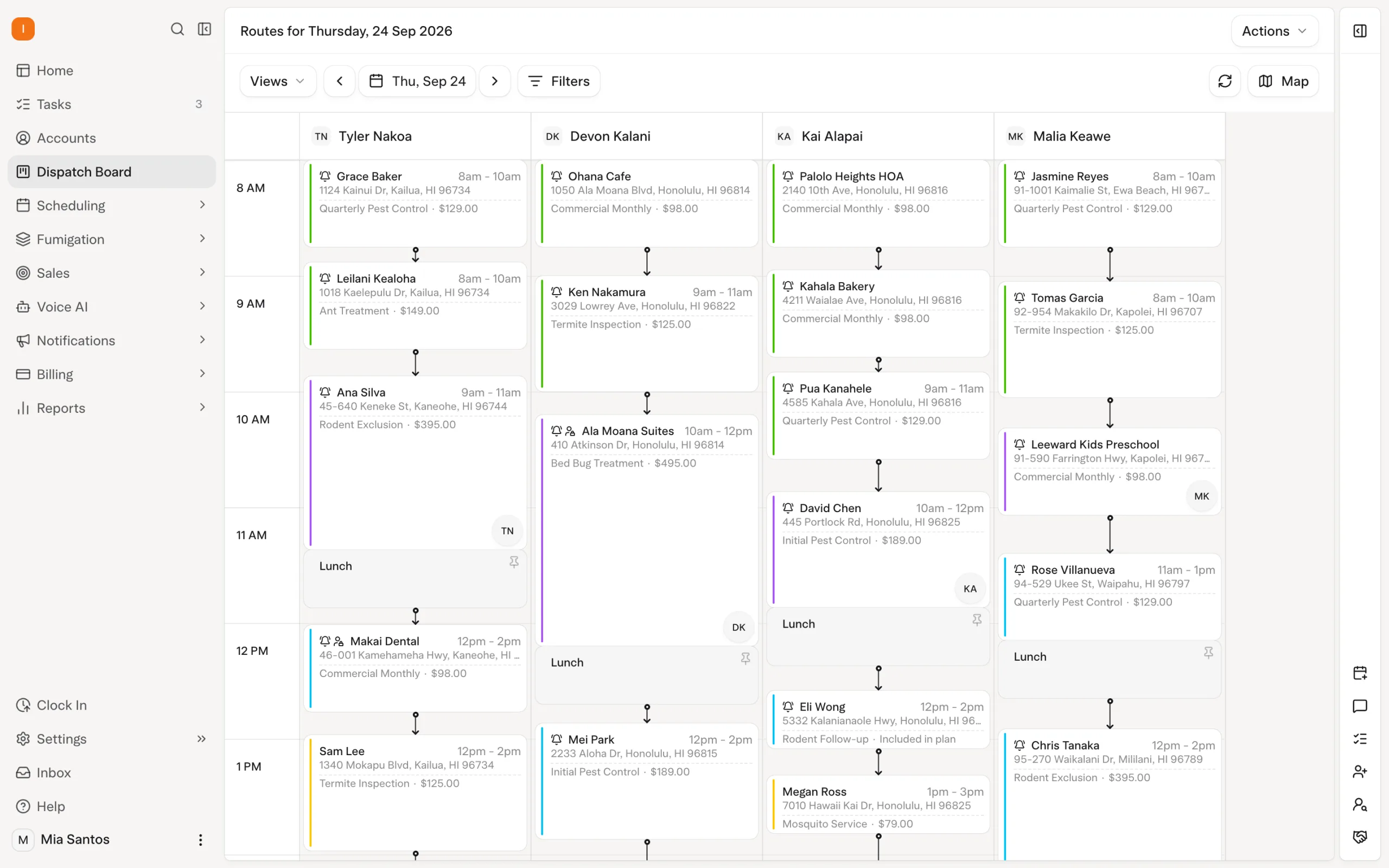
For customer-record handling, account and property information supplies context to the connected workflow. Structured scheduling preferences and correct communication recipients can reduce repetitive clarification. The setup still requires accurate information; measuring that initial effort separately makes the ongoing comparison fair.
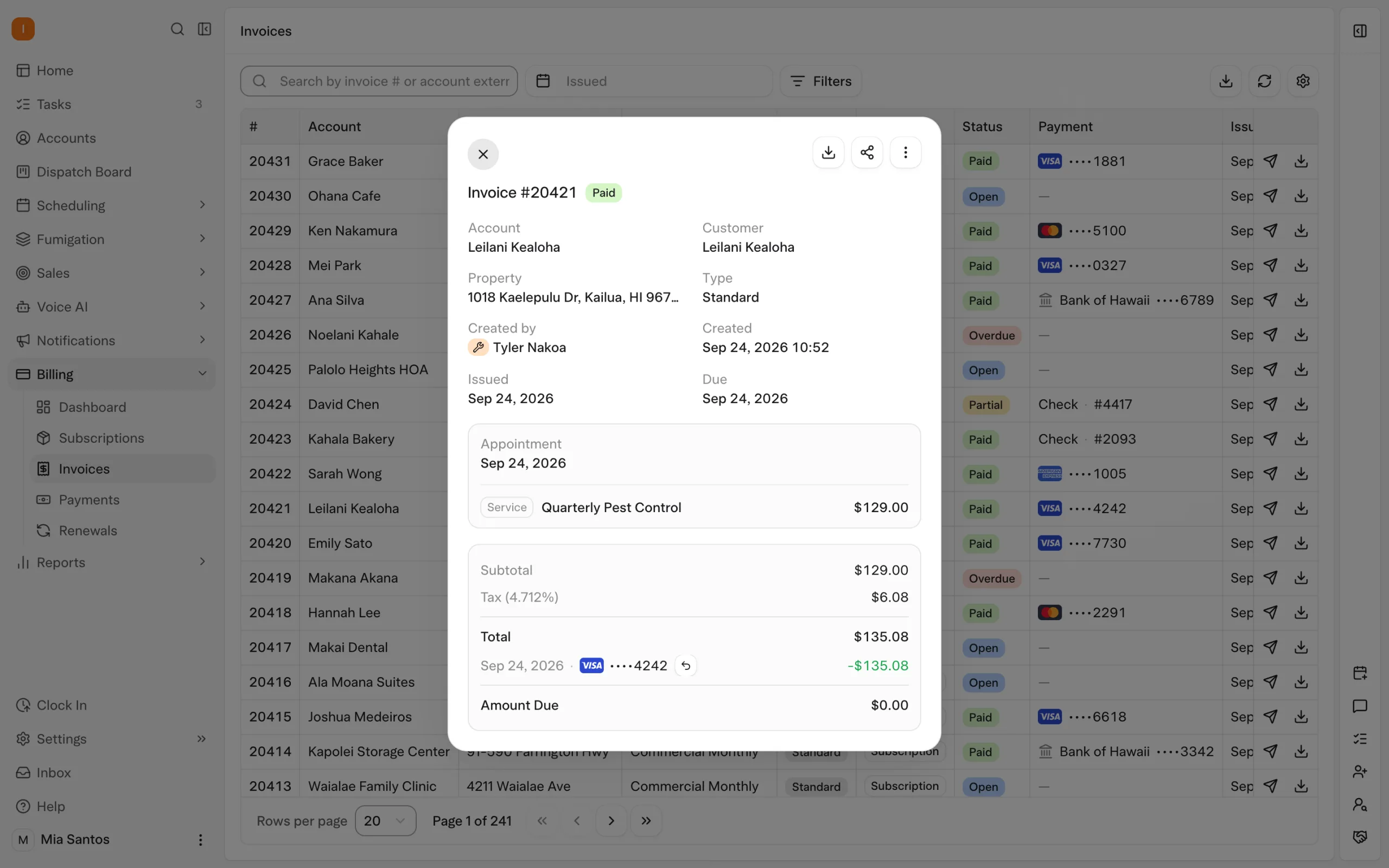
For billing follow-through, configured auto-charge, receipts and overdue notifications handle routine actions within Solea's AI-native platform. Measure successful follow-through and the remaining exceptions. A task that moved from one employee to another has not necessarily disappeared. Explore billing and payments.
Track customer experience beside time
Less office time is useful only if the work still gets done well. Pair the workload measure with a small set of checks: whether commitments were respected, whether service records were understandable and whether customer questions were resolved.
Define those checks before comparing periods. For example, you could sample completed visits for missing information or count customer callbacks asking for an explanation. These are suggested operational measures, not claims about default Solea reports or guaranteed improvements.
AI-assisted reporting is part of Solea's wider platform. Its documented Billing Aggregate view distinguishes billed and collected amounts, giving a separate view of the financial activity around the work. That view does not, by itself, measure office labor minutes. Explore reporting.
Use recovered time deliberately
If the team spends less time on routine handling, decide what it will do with that capacity. It might answer customers more thoughtfully, resolve outstanding account questions or support more service work. Do not automatically label every recovered hour as a reduction in payroll expense.
Repeat the same measurement once the workflow has settled. Keep the service group, category definitions and observation method consistent. Record what changed in configuration or staffing so the next review can explain the result.
For a buying conversation, bring the baseline and ask the vendor to demonstrate the tasks creating the most repeat work. Book a Solea demo, request a quote, or use the existing ROI calculator with assumptions from your own operation.
Frequently asked questions
- How do I calculate office time per pest control visit?
- Add the included staff-minutes supporting the selected service group, then divide by completed visits in that group and period. Define the work categories first and avoid double counting. Keep initial setup separate from ongoing handling so a temporary rollout effort does not obscure the steady operating workload.
- Is time saved the same as money saved?
- Not necessarily. Recovered time may create capacity for customer service or additional work while payroll stays the same. Separate the observed time difference from any financial assumption. If you estimate a value for that time, label the calculation and explain how the business would actually use the capacity.
- Does Solea automatically report every office minute?
- This guide does not claim that it does. The worksheet is a suggested measurement method for your team. Solea provides AI scheduling and connected payment, collection and reporting workflows, but the office-labor baseline described here requires an explicit observation process and consistent definitions of the work being counted.
- How can I tell whether AI automation caused an improvement?
- Compare similar teams, service mixes and periods, and record other changes such as staffing or customer volume. Look at specific tasks the automation affects and include exception-handling time. A before-and-after difference is useful evidence, but it does not prove that software alone caused the entire change.


 Overnight